centos7 - nginx配置access_log問(wèn)題
問(wèn)題描述
我想給nginx開啟訪問(wèn)日志。百度了一下,主要是在nginx.conf中配置
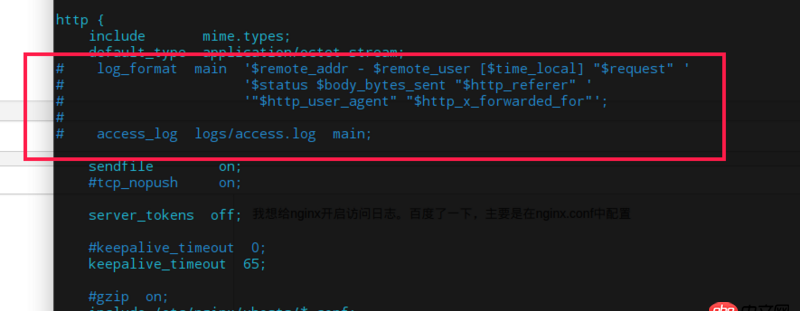
這一段
# log_format main ’$remote_addr - $remote_user [$time_local] '$request' ’# ’$status $body_bytes_sent '$http_referer' ’# ’'$http_user_agent' '$http_x_forwarded_for'’;## access_log logs/access.log main;
默認(rèn)都是加#注釋掉的,我想開啟,也就是這段都取消#注釋了。然后重啟nginx卻重啟不了,提示Job for nginx.service failed because the control process exited with error code. See 'systemctl status nginx.service' and 'journalctl -xe' for details.
把#加回去又沒(méi)事了,什么原因啊,包括開頭的錯(cuò)誤日志
#error_log logs/error.log;#error_log logs/error.log notice;#error_log logs/error.log info;
也是把#去掉想生效,結(jié)果nginx就啟動(dòng)不了。`
問(wèn)題解答
回答1:1.請(qǐng)使用 nginx -t 檢查配置文件獲取 查看具體得錯(cuò)誤信息
日志這樣處理
log_format main ’$remote_addr - $remote_user [$time_local] '$request' ’ ’$status $body_bytes_sent '$http_referer' ’ ’'$http_user_agent' '$http_x_forwarded_for'’; access_log logs/access.log main;
相關(guān)文章:
1. javascript - node得到req不能得到boolean2. node.js - nodejs+express+vue3. 數(shù)據(jù)庫(kù) - Mysql的存儲(chǔ)過(guò)程真的是個(gè)坑!求助下面的存儲(chǔ)過(guò)程哪里錯(cuò)啦,實(shí)在是找不到哪里的問(wèn)題了。4. mysql時(shí)間格式問(wèn)題5. javascript - 我的站點(diǎn)貌似被別人克隆了, google 搜索特定文章,除了域名不一樣,其他的都一樣,如何解決?6. python對(duì)8000行csv添加列7. DADB.class.php文件的代碼怎么寫8. 使用mysql命令行連接遠(yuǎn)程數(shù)據(jù)庫(kù)host跳轉(zhuǎn)9. java - web端百度網(wǎng)盤的一個(gè)操作為什么要分兩次請(qǐng)求服務(wù)器, 有什么好處嗎10. python 字符串匹配問(wèn)題

 網(wǎng)公網(wǎng)安備