macbook - mac 中 mysql 中文亂碼問題
問題描述
問題如下:mac 系統(tǒng)版本 10.12.2 mysql 數據版本 5.6.35-macos10.12-x86_64
現(xiàn)在已經在/etc/my.cnf 中添加utf8編碼
# For advice on how to change settings please see# http://dev.mysql.com/doc/refman/5.6/en/server-configuration-defaults.html# *** DO NOT EDIT THIS FILE. It’s a template which will be copied to the# *** default location during install, and will be replaced if you# *** upgrade to a newer version of MySQL.[mysqld] character-set-server=utf8# Remove leading # and set to the amount of RAM for the most important data# cache in MySQL. Start at 70% of total RAM for dedicated server, else 10%.# innodb_buffer_pool_size = 128M# Remove leading # to turn on a very important data integrity option: logging# changes to the binary log between backups.# log_bin# These are commonly set, remove the # and set as required.# basedir = .....# datadir = .....# port = .....# server_id = .....# socket = .....[client] default-character-set=utf8
終端查詢字符編碼如下:
終端查詢中已經設置成為utf8 編碼
navicat 中查詢
終端查詢帶有中文的數據表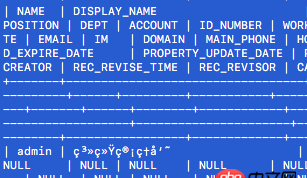
IDE 中 java 查詢數據表
現(xiàn)在問題是 能在navicat 中能夠查詢中文。 在mac終端和java中查詢都是亂碼。 ,求解決。。。。。。。
問題解答
回答1:已經找到問題所在,就是因為在navicat批量導入sql文件得的時候,mac系統(tǒng)中的navicat會自動把編碼變?yōu)閐efault(latin1) ,所以在navicat中看到是正常的中文,而由于在mac終端以及java 設置的編碼都是utf8,所以就產生了亂碼。以后導入sql數據時候需要注意一下!!!
相關文章:
1. node.js - mongodb查找子對象的名稱為某個值的對象的方法2. docker 17.03 怎么配置 registry mirror ?3. docker 下面創(chuàng)建的IMAGE 他們的 ID 一樣?這個是怎么回事????4. 前端 - @media query 使用出現(xiàn)的問題?5. html5 - datatables 加載不出來數據。6. 運行python程序時出現(xiàn)“應用程序發(fā)生異常”的內存錯誤?7. 測試自動化html元素選擇器元素ID或DataAttribute [關閉]8. javascript - QQ第三方登錄的問題9. 利用IPMI遠程安裝centos報錯!10. spring-mvc - spring-session-redis HttpSessionListener失效

 網公網安備
網公網安備