css - FireFox border樣式異常
問題描述
在FireFox下,頁面里一些table的邊框顯示異常(消失不顯示),但在IE和Chrome下正常;頁面效果: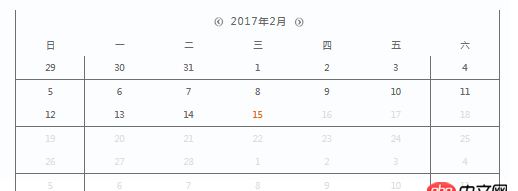
單元格樣式: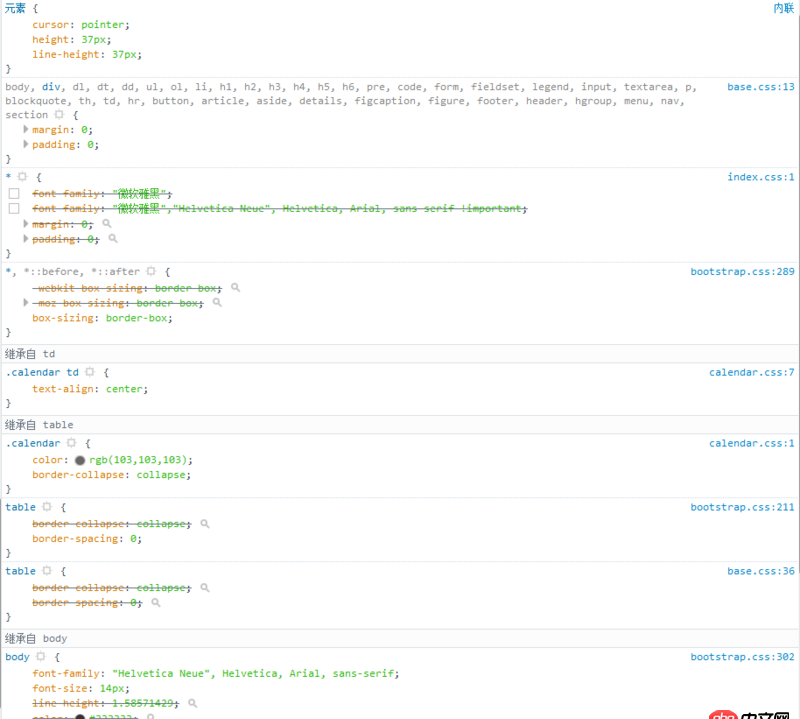
頁面在縮放時(shí),邊框消失的情況會(huì)發(fā)生改變。求大神幫忙回答,謝謝!
calendar.css如下:
.calendar { color: rgb(103,103,103); border-collapse: collapse; width: 100%;}.calendar td { border: 1px solid #6f6f6f; text-align: center;}.calendar thead tr:last-child td { border: 0px solid #6f6f6f; border-width:1px 0px 1px 0px; text-align: center;}.calendar thead tr:last-child td:first-child { border:0px solid #6f6f6f; border-width:1px 0px 1px 1px; text-align: center;}.calendar thead tr:last-child td:last-child { border: 0px solid #6f6f6f; border-width:1px 1px 1px 0px; text-align: center;}.calendar-head-oper{ font-size: 18px; cursor: pointer;}.calendar-head-title{ font-size: 16px; letter-spacing: 2px;}.calendar-text {/* background-color: #6f6f6f; */}.calendar-leftbtn { margin-left:5px; float: left}.calendar-rightbtn{ float:right;}/*不可點(diǎn)*/.calendar-td-notclick { color: #DDDDDD;}/*當(dāng)前*/.calendar-td-today { color: #eb6100;}/*異常*/.calendar-td-abnormal{ color: #eb6100; line-height: 10px; cursor:pointer;}.calendar-td-span-l1{ color: #eb6100; }.calendar-td-span-l2{ color: #0096ff; }/*選中*/.calendar-td-selected { color: #0096ff;}
js中的resize:
$(window).on('resize', function() { $('#index').adjustScreen(); resizecontent();});var resizecontent = function(){ $('.index-content-detail').height($('#index').height() - $('.top').height()*1.1);}
問題解答
回答1:我想知道框線是不是動(dòng)態(tài)計(jì)算的?是不是resize里有rem處理?chrome和firefox對(duì)小數(shù)px的處理不太一樣,但是看不到代碼所以不確定是不是這個(gè)原因。
回答2:td加個(gè)border試試
相關(guān)文章:
1. docker鏡像push報(bào)錯(cuò)2. 關(guān)docker hub上有些鏡像的tag被標(biāo)記““This image has vulnerabilities””3. Docker for Mac 創(chuàng)建的dnsmasq容器連不上/不工作的問題4. docker - 如何修改運(yùn)行中容器的配置5. javascript - 請(qǐng)指條明路,angular的$event,在select中卻是undefined?6. java - 如何點(diǎn)擊按鈕,重新運(yùn)行(我是初學(xué)者)?7. html5和Flash對(duì)抗是什么情況?8. docker 下面創(chuàng)建的IMAGE 他們的 ID 一樣?這個(gè)是怎么回事????9. javascript - 在 model里定義的 引用表模型時(shí),model為undefined。10. phpstudy8.1沒集成mysql-front
 網(wǎng)公網(wǎng)安備