Python pandas軸旋轉(zhuǎn)stack和unstack的使用說明
摘要
前面給大家分享了pandas做數(shù)據(jù)合并的兩篇[pandas.merge]和[pandas.cancat]的用法。今天這篇主要講的是pandas的DataFrame的軸旋轉(zhuǎn)操作,stack和unstack的用法。
首先,要知道以下五點:1.stack:將數(shù)據(jù)的列“旋轉(zhuǎn)”為行
2.unstack:將數(shù)據(jù)的行“旋轉(zhuǎn)”為列
3.stack和unstack默認(rèn)操作為最內(nèi)層
4.stack和unstack默認(rèn)旋轉(zhuǎn)軸的級別將會成果結(jié)果中的最低級別(最內(nèi)層)
5.stack和unstack為一組逆運算操作
第一點和第二點以及第五點比較好懂,可能乍看第三點和第四點會不太理解,沒關(guān)系,看看具體下面的例子,你就懂了。
1、創(chuàng)建DataFrame,行索引名為state,列索引名為numberimport pandas as pdimport numpy as npdata = pd.DataFrame(np.arange(6).reshape((2,3)),index=pd.Index([’Ohio’,’Colorado’],name=’state’) ,columns=pd.Index([’one’,’two’,’three’],name=’number’))data
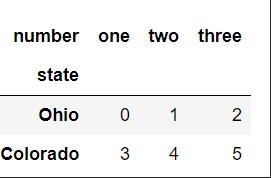
result = data.stack()result
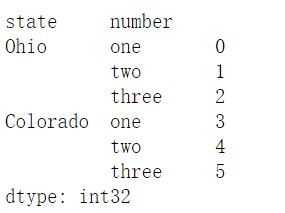
從下圖中結(jié)果來理解上述點4,stack操作后將列索引number旋轉(zhuǎn)為行索引,并且置于行索引的最內(nèi)層(外層為索引state),也就是將旋轉(zhuǎn)軸(number)的結(jié)果置于 最低級別。
3、將DataFrame的行旋轉(zhuǎn)為列,即unstack操作result.unstack()
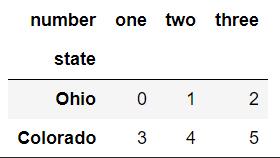
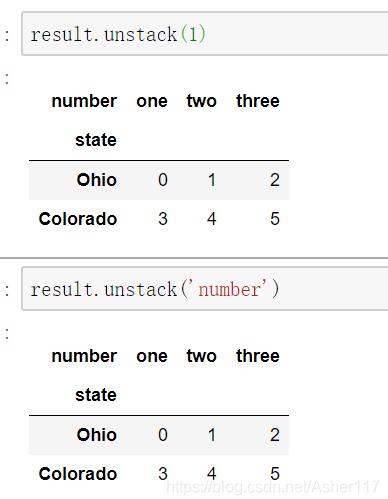
從下面結(jié)果理解上述點3,unstack操作默認(rèn)將內(nèi)層索引number旋轉(zhuǎn)為列索引。
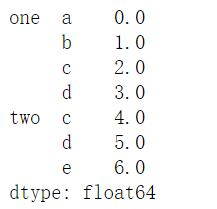
同時,也可以指定分層級別或者索引名稱來指定操作級別,下面做錯同樣會得到上面的結(jié)果。
s1 = pd.Series([0,1,2,3],index=list(’abcd’))s2 = pd.Series([4,5,6],index=list(’cde’))data2 = pd.concat([s1,s2],keys=[’one’,’two’])data2
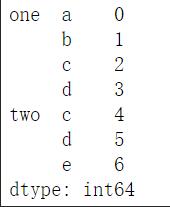
data2.unstack().stack()
補(bǔ)充:使用Pivot、Pivot_Table、Stack和Unstack等方法在Pandas中對數(shù)據(jù)變形(重塑)
Pandas是著名的Python數(shù)據(jù)分析包,這使它更容易讀取和轉(zhuǎn)換數(shù)據(jù)。在Pandas中數(shù)據(jù)變形意味著轉(zhuǎn)換表或向量(即DataFrame或Series)的結(jié)構(gòu),使其進(jìn)一步適合做其他分析。在本文中,小編將舉例說明最常見的一些Pandas重塑功能。
一、Pivotpivot函數(shù)用于從給定的表中創(chuàng)建出新的派生表,pivot有三個參數(shù):索引、列和值。具體如下:
def pivot_simple(index, columns, values): ''' Produce ’pivot’ table based on 3 columns of this DataFrame. Uses unique values from index / columns and fills with values. Parameters ---------- index : ndarray Labels to use to make new frame’s index columns : ndarray Labels to use to make new frame’s columns values : ndarray Values to use for populating new frame’s values
作為這些參數(shù)的值需要事先在原始的表中指定好對應(yīng)的列名。然后,pivot函數(shù)將創(chuàng)建一個新表,其行和列索引是相應(yīng)參數(shù)的唯一值。我們一起來看一下下面這個例子:
假設(shè)我們有以下數(shù)據(jù):
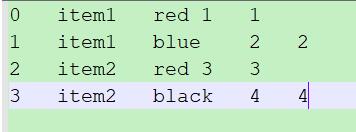
我們將數(shù)據(jù)讀取進(jìn)來:
from collections import OrderedDictfrom pandas import DataFrameimport pandas as pdimport numpy as np data = OrderedDict(( ('item', [’Item1’, ’Item1’, ’Item2’, ’Item2’]), (’color’, [’red’, ’blue’, ’red’, ’black’]), (’user’, [’1’, ’2’, ’3’, ’4’]), (’bm’, [’1’, ’2’, ’3’, ’4’])))data = DataFrame(data)print(data)
得到結(jié)果為:
item color user bm0 Item1 red 1 11 Item1 blue 2 22 Item2 red 3 33 Item2 black 4 4
接下來,我們對以上數(shù)據(jù)進(jìn)行變形:
df = data.pivot(index=’item’, columns=’color’, values=’user’)print(df)
得到的結(jié)果為:
color black blue reditem Item1 None 2 1Item2 4 None 3
注意:可以使用以下方法對原始數(shù)據(jù)和轉(zhuǎn)換后的數(shù)據(jù)進(jìn)行等效查詢:
# 原始數(shù)據(jù)集print(data[(data.item==’Item1’) & (data.color==’red’)].user.values) # 變換后的數(shù)據(jù)集print(df[df.index==’Item1’].red.values)
結(jié)果為:
[’1’][’1’]
在以上的示例中,轉(zhuǎn)化后的數(shù)據(jù)不包含bm的信息,它僅包含我們在pivot方法中指定列的信息。下面我們對上面的例子進(jìn)行擴(kuò)展,使其在包含user信息的同時也包含bm信息。
df2 = data.pivot(index=’item’, columns=’color’)print(df2)
結(jié)果為:
user bm color black blue red black blue reditem Item1 None 2 1 None 2 1Item2 4 None 3 4 None 3
從結(jié)果中我們可以看出:Pandas為新表創(chuàng)建了分層列索引。我們可以用這些分層列索引來過濾出單個列的值,例如:使用df2.user可以得到user列中的值。
二、Pivot Table有如下例子:
data = OrderedDict(( ('item', [’Item1’, ’Item1’, ’Item1’, ’Item2’]), (’color’, [’red’, ’blue’, ’red’, ’black’]), (’user’, [’1’, ’2’, ’3’, ’4’]), (’bm’, [’1’, ’2’, ’3’, ’4’])))data = DataFrame(data) df = data.pivot(index=’item’, columns=’color’, values=’user’)
得到的結(jié)果為:
ValueError: Index contains duplicate entries, cannot reshape
因此,在調(diào)用pivot函數(shù)之前,我們必須確保我們指定的列和行沒有重復(fù)的數(shù)據(jù)。如果我們無法確保這一點,我們可以使用pivot_table這個方法。
pivot_table方法實現(xiàn)了類似pivot方法的功能,它可以在指定的列和行有重復(fù)的情況下使用,我們可以使用均值、中值或其他的聚合函數(shù)來計算重復(fù)條目中的單個值。
首先,我們先來看一下pivot_table()這個方法:
def pivot_table(data, values=None, index=None, columns=None, aggfunc=’mean’,fill_value=None, margins=False, dropna=True,margins_name=’All’): ''' Create a spreadsheet-style pivot table as a DataFrame. The levels in the pivot table will be stored in MultiIndex objects (hierarchical indexes) on the index and columns of the result DataFrame Parameters ---------- data : DataFrame values : column to aggregate, optional index : column, Grouper, array, or list of the previous If an array is passed, it must be the same length as the data. The list can contain any of the other types (except list). Keys to group by on the pivot table index. If an array is passed, it is being used as the same manner as column values. columns : column, Grouper, array, or list of the previous If an array is passed, it must be the same length as the data. The list can contain any of the other types (except list). Keys to group by on the pivot table column. If an array is passed, it is being used as the same manner as column values. aggfunc : function or list of functions, default numpy.mean If list of functions passed, the resulting pivot table will have hierarchical columns whose top level are the function names (inferred from the function objects themselves) fill_value : scalar, default None Value to replace missing values with margins : boolean, default False Add all row / columns (e.g. for subtotal / grand totals) dropna : boolean, default True Do not include columns whose entries are all NaN margins_name : string, default ’All’ Name of the row / column that will contain the totals when margins is True. 接下來我們來看一個示例:data = OrderedDict(( ('item', [’Item1’, ’Item1’, ’Item1’, ’Item2’]), (’color’, [’red’, ’blue’, ’red’, ’black’]), (’user’, [’1’, ’2’, ’3’, ’4’]), (’bm’, [’1’, ’2’, ’3’, ’4’])))data = DataFrame(data) df = data.pivot_table(index=’item’, columns=’color’, values=’user’, aggfunc=np.min)print(df)
結(jié)果為:
color black blue reditem Item1 None 2 1Item2 4 None None
實際上,pivot_table()是pivot()的泛化,它允許在數(shù)據(jù)集中聚合具有相同目標(biāo)的多個值。
三、Stack/Unstack事實上,變換一個表只是堆疊DataFrame的一種特殊情況,假設(shè)我們有一個在行列上有多個索引的DataFrame。堆疊DataFrame意味著移動最里面的列索引成為最里面的行索引,反向操作稱之為取消堆疊,意味著將最里面的行索引移動為最里面的列索引。例如:
from pandas import DataFrameimport pandas as pdimport numpy as np # 建立多個行索引row_idx_arr = list(zip([’r0’, ’r0’], [’r-00’, ’r-01’]))row_idx = pd.MultiIndex.from_tuples(row_idx_arr) # 建立多個列索引col_idx_arr = list(zip([’c0’, ’c0’, ’c1’], [’c-00’, ’c-01’, ’c-10’]))col_idx = pd.MultiIndex.from_tuples(col_idx_arr) # 創(chuàng)建DataFramed = DataFrame(np.arange(6).reshape(2,3), index=row_idx, columns=col_idx)d = d.applymap(lambda x: (x // 3, x % 3)) # Stack/Unstacks = d.stack()u = d.unstack()print(s)print(u)
得到的結(jié)果為:
c0 c1r0 r-00 c-00 (0, 0) NaN c-01 (0, 1) NaN c-10 NaN (0, 2) r-01 c-00 (1, 0) NaN c-01 (1, 1) NaN c-10 NaN (1, 2) c0 c1 c-00 c-01 c-10 r-00 r-01 r-00 r-01 r-00 r-01r0 (0, 0) (1, 0) (0, 1) (1, 1) (0, 2) (1, 2)
實際上,Pandas允許我們在索引的任何級別上堆疊/取消堆疊。 因此,在前面的示例中,我們也可以堆疊在最外層的索引級別上。 但是,默認(rèn)(最典型的情況)是在最里面的索引級別進(jìn)行堆疊/取消堆疊。
以上為個人經(jīng)驗,希望能給大家一個參考,也希望大家多多支持好吧啦網(wǎng)。如有錯誤或未考慮完全的地方,望不吝賜教。
相關(guān)文章:
1. CentOS郵箱服務(wù)器搭建系列——SMTP服務(wù)器的構(gòu)建( Postfix )2. PHP基礎(chǔ)之生成器4——比較生成器和迭代器對象3. ASP新手必備的基礎(chǔ)知識4. Docker 啟動Redis 并設(shè)置密碼的操作5. asp文件用什么軟件編輯6. 通過IEAD+Maven快速搭建SSM項目的過程(Spring + Spring MVC + Mybatis)7. JS中6個對象數(shù)組去重的方法8. vue+element開發(fā)一個谷歌插件的全過程9. 利用CSS制作3D動畫10. Vue axios獲取token臨時令牌封裝案例

 網(wǎng)公網(wǎng)安備