python+opencv實現(xiàn)車道線檢測
python+opencv車道線檢測(簡易實現(xiàn)),供大家參考,具體內(nèi)容如下
技術棧:python+opencv
實現(xiàn)思路:1、canny邊緣檢測獲取圖中的邊緣信息;2、霍夫變換尋找圖中直線;3、繪制梯形感興趣區(qū)域獲得車前范圍;4、得到并繪制車道線;
效果展示: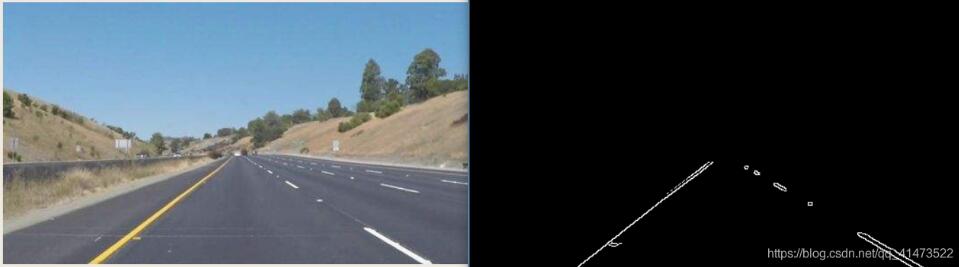
import cv2import numpy as npdef canny(): gray = cv2.cvtColor(lane_image, cv2.COLOR_RGB2GRAY) #高斯濾波 blur = cv2.GaussianBlur(gray, (5, 5), 0) #邊緣檢測 canny_img = cv2.Canny(blur, 50, 150) return canny_imgdef region_of_interest(r_image): h = r_image.shape[0] w = r_image.shape[1] # 這個區(qū)域不穩(wěn)定,需要根據(jù)圖片更換 poly = np.array([ [(100, h), (500, h), (290, 180), (250, 180)] ]) mask = np.zeros_like(r_image) # 繪制掩膜圖像 cv2.fillPoly(mask, poly, 255) # 獲得ROI區(qū)域 masked_image = cv2.bitwise_and(r_image, mask) return masked_imageif __name__ == ’__main__’: image = cv2.imread(’test.jpg’) lane_image = np.copy(image) canny = canny() cropped_image = region_of_interest(canny) cv2.imshow('result', cropped_image) cv2.waitKey(0)霍夫變換加線性擬合改良:
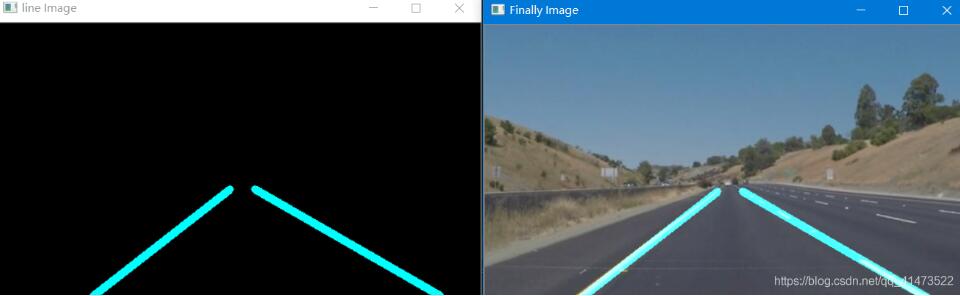
效果圖:
代碼實現(xiàn):
主要增加了根據(jù)斜率作線性擬合過濾無用點后連線的操作;
import cv2import numpy as npdef canny(): gray = cv2.cvtColor(lane_image, cv2.COLOR_RGB2GRAY) blur = cv2.GaussianBlur(gray, (5, 5), 0) canny_img = cv2.Canny(blur, 50, 150) return canny_imgdef region_of_interest(r_image): h = r_image.shape[0] w = r_image.shape[1] poly = np.array([ [(100, h), (500, h), (280, 180), (250, 180)] ]) mask = np.zeros_like(r_image) cv2.fillPoly(mask, poly, 255) masked_image = cv2.bitwise_and(r_image, mask) return masked_imagedef get_lines(img_lines): if img_lines is not None: for line in lines: for x1, y1, x2, y2 in line: # 分左右車道 k = (y2 - y1) / (x2 - x1) if k < 0: lefts.append(line) else: rights.append(line)def choose_lines(after_lines, slo_th): # 過濾斜率差別較大的點 slope = [(y2 - y1) / (x2 - x1) for line in after_lines for x1, x2, y1, y2 in line] # 獲得斜率數(shù)組 while len(after_lines) > 0: mean = np.mean(slope) # 計算平均斜率 diff = [abs(s - mean) for s in slope] # 每條線斜率與平均斜率的差距 idx = np.argmax(diff) # 找到最大斜率的索引 if diff[idx] > slo_th: # 大于預設的閾值選取 slope.pop(idx) after_lines.pop(idx) else: break return after_linesdef clac_edgepoints(points, y_min, y_max): x = [p[0] for p in points] y = [p[1] for p in points] k = np.polyfit(y, x, 1) # 曲線擬合的函數(shù),找到xy的擬合關系斜率 func = np.poly1d(k) # 斜率代入可以得到一個y=kx的函數(shù) x_min = int(func(y_min)) # y_min = 325其實是近似找了一個 x_max = int(func(y_max)) return [(x_min, y_min), (x_max, y_max)]if __name__ == ’__main__’: image = cv2.imread(’F:A_javaProtest.jpg’) lane_image = np.copy(image) canny_img = canny() cropped_image = region_of_interest(canny_img) lefts = [] rights = [] lines = cv2.HoughLinesP(cropped_image, 1, np.pi / 180, 15, np.array([]), minLineLength=40, maxLineGap=20) get_lines(lines) # 分別得到左右車道線的圖片 good_leftlines = choose_lines(lefts, 0.1) # 處理后的點 good_rightlines = choose_lines(rights, 0.1) leftpoints = [(x1, y1) for left in good_leftlines for x1, y1, x2, y2 in left] leftpoints = leftpoints + [(x2, y2) for left in good_leftlines for x1, y1, x2, y2 in left] rightpoints = [(x1, y1) for right in good_rightlines for x1, y1, x2, y2 in right] rightpoints = rightpoints + [(x2, y2) for right in good_rightlines for x1, y1, x2, y2 in right] lefttop = clac_edgepoints(leftpoints, 180, image.shape[0]) # 要畫左右車道線的端點 righttop = clac_edgepoints(rightpoints, 180, image.shape[0]) src = np.zeros_like(image) cv2.line(src, lefttop[0], lefttop[1], (255, 255, 0), 7) cv2.line(src, righttop[0], righttop[1], (255, 255, 0), 7) cv2.imshow(’line Image’, src) src_2 = cv2.addWeighted(image, 0.8, src, 1, 0) cv2.imshow(’Finally Image’, src_2) cv2.waitKey(0)
待改進:
代碼實用性差,幾乎不能用于實際,但是可以作為初學者的練手項目;斑馬線檢測思路:獲取車前感興趣區(qū)域,判斷白色像素點比例即可實現(xiàn);行人檢測思路:opencv有內(nèi)置行人檢測函數(shù),基于內(nèi)置的訓練好的數(shù)據(jù)集;
以上就是本文的全部內(nèi)容,希望對大家的學習有所幫助,也希望大家多多支持好吧啦網(wǎng)。
相關文章:

 網(wǎng)公網(wǎng)安備