解決Python Matplotlib繪圖數據點位置錯亂問題
在繪制正負樣本在各個特征維度上的CDF(累積分布)圖時出現了以下問題:
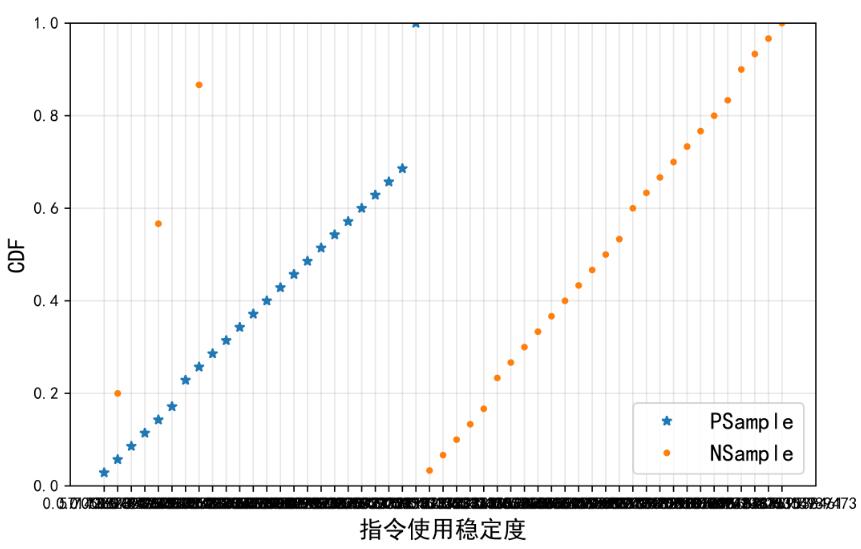
問題具體表現為:
1.幾個負樣本的數據點位置倒錯
2.X軸刻度變成了亂七八糟一團鬼東西
最終解決辦法
造成上述情況的原因其實是由于輸入matplotlib.plot()函數的數據x_data和y_data從CSV文件中直接導入后格式為string,因此才會導致所有數據點的x坐標都被直接刻在了x軸上,且由于坐標數據格式錯誤,部分點也就表現為“亂點”。解決辦法就是導入x,y數據后先將其轉化為float型數據,然后輸入plot()函數,問題即解決。
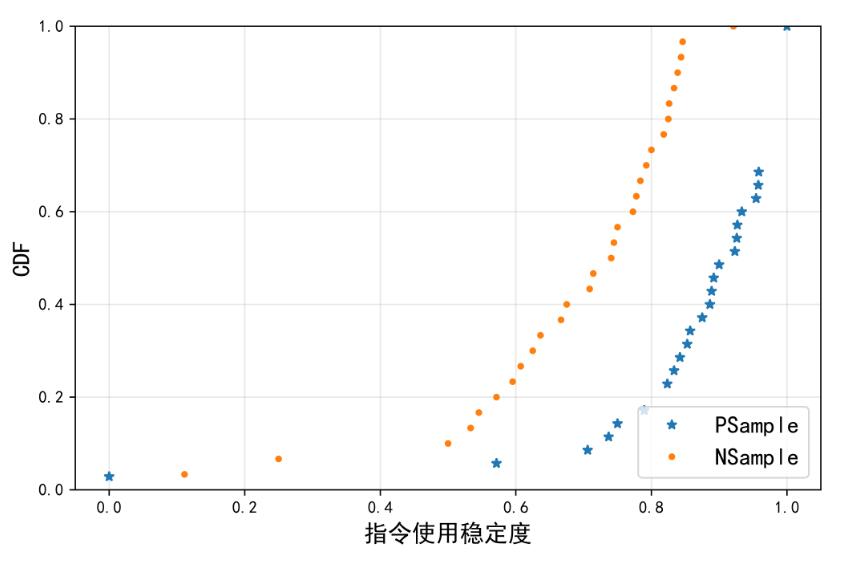
補充知識:matplotlib如何在繪制時間序列時跳過無數據的區間
其實官方文檔里就提供了方法,這里簡單的翻譯并記錄一下.
11.1.9 Skip dates where there is no dataWhen plotting time series, e.g., financial time series, one often wants to leave out days on which there is no data, e.g., weekends.By passing in dates on the x-xaxis, you get large horizontal gaps on periods when there is not data.
The solution is to pass in some proxy x-data, e.g., evenly sampled indices, and then use a custom formatter to format these as dates.The example below shows how to use an ‘index formatter’ to achieve the desired plot:
解決方案是通過傳遞x軸數據的代理,比如下標,
然后通過自定義的’formatter’去取到相對應的時間信息
manual內示例代碼:
import numpy as npimport matplotlib.pyplot as pltimport matplotlib.mlab as mlabimport matplotlib.ticker as ticker#讀數據r = mlab.csv2rec(’../data/aapl.csv’)r.sort()r = r[-30:] # get the last 30 daysN = len(r)ind = np.arange(N) # the evenly spaced plot indicesdef format_date(x, pos=None): #保證下標不越界,很重要,越界會導致最終plot坐標軸label無顯示 thisind = np.clip(int(x+0.5), 0, N-1) return r.date[thisind].strftime(’%Y-%m-%d’)fig = plt.figure()ax = fig.add_subplot(1,1,1)ax.plot(ind, r.adj_close, ’o-’)ax.xaxis.set_major_formatter(ticker.FuncFormatter(format_date))fig.autofmt_xdate()plt.show()
示例:
同樣一段數據上為原始,下為去掉無數據間隔區間
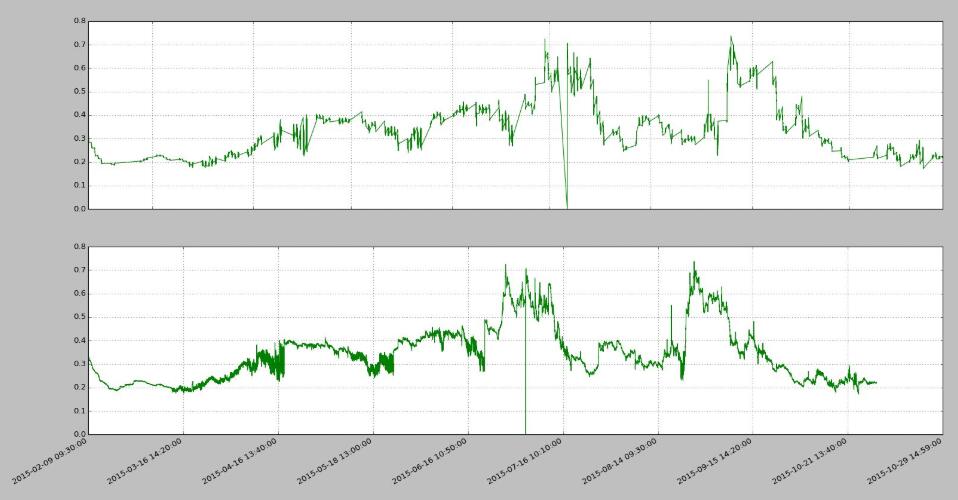
import pandas as PDimport numpy as NPimport matplotlib.pyplot as PLTimport matplotlib.ticker as MTKfile = r’vix_series.csv’df = PD.read_csv(file, parse_dates=[0, 2])#用下標代理原始時間戳數據idx_pxy = NP.arange(df.shape[0])#下標-時間轉換funcdef x_fmt_func(x, pos=None): idx = NP.clip(int(x+0.5), 0, df.shape[0]-1) return df[’datetime’].iat[idx]#繪圖流程def decorateAx(ax, xs, ys, x_func): ax.plot(xs, ys, color='green', linewidth=1, linestyle='-') ax.plot(ax.get_xlim(), [0,0], color='blue', linewidth=0.5, linestyle='--') if x_func: #set數據代理func ax.xaxis.set_major_formatter(MTK.FuncFormatter(x_func)) ax.grid(True) returnfig = PLT.figure()ax1 = fig.add_subplot(2,1,1)ax2 = fig.add_subplot(2,1,2)decorateAx(ax1, df[’datetime’], df[’vix_all’], None)decorateAx(ax2, idx_pxy, df[’vix_all’], x_fmt_func)#優化label顯示,非必須fig.autofmt_xdate()PLT.show()
很多時候亂翻google還不如好好通讀官方manual…
以上這篇解決Python Matplotlib繪圖數據點位置錯亂問題就是小編分享給大家的全部內容了,希望能給大家一個參考,也希望大家多多支持好吧啦網。
相關文章:

 網公網安備
網公網安備