使用Python將圖片轉正方形的兩種方法實例代碼詳解
一、將原圖粘貼到一張正方形的背景上
def trans_square(image): r'''Open the image using PIL.''' image = image.convert(’RGB’) w, h = image.size background = Image.new(’RGB’, size=(max(w, h), max(w, h)), color=(127, 127, 127)) # 創建背景圖,顏色值為127 length = int(abs(w - h) // 2) # 一側需要填充的長度 box = (length, 0) if w < h else (0, length) # 粘貼的位置 background.paste(image, box) return background
二、切片填充的方式使用numpy創建背景,使用切片將原圖的值填充到背景中。
def trans_square(image): r'''Open the image using PIL.''' img = image.convert(’RGB’) img = np.array(img, dtype=np.uint8) # 圖片轉numpy img_h, img_w, img_c = img.shape if img_h != img_w: long_side = max(img_w, img_h) short_side = min(img_w, img_h) loc = abs(img_w - img_h) // 2 img = img.transpose((1, 0, 2)) if img_w < img_h else img # 如果高是長邊則換軸,最后再換回來 background = np.zeros((long_side, long_side, img_c), dtype=np.uint8) # 創建正方形背景 background[loc: loc + short_side] = img[...] # 數據填充在中間位置 img = background.transpose((1, 0, 2)) if img_w < img_h else background return Image.fromarray(img, ’RGB’)
使用 nn.ZeroPad2d() 或者 nn.ConstantPad2d() 進行填充
def trans_square(image): r'''transform square. :return PIL image ''' img = transforms.ToTensor()(image) C, H, W = img.shape pad_1 = int(abs(H - W) // 2) # 一側填充長度 pad_2 = int(abs(H - W) - pad_1) # 另一側填充長度 img = img.unsqueeze(0) # 加軸 if H > W: img = nn.ZeroPad2d((pad_1, pad_2, 0, 0))(img) # 左右填充,填充值是0 # img = nn.ConstantPad2d((pad_1, pad_2, 0, 0), 127)(img) # 左右填充,填充值是127 elif H < W: img = nn.ZeroPad2d((0, 0, pad_1, pad_2))(img) # 上下填充,填充值是0 # img = nn.ConstantPad2d((0, 0, pad_1, pad_2), 127)(img) # 上下填充,填充值是127 img = img.squeeze(0) # 減軸 img = transforms.ToPILImage()(img) return img
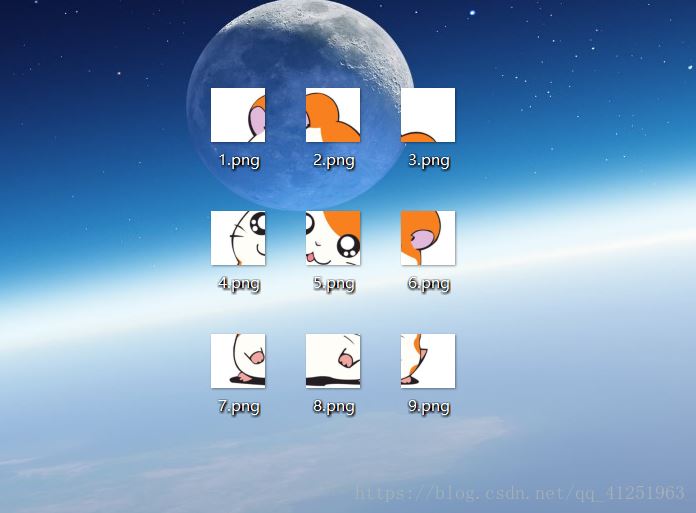
ps:下面看下python 將圖片轉換成九宮格形式
用到的模塊PIL(安裝:pip install pillow)
完整代碼:
from PIL import Image import sys #先將 input image 填充為正方形 def fill_image(image): width, height = image.size #選取長和寬中較大值作為新圖片的 new_image_length = width if width > height else height #生成新圖片[白底] new_image = Image.new(image.mode, (new_image_length, new_image_length), color=’white’) #注意這個函數! #將之前的圖粘貼在新圖上,居中 if width > height:#原圖寬大于高,則填充圖片的豎直維度 #(x,y)二元組表示粘貼上圖相對下圖的起始位置,是個坐標點。 new_image.paste(image, (0, int((new_image_length - height) / 2))) else: new_image.paste(image, (int((new_image_length - width) / 2),0)) return new_image def cut_image(image): width, height = image.size item_width = int(width / 3) box_list = [] # (left, upper, right, lower) for i in range(0,3): for j in range(0,3): #print((i*item_width,j*item_width,(i+1)*item_width,(j+1)*item_width)) box = (j*item_width,i*item_width,(j+1)*item_width,(i+1)*item_width) box_list.append(box) image_list = [image.crop(box) for box in box_list] return image_list#保存 def save_images(image_list): index = 1 for image in image_list: image.save(str(index) + ’.png’, ’PNG’) index += 1 if __name__ == ’__main__’: file_path = '***'#填入圖片名 image = Image.open(file_path) #image.show() image = fill_image(image) image_list = cut_image(image) save_images(image_list)
原圖:

運行程序后效果圖:
到此這篇關于使用Python將圖片轉正方形的兩種方法的文章就介紹到這了,更多相關python 圖片轉正方形內容請搜索好吧啦網以前的文章或繼續瀏覽下面的相關文章希望大家以后多多支持好吧啦網!
相關文章:
 網公網安備
網公網安備