Python通過2種方法輸出帶顏色字體
方法1:
使用Python中自帶的print輸出帶有顏色或者背景的字符串
書寫語法
print(033[顯示方式;前景色;背景色m輸出內容033[0m)
其中,顯示方式、前景色、背景色都是可選參數(可缺省一個或多個)。
參數
顯示方式
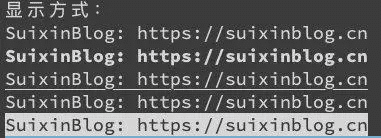
顯示方式 效果 0 默認 1 粗體 4 下劃線 5 閃爍 7 反白顯示
print('顯示方式:')print('033[0mSuixinBlog: https://suixinblog.cn033[0m')print('033[1mSuixinBlog: https://suixinblog.cn033[0m')print('033[4mSuixinBlog: https://suixinblog.cn033[0m')print('033[5mSuixinBlog: https://suixinblog.cn033[0m')print('033[7mSuixinBlog: https://suixinblog.cn033[0m')
顏色
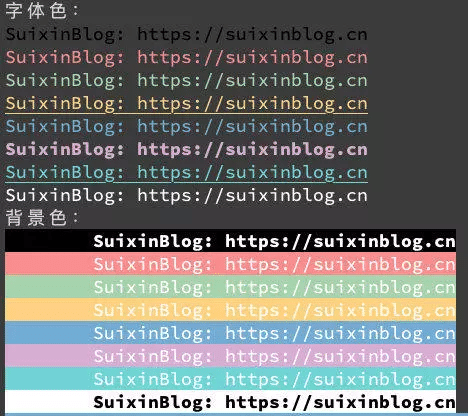
字體色編號 背景色編號 顏色 30 40 黑色 31 41 紅色 32 42 綠色 33 43 黃色 34 44 藍色 35 45 紫色 36 46 青色 37 47 白色
print('字體色:')print('033[30mSuixinBlog: https://suixinblog.cn033[0m')print('033[31mSuixinBlog: https://suixinblog.cn033[0m')print('033[32mSuixinBlog: https://suixinblog.cn033[0m')print('033[4;33mSuixinBlog: https://suixinblog.cn033[0m')print('033[34mSuixinBlog: https://suixinblog.cn033[0m')print('033[1;35mSuixinBlog: https://suixinblog.cn033[0m')print('033[4;36mSuixinBlog: https://suixinblog.cn033[0m')print('033[37mSuixinBlog: https://suixinblog.cn033[0m')print('背景色:')print('033[1;37;40mtSuixinBlog: https://suixinblog.cn033[0m')print('033[37;41mtSuixinBlog: https://suixinblog.cn033[0m')print('033[37;42mtSuixinBlog: https://suixinblog.cn033[0m')print('033[37;43mtSuixinBlog: https://suixinblog.cn033[0m')print('033[37;44mtSuixinBlog: https://suixinblog.cn033[0m')print('033[37;45mtSuixinBlog: https://suixinblog.cn033[0m')print('033[37;46mtSuixinBlog: https://suixinblog.cn033[0m')print('033[1;30;47mtSuixinBlog: https://suixinblog.cn033[0m')
方法2:
colorama是一個python專門用來在控制臺、命令行輸出彩色文字的模塊,可以跨平臺使用。
1. 安裝colorama模塊
pip install colorama
可用格式常數:
Fore: BLACK, RED, GREEN, YELLOW, BLUE, MAGENTA, CYAN, WHITE, RESET.Back: BLACK, RED, GREEN, YELLOW, BLUE, MAGENTA, CYAN, WHITE, RESET.Style: DIM, NORMAL, BRIGHT, RESET_ALL
跨平臺印刷彩色文本可以使用彩色光的常數簡稱ANSI轉義序列:
from colorama import Fore,Back,Styleprint (Fore.RED + 'some red text')print (Back.GREEN + 'and with a green background')print (Style.DIM + 'and in dim text')print (Style.RESET_ALL)print ('back to normal now!!')
Init關鍵字參數:
init()接受一些* * kwargs覆蓋缺省行為
init(autoreset = False):
如果你發現自己一再發送重置序列結束時關閉顏色變化每一個打印,然后init(autoreset = True)將自動化示例:
from colorama import init,Foreinit(autoreset=True)print (Fore.RED + 'welcome to python !!')print ('automatically back to default color again')
以上就是本文的全部內容,希望對大家的學習有所幫助,也希望大家多多支持好吧啦網。
相關文章:
 網公網安備
網公網安備