文章詳情頁
JSP 中Servlet的自己實現
瀏覽:361日期:2022-06-07 10:27:14
JSP 中Servlet的自己實現
一 步驟
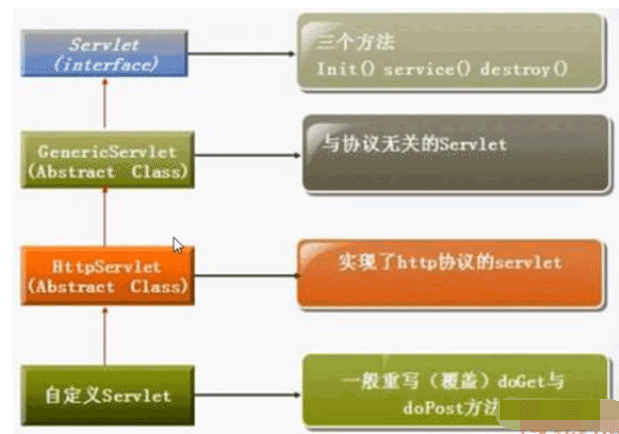
1、繼承HttpServlet
2、重寫doGet()或者doPost()方法
3、在web.xml中注冊Servlet
二 HttpServlet類繼承圖
三 實例
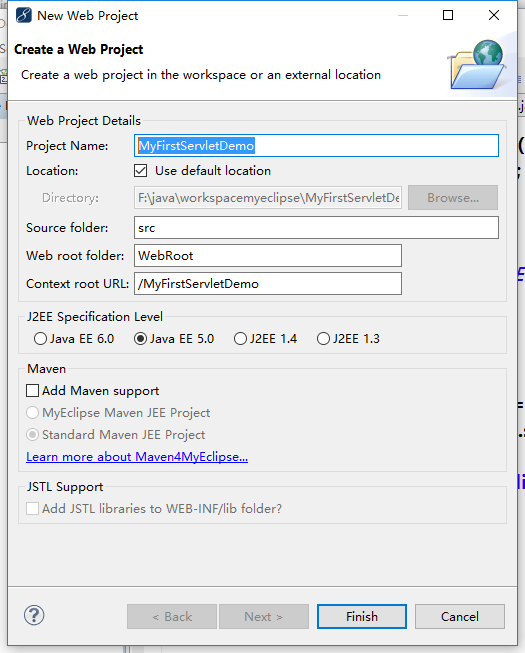
1、創建MyFirstServletDemo web project.
2、編輯index.jsp
<%@ page language="java" import="java.util.*" contentType="text/html; charset=utf-8"%><%String path = request.getContextPath();String basePath = request.getScheme()+"://"+request.getServerName()+":"+request.getServerPort()+path+"/";%> <!DOCTYPE HTML PUBLIC "-//W3C//DTD HTML 4.01 Transitional//EN"><html> <head> <base href="<%=basePath%>" rel="external nofollow" > <title>My JSP "index.jsp" starting page</title> <meta http-equiv="pragma" content="no-cache"> <meta http-equiv="cache-control" content="no-cache"> <meta http-equiv="expires" content="0"> <meta http-equiv="keywords" content="keyword1,keyword2,keyword3"> <meta http-equiv="description" content="This is my page"> <!-- <link rel="stylesheet" type="text/css" href="styles.css" rel="external nofollow" > --> </head> <body> <h1>第一個Servlet小例子</h1> <a href="servlet/HelloServlet" rel="external nofollow" >Get方式請求HelloServlet</a> <form action="servlet/HelloServlet" method="post"> <input type="submit" value="Post方式請求HelloServlet"> </form> </body></html>
3、編寫HelloServlet
package servlet; import java.io.IOException;import java.io.PrintWriter; import javax.servlet.ServletException;import javax.servlet.http.HttpServlet;import javax.servlet.http.HttpServletRequest;import javax.servlet.http.HttpServletResponse; //繼承于HttpServletpublic class HelloServlet extends HttpServlet { @Override protected void doGet(HttpServletRequest request, HttpServletResponse response) throws ServletException, IOException { // TODO Auto-generated method stub System.out.println("處理get()請求..."); PrintWriter out = response.getWriter(); response.setContentType("text/html; charset=utf-8"); out.println("<strong>Hello Servlet!</strong><br>"); } @Override protected void doPost(HttpServletRequest request, HttpServletResponse response) throws ServletException, IOException { System.out.println("處理post()請求..."); PrintWriter out = response.getWriter(); response.setContentType("text/html; charset=utf-8"); out.println("<strong>Hello Servlet!</strong><br>"); } }4、編寫web.xml
<?xml version="1.0" encoding="UTF-8"?><web-app version="2.5" xmlns="http://java.sun.com/xml/ns/javaee"; xmlns:xsi="http://www.w3.org/2001/XMLSchema-instance"; xsi:schemaLocation="http://java.sun.com/xml/ns/javaeehttp://java.sun.com/xml/ns/javaee/web-app_2_5.xsd";> <display-name></display-name> <welcome-file-list> <welcome-file>index.jsp</welcome-file> </welcome-file-list> <servlet> <servlet-name>HelloServlet</servlet-name> <servlet-class>servlet.HelloServlet</servlet-class> </servlet> <servlet-mapping> <servlet-name>HelloServlet</servlet-name> <url-pattern>/servlet/HelloServlet</url-pattern> </servlet-mapping></web-app>
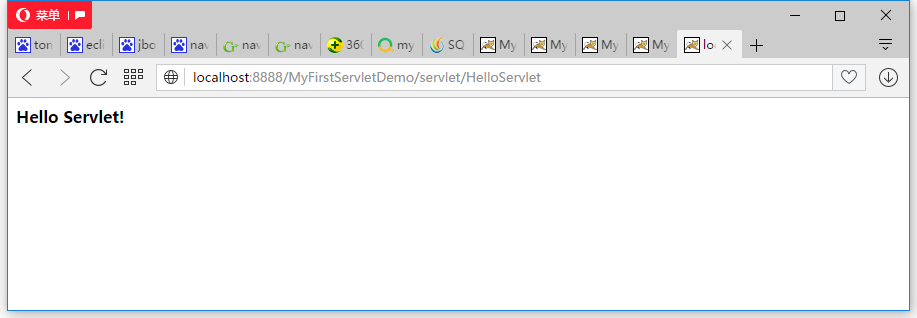
四 運行結果
如有疑問請留言或者到本站社區交流討論,感謝閱讀,希望能幫助到大家,謝謝大家對本站的支持!
標簽:
JSP
相關文章:
排行榜

 網公網安備
網公網安備