Java中EasyPoi多sheet導(dǎo)出功能實(shí)現(xiàn)
序言:之前一直想開(kāi)始寫(xiě)博客,都沒(méi)有時(shí)間行動(dòng)起來(lái),今天終于開(kāi)始了我的第一篇博客…
最近接到一個(gè)導(dǎo)出excel功能的需求,該功能主要難點(diǎn)是
多sheet頁(yè) 導(dǎo)出合并單元格(跨行、跨列) 多表頭合并我開(kāi)始的想法是如果采用poi來(lái)實(shí)現(xiàn)這個(gè)功能,業(yè)務(wù)邏輯可能會(huì)有點(diǎn)復(fù)雜,于是我使用了easyPoi——一個(gè)so easy的工具,它的特點(diǎn)就是非常方便,用jQuery的一句來(lái)說(shuō)就是:write Less,Do More。
話不多說(shuō),接下來(lái)分享一下我的代碼(我使用的是SSH框架搭建環(huán)境)
一、引入maven jar包<dependency> <groupId>cn.afterturn</groupId> <artifactId>easypoi-base</artifactId> <version>3.2.0</version></dependency><dependency> <groupId>cn.afterturn</groupId> <artifactId>easypoi-web</artifactId> <version>3.2.0</version></dependency><dependency> <groupId>cn.afterturn</groupId> <artifactId>easypoi-annotation</artifactId> <version>3.2.0</version></dependency>二、編寫(xiě)導(dǎo)出的實(shí)體類(使用注解形式)
1、DeptUtil 類
@ExcelTarget('deptUtil')public class DeptUtil { @Excel(name = '部門(mén)編號(hào)', width = 30 , needMerge = true) private Integer id; @Excel(name = '部門(mén)名稱', width = 30 , needMerge = true) private String deptName; @ExcelCollection(name = '員工信息') private List<EmpUtil> emps;....省略getter、setter方法
2、EmpUtil類
@ExcelTarget('empUtil')public class EmpUtil{ @Excel(name = '序號(hào)', width = 30, isColumnHidden = true) private Integer id; @Excel(name = '員工姓名', width = 30, groupName = '基本信息') private String empName; @Excel(name = '年齡', width = 30, type = 10, groupName = '基本信息') private Integer age; @Excel(name = '入職時(shí)間', width = 30, groupName = '工作信息', format = 'yyyy/MM/dd HH:mm') private Date hiredate; @Excel(name = '薪酬', width = 30, type = 10, groupName = '工作信息') private BigDecimal salary;....省略getter、setter方法
3、核心代碼
public String export(){ Workbook workBook = null; try { List<DeptUtil> exportList = exportService.exportList(); System.err.println(JSONArray.toJSONString(exportList)); // 創(chuàng)建參數(shù)對(duì)象(用來(lái)設(shè)定excel得sheet得內(nèi)容等信息) ExportParams deptExportParams = new ExportParams(); // 設(shè)置sheet得名稱 deptExportParams.setSheetName('員工報(bào)表1'); // 創(chuàng)建sheet1使用得map Map<String, Object> deptExportMap = new HashMap<>(); // title的參數(shù)為ExportParams類型,目前僅僅在ExportParams中設(shè)置了sheetName deptExportMap.put('title', deptExportParams); // 模版導(dǎo)出對(duì)應(yīng)得實(shí)體類型 deptExportMap.put('entity', DeptUtil.class); // sheet中要填充得數(shù)據(jù) deptExportMap.put('data', exportList); ExportParams empExportParams = new ExportParams(); empExportParams.setSheetName('員工報(bào)表2'); // 創(chuàng)建sheet2使用得map Map<String, Object> empExportMap = new HashMap<>(); empExportMap.put('title', empExportParams); empExportMap.put('entity', DeptUtil.class); empExportMap.put('data', exportList); // 將sheet1、sheet2、sheet3使用得map進(jìn)行包裝 List<Map<String, Object>> sheetsList = new ArrayList<>(); sheetsList.add(deptExportMap); sheetsList.add(empExportMap); // 執(zhí)行方法 workBook = ExcelExportUtil.exportExcel(sheetsList, ExcelType.HSSF); fileName = URLEncoder.encode('員工報(bào)表導(dǎo)出', 'UTF-8'); ByteArrayOutputStream outputStream = new ByteArrayOutputStream(); workBook.write(outputStream); outputStream.flush(); byte[] byteArray = outputStream.toByteArray(); excelStream = new ByteArrayInputStream(byteArray,0,byteArray.length); outputStream.close(); }catch (Exception e){ e.printStackTrace(); }finally { if(workBook != null) {try { workBook.close();} catch (IOException e) { e.printStackTrace();} } } return 'success'; }三、效果展示
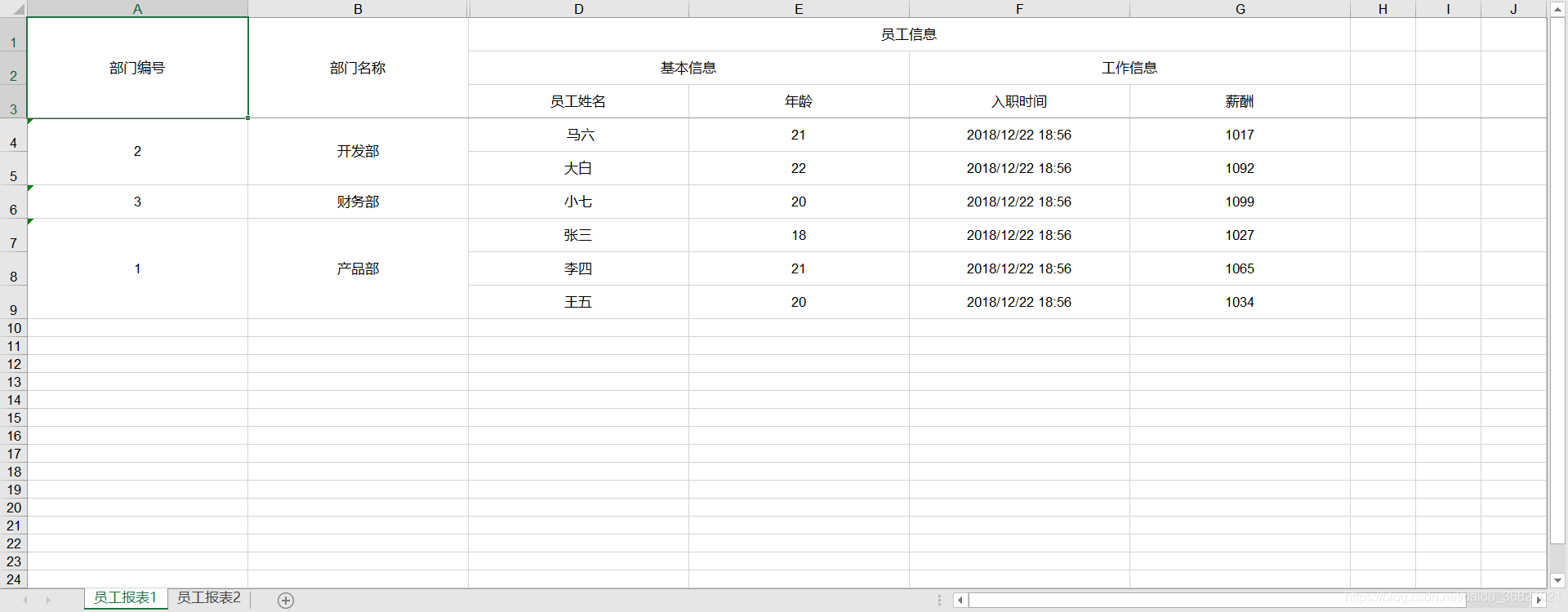
有一個(gè)問(wèn)題就是如果sheet填充的數(shù)據(jù)源是一樣的,那么第二個(gè)sheet的內(nèi)容就會(huì)為空
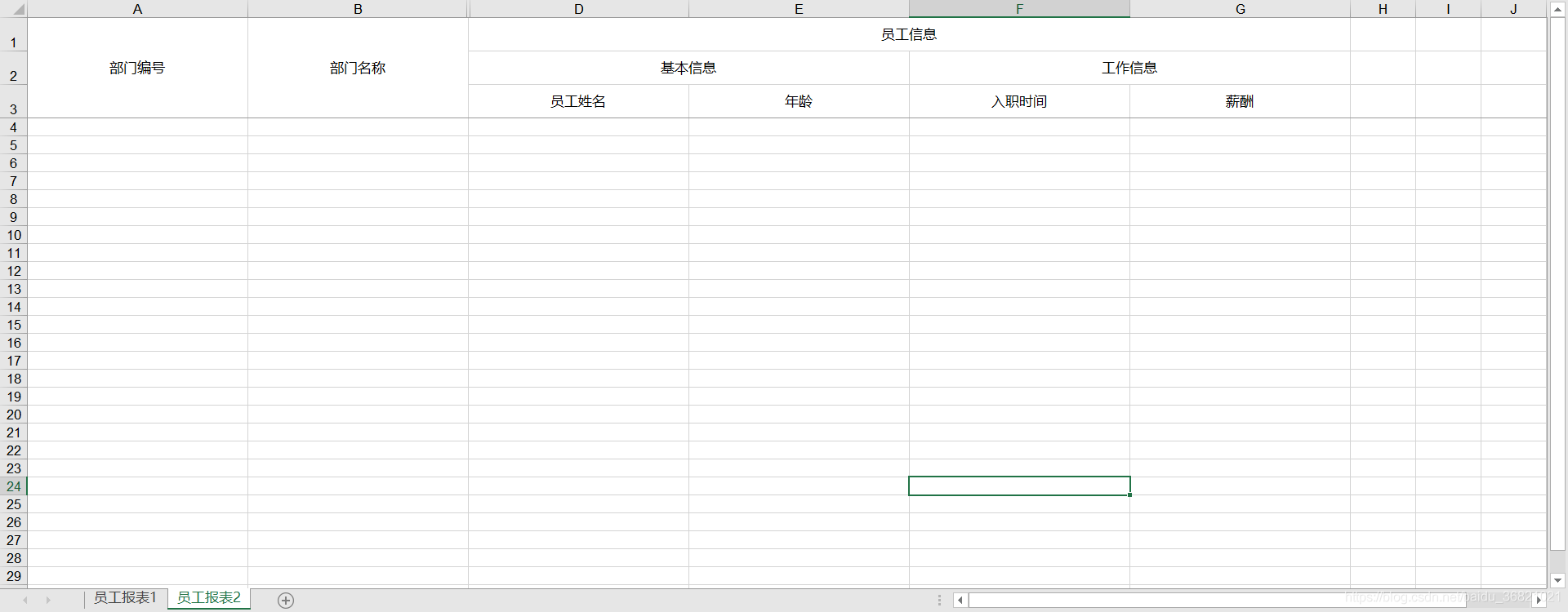
不過(guò)一般上要實(shí)現(xiàn)多sheet頁(yè)展示,內(nèi)容應(yīng)該是不一樣的,這里只是作為實(shí)現(xiàn)效果展示,就采用了同一個(gè)數(shù)據(jù)獲取源。
以上就是所有內(nèi)容了,如果想要學(xué)習(xí)更多可以查閱easyPoi的api(http://easypoi.mydoc.io/)另外附上我的項(xiàng)目源碼:https://github.com/wzqonly/easyPoi_export
到此這篇關(guān)于Java中EasyPoi多sheet導(dǎo)出功能實(shí)現(xiàn)的文章就介紹到這了,更多相關(guān)Java EasyPoi多sheet導(dǎo)出內(nèi)容請(qǐng)搜索好吧啦網(wǎng)以前的文章或繼續(xù)瀏覽下面的相關(guān)文章希望大家以后多多支持好吧啦網(wǎng)!
相關(guān)文章:
1. python 代碼實(shí)現(xiàn)k-means聚類分析的思路(不使用現(xiàn)成聚類庫(kù))2. Java如何基于反射機(jī)制獲取不同的類3. IntelliJ IDEA安裝插件的方法步驟4. Android table布局開(kāi)發(fā)實(shí)現(xiàn)簡(jiǎn)單計(jì)算器5. jQuery 實(shí)現(xiàn)DOM元素拖拽交換位置的實(shí)例代碼6. php模擬實(shí)現(xiàn)斗地主發(fā)牌7. 理解PHP5中static和const關(guān)鍵字8. Vue封裝一個(gè)TodoList的案例與瀏覽器本地緩存的應(yīng)用實(shí)現(xiàn)9. Vuex localStorage的具體使用10. Android 在 res/layout 文件夾 下創(chuàng)建一個(gè) 子文件夾實(shí)例
 網(wǎng)公網(wǎng)安備