java實現(xiàn)坦克大戰(zhàn)游戲
本文實例為大家分享了java實現(xiàn)坦克大戰(zhàn)游戲的具體代碼,供大家參考,具體內(nèi)容如下
一、實現(xiàn)的功能
1、游戲玩法介紹2、自定義游戲(選擇游戲難度、關卡等)3、自定義玩家姓名4、數(shù)據(jù)的動態(tài)顯示
二、程序基本結構
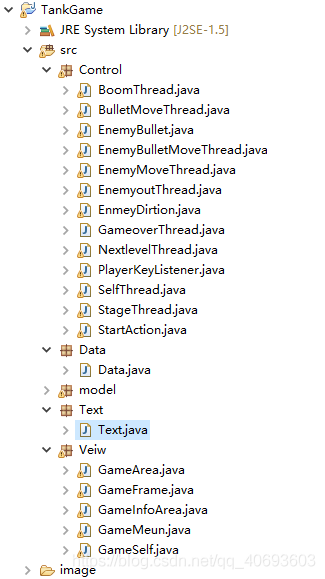
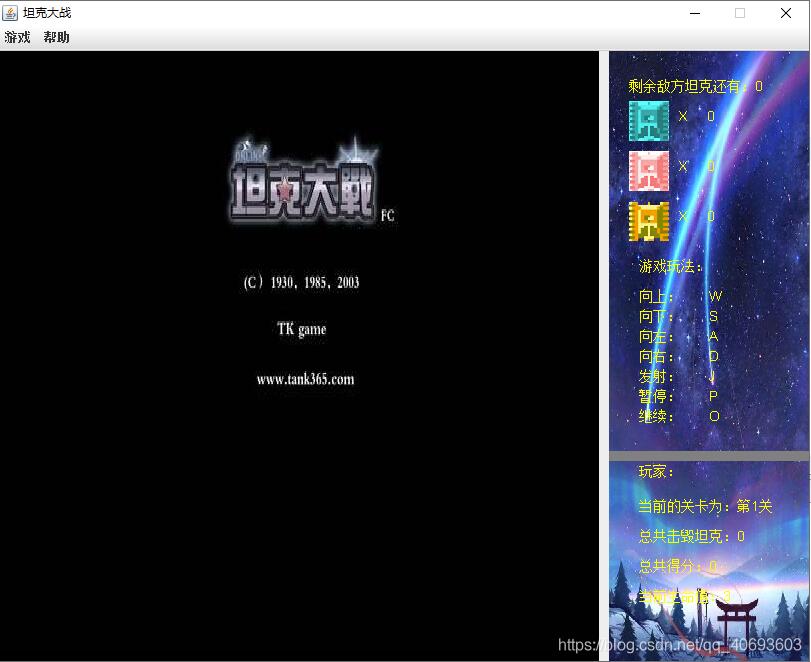
三、主要的界面
1)游戲首頁
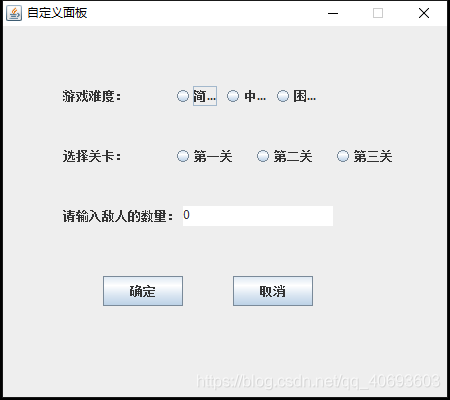
2)自定義游戲頁面
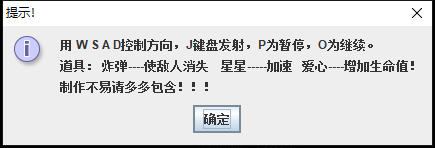
3)游戲介紹
4)開始游戲,自定義玩家姓名
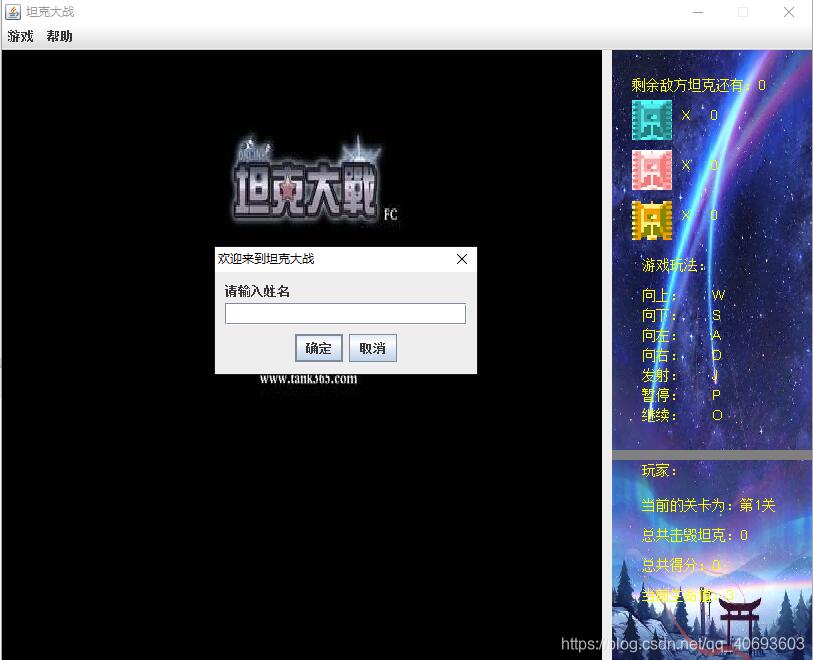
5)游戲主頁面
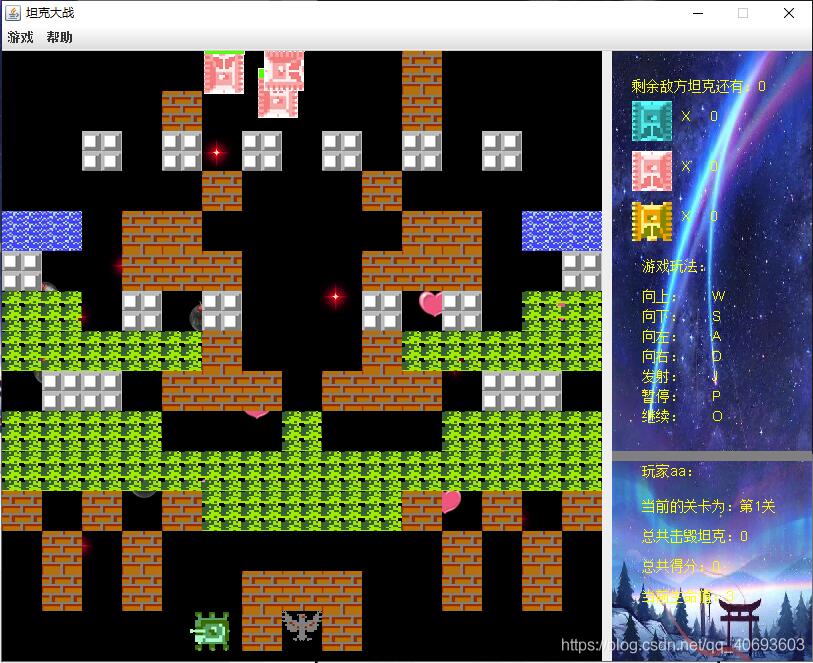
四、主要代碼
1)數(shù)據(jù)的初始化類
public class Data { public static boolean isRestart=false; public static boolean isGameOver=false; public static int start = 0;// 1為開始 0為還未開始 public static int levle = 1;//關卡 public static int pouse = 0;//0表示繼續(xù) 1表示暫停 public static String name = ''; public static int time = 0; public static int b = 0; public static int a = 1;//玩家的方向 1為上 2為下 3為左 4為右 public static int count; // 計算積分數(shù) public static int hit = 0; // 計算擊毀坦克的數(shù)量 public static Player player = new Player(200, 560, 3, 1);// 創(chuàng)建 玩家 public static home home = new home(280, 560, 1);// 創(chuàng)建碉堡 // 加載圖片 相對路徑 jpg png gif public static final Image IMG_ST = new ImageIcon('image/timg (2).jpg').getImage(); public static final Image IMG_buleUp = new ImageIcon('image/buleUp.gif').getImage(); public static final Image IMG_buledown = new ImageIcon('image/buledown.gif').getImage(); public static final Image IMG_buleLeft = new ImageIcon('image/buleLeft.gif').getImage(); public static final Image IMG_buleRight = new ImageIcon('image/buleRight.gif').getImage(); public static final Image IMG_pinkDown = new ImageIcon('image/pinkDown.gif').getImage(); public static final Image IMG_pinkLeft = new ImageIcon('image/pinkLeft.gif').getImage(); public static final Image IMG_pinkRight = new ImageIcon('image/pinkRight.gif').getImage(); public static final Image IMG_pinkUp = new ImageIcon('image/pinkUp.gif').getImage(); public static final Image IMG_yellowDown = new ImageIcon('image/yellowDown.gif').getImage(); public static final Image IMG_yellowLeft = new ImageIcon('image/yellowLeft.gif').getImage(); public static final Image IMG_yellowRight = new ImageIcon('image/yellowRight.gif').getImage(); public static final Image IMG_yellowUp = new ImageIcon('image/yellowUp.gif').getImage(); public static final Image IMG_tie = new ImageIcon('image/tie4.gif').getImage(); public static final Image IMG_warter = new ImageIcon('image/water.gif').getImage(); public static final Image IMG_grass = new ImageIcon('image/grass.gif').getImage(); public static final Image IMG_wall = new ImageIcon('image/walls.gif').getImage(); public static final Image IMG_smallwall = new ImageIcon('image/smallwalls.gif').getImage(); public static final Image IMG_PLAYER1 = new ImageIcon('image/player1.gif').getImage(); public static final Image IMG_PLAYER2 = new ImageIcon('image/player2.gif').getImage(); public static final Image IMG_PLAYER3 = new ImageIcon('image/player3.gif').getImage(); public static final Image IMG_PLAYER4 = new ImageIcon('image/player4.gif').getImage(); public static final Image IMG_home = new ImageIcon('image/symbol.gif').getImage(); public static final Image IMG_bullet = new ImageIcon('image/bullet.gif').getImage(); public static final Image IMG_over = new ImageIcon('image/gameOver.gif').getImage(); public static final Image IMG_win = new ImageIcon('image/gameWin.jpeg').getImage(); public static final Image IMG_hp = new ImageIcon('image/hp.png').getImage(); public static final Image IMG_speed = new ImageIcon('image/124.png').getImage(); public static final Image IMG_bomb = new ImageIcon('image/128.png').getImage(); public static final Image IMG_gia1 = new ImageIcon('image/i1.jpg').getImage(); public static final Image IMG_gia2 = new ImageIcon('image/i2.jpg').getImage(); public static final Image IMG_gia3 = new ImageIcon('image/i3.jpg').getImage(); // 子彈的集合 public static ArrayList<Bullet> zdList = new ArrayList<Bullet>(); public static ArrayList<EnBullet> enzdList = new ArrayList<EnBullet>(); // 界面敵人的集合 public static ArrayList<Enemy> enemyList = new ArrayList<Enemy>(); //后臺敵人的集合 public static ArrayList<Enemy> backlist = new ArrayList<Enemy>(); // 計算各個敵人的數(shù)量集合 public static ArrayList<Enemy> yellowcount = new ArrayList<Enemy>(); public static ArrayList<Enemy> bulecount = new ArrayList<Enemy>(); public static ArrayList<Enemy> pinkcount = new ArrayList<Enemy>(); //道具的集合 public static ArrayList<stage> stagelList = new ArrayList<stage>(); public static void initenemy(int num) { Random ran = new Random(); for (int i = 0; i < num; i++) { int key = ran.nextInt(3); Enemy en = null; if (key == 0) { en = new YellowEnemy(0, 0, 1, 0, 0,100); yellowcount.add(en); } else if (key == 1) { en = new BuleEnemy(560, 0, 1, 0, 0,100); bulecount.add(en); } else { en = new PinkEnemy(250, 0, 1, 0, 0,100); pinkcount.add(en); } backlist.add(en); } }}
2)開始游戲
public class StartAction implements ActionListener { private GameFrame f; private GameArea ga; public StartAction(GameFrame f) { super(); this.f = f; } public void actionPerformed(ActionEvent e) { String startaction = e.getActionCommand(); if (startaction.equals('start')) { String title = JOptionPane.showInputDialog(null, '請輸入姓名', '歡迎來到坦克大戰(zhàn)', JOptionPane.PLAIN_MESSAGE); Data.name = title; Data.start = 1; Data.initenemy(3); f.getGm().getStartgame().setEnabled(false); f.getGm().getRestart().setEnabled(true); } else if (startaction.equals('restart')) { Data.enemyList.clear(); Data.backlist.clear(); Data.yellowcount.clear(); Data.bulecount.clear(); Data.pinkcount.clear(); Data.stagelList.clear(); Data.player.setX(200); Data.player.setY(560); Data.initenemy(3); Data.b = 0; Player.setHP(3); Data.isGameOver = true; Data.isRestart =true; } else if (startaction.equals('exit')) { System.exit(0); } else if (startaction.equals('game')) { JOptionPane.showMessageDialog(null,'用 W S A D控制方向,J鍵盤發(fā)射,P為暫停,O為繼續(xù)。n道具: 炸彈----使敵人消失 星星-----加速 愛心----增加生命值!n制作不易請多多包含!!!', '提示!', JOptionPane.INFORMATION_MESSAGE); } else if (startaction.equals('self')) { new GameSelf(); } }}
3)監(jiān)聽按鍵類
public class PlayerKeyListener extends KeyAdapter { private Player player; @Override public void keyPressed(KeyEvent e) { super.keyPressed(e); int key = e.getKeyCode(); if (key == KeyEvent.VK_W) { if (Data.pouse == 0 && Data.player.getY() > 0) { Data.player.up(); Data.a = 1; } } if (key == KeyEvent.VK_S) { if (Data.pouse == 0 && Data.player.getY() < 560) { Data.player.down(); Data.a = 2; } } if (key == KeyEvent.VK_A) { if (Data.pouse == 0 && Data.player.getX() > 0) { Data.player.left(); Data.a = 3; } } if (key == KeyEvent.VK_D) { if (Data.pouse == 0 && Data.player.getX() < 560) { Data.player.right(); Data.a = 4; } } if (key == KeyEvent.VK_P) { Data.pouse = 1; } if (key == KeyEvent.VK_O) { Data.pouse = 0; } } @Override public void keyReleased(KeyEvent e) { super.keyReleased(e); int key = e.getKeyCode(); if (key == KeyEvent.VK_J) { if (Data.pouse == 0 && Data.a == 1) { int x = Data.player.getX() + 16; int y = Data.player.getY() - 5; Bullet bullet = new Bullet(x, y, Data.a); Data.zdList.add(bullet); return; } if (Data.pouse == 0 && Data.a == 2) { int x = Data.player.getX() + 16; int y = Data.player.getY() + 32; Bullet bullet = new Bullet(x, y, Data.a); Data.zdList.add(bullet); return; } if (Data.pouse == 0 && Data.a == 3) { int x = Data.player.getX() - 10; int y = Data.player.getY() + 15; Bullet bullet = new Bullet(x, y, Data.a); Data.zdList.add(bullet); return; } if (Data.pouse == 0 && Data.a == 4) { int x = Data.player.getX() + 38; int y = Data.player.getY() + 15; Bullet bullet = new Bullet(x, y, Data.a); Data.zdList.add(bullet); return; } } }}
源碼下載:坦克游戲
以上就是本文的全部內(nèi)容,希望對大家的學習有所幫助,也希望大家多多支持好吧啦網(wǎng)。
相關文章:
1. 理解PHP5中static和const關鍵字2. IntelliJ IDEA安裝插件的方法步驟3. php模擬實現(xiàn)斗地主發(fā)牌4. .Net Core使用Coravel實現(xiàn)任務調(diào)度的完整步驟5. Vue封裝一個TodoList的案例與瀏覽器本地緩存的應用實現(xiàn)6. jQuery 實現(xiàn)DOM元素拖拽交換位置的實例代碼7. Vuex localStorage的具體使用8. vue 使用localstorage實現(xiàn)面包屑的操作9. spring acegi security 1.0.0 發(fā)布10. MyBatis中的JdbcType映射使用詳解

 網(wǎng)公網(wǎng)安備