iOS UIBezierPath實現餅狀圖
本文實例為大家分享了iOS UIBezierPath實現餅狀圖的具體代碼,供大家參考,具體內容如下
首先看效果圖:
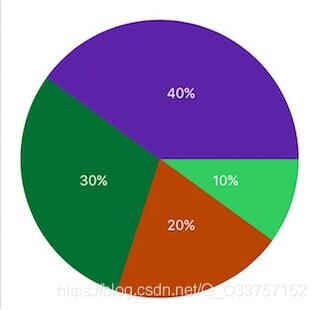
代碼:
#import <UIKit/UIKit.h> NS_ASSUME_NONNULL_BEGIN @interface CircleView : UIView @property (nonatomic, copy) NSArray<NSNumber *> *valueArray; @end NS_ASSUME_NONNULL_END // #define S_W self.frame.size.width #import 'CircleView.h' @interface CircleView () @property (nonatomic, copy) NSArray<NSNumber *> *dataArray;@property (nonatomic, assign) CGFloat endAngleFloat; // 每個扇形起點角度 @end @implementation CircleView - (void)setValueArray:(NSArray<NSNumber *> *)valueArray { self.dataArray = valueArray; self.endAngleFloat = 0; [self creatUI];} - (void)creatUI { for (NSInteger i = 0; i<_dataArray.count; i++) { CAShapeLayer *shapeLayer = [CAShapeLayer layer]; shapeLayer.lineWidth = 1; shapeLayer.fillColor = [UIColor colorWithRed:arc4random()%256/255.0f green:arc4random()%256/255.0f blue:arc4random()%256/255.0f alpha:1].CGColor; shapeLayer.strokeColor = shapeLayer.fillColor; CGFloat valueFloat = [_dataArray[i] floatValue]; CGFloat angleFloat = valueFloat*2*M_PI/100; UIBezierPath *bezierPath = [UIBezierPath bezierPath]; [bezierPath moveToPoint:CGPointMake(S_W/2, S_W/2)]; [bezierPath addLineToPoint:CGPointMake(S_W*(1+cos(_endAngleFloat))/2, S_W*(1+sin(_endAngleFloat))/2)]; [bezierPath addArcWithCenter:CGPointMake(S_W/2, S_W/2) radius:S_W/2 startAngle:_endAngleFloat endAngle:angleFloat+_endAngleFloat clockwise:YES]; [bezierPath closePath]; shapeLayer.path = bezierPath.CGPath; [self.layer addSublayer:shapeLayer]; [self addLabelWithFloat:valueFloat angleFloat:angleFloat]; _endAngleFloat += angleFloat; }} - (void)addLabelWithFloat:(CGFloat)valueFloat angleFloat:(CGFloat)angleFloat { UILabel *label = [[UILabel alloc] init]; label.center = CGPointMake(S_W*(2+cos(angleFloat/2 + _endAngleFloat))/4, S_W*(2+sin(angleFloat/2 + _endAngleFloat))/4); label.bounds = CGRectMake(0, 0, 50, 50); label.text = [NSString stringWithFormat:@'%.f%%',valueFloat]; label.textColor = UIColor.whiteColor; label.textAlignment = NSTextAlignmentCenter; label.font = [UIFont systemFontOfSize:14]; [self addSubview:label];}
外部調用:
CircleView *view = [[CircleView alloc] initWithFrame:CGRectMake(20, 100, self.view.frame.size.width-40, self.view.frame.size.width-40)]; view.valueArray = @[@(10),@(20),@(30),@(40)]; [self.view addSubview:view];
以上就是本文的全部內容,希望對大家的學習有所幫助,也希望大家多多支持好吧啦網。
相關文章:

 網公網安備
網公網安備