Android實現簡易計算功能
本文實例為大家分享了Android實現簡易計算功能的具體代碼,供大家參考,具體內容如下
效果如圖:
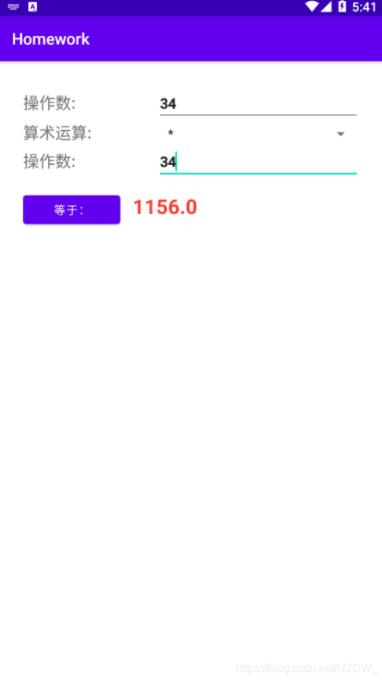
activity_main.xml
<?xml version='1.0' encoding='utf-8'?><LinearLayout xmlns:android='http://schemas.android.com/apk/res/android' android:layout_width='match_parent' android:layout_height='match_parent' android:gravity='clip_horizontal' android:orientation='vertical' android:padding='30dp'> <LinearLayoutandroid:layout_width='match_parent'android:layout_height='wrap_content'><TextView android:layout_width='wrap_content' android:layout_height='wrap_content' android:layout_weight='1' android:text='操作數:' android:textSize='20sp' /><EditText android: android:layout_width='wrap_content' android:layout_height='wrap_content' android:layout_weight='1' android:hint='請輸入數值操作數' android:textStyle='bold' android:inputType='number' /> </LinearLayout> <LinearLayoutandroid:layout_width='match_parent'android:layout_height='wrap_content'><TextView android:layout_width='wrap_content' android:layout_height='wrap_content' android:layout_weight='1' android:text='算術運算:' android:textSize='20sp'></TextView><Spinner android: android:layout_width='wrap_content' android:layout_height='wrap_content' android:layout_weight='1' android:entries='@array/sign' /> </LinearLayout> <LinearLayoutandroid:layout_width='match_parent'android:layout_height='wrap_content'><TextView android:layout_width='wrap_content' android:layout_height='wrap_content' android:layout_weight='1' android:text='操作數:' android:textSize='20sp' /><EditText android: android:layout_width='wrap_content' android:layout_height='wrap_content' android:layout_weight='1' android:hint='請輸入數值操作數' android:textStyle='bold' android:inputType='number' /> </LinearLayout> <LinearLayoutandroid:layout_width='match_parent'android:layout_height='wrap_content'><Button android: android:layout_width='wrap_content' android:layout_height='wrap_content' android:layout_weight='1' android:text='等于:' /><TextView android: android:layout_width='wrap_content' android:layout_height='wrap_content' android:layout_weight='5' android:hint='計算結果' android:padding='15dp' android:textColor='#F44336' android:textSize='25sp' android:textStyle='bold' /> </LinearLayout></LinearLayout>
arrays.xml
<?xml version='1.0' encoding='utf-8'?><resources> <string-array name='sign'><item>請選擇運算符</item><item>+</item><item>-</item><item>*</item><item>/</item> </string-array></resources>
MainActivity
package com.jld.homework;import android.os.Bundle;import android.view.View;import android.widget.AdapterView;import android.widget.Button;import android.widget.EditText;import android.widget.Spinner;import android.widget.TextView;import androidx.appcompat.app.AppCompatActivity;public class MainActivity extends AppCompatActivity { String op; @Override protected void onCreate(Bundle savedInstanceState) {super.onCreate(savedInstanceState);setContentView(R.layout.activity_main);Spinner spinner = (Spinner) this.findViewById(R.id.operator);//獲取活動布局中的Spinner對象//為Spinner注冊內部監聽器對象spinner.setOnItemSelectedListener(new AdapterView.OnItemSelectedListener() { @Override public void onItemSelected(AdapterView<?> parent, View view, int position, long id) {//將Spinner選項的值賦值給成員變量op(保存算術運算符)op = ((TextView) view).getText().toString(); } @Override public void onNothingSelected(AdapterView<?> parent) { }});//各類組件Button calcButton = findViewById(R.id.calc);EditText firstNum = findViewById(R.id.firstNum);EditText secondNum = findViewById(R.id.secondNum);TextView result = findViewById(R.id.result);//計算核心calcButton.setOnClickListener(v -> { switch (op) {case '+': { double r = Double.parseDouble(firstNum.getText().toString()) + Double.parseDouble(secondNum.getText().toString()); result.setText(String.valueOf(r)); break;}case '-': { double r = Double.parseDouble(firstNum.getText().toString()) - Double.parseDouble(secondNum.getText().toString()); result.setText(String.valueOf(r)); break;}case '*': { double r = Double.parseDouble(firstNum.getText().toString()) * Double.parseDouble(secondNum.getText().toString()); result.setText(String.valueOf(r)); break;}case '/': { double r = Double.parseDouble(firstNum.getText().toString()) / Double.parseDouble(secondNum.getText().toString()); result.setText(String.valueOf(r)); break;}default://非法情況報錯 result.setText(R.string.ERROR); break; }}); }}
以上就是本文的全部內容,希望對大家的學習有所幫助,也希望大家多多支持好吧啦網。
相關文章:

 網公網安備
網公網安備