Android控件RadioButton的使用方法
本文實(shí)例為大家分享了Android控件RadioButton的使用代碼,供大家參考,具體內(nèi)容如下
內(nèi)容
<?xml version='1.0' encoding='utf-8'?><RelativeLayout xmlns:android='http://schemas.android.com/apk/res/android' xmlns:app='http://schemas.android.com/apk/res-auto' xmlns:tools='http://schemas.android.com/tools' android:layout_width='match_parent' android:layout_height='match_parent' tools:context='.RadioActivity'> <RadioGroup //定義一個單選按鈕組android: android:layout_width='wrap_content'android:layout_height='wrap_content'android:orientation='vertical'><RadioButton //單選按鈕一 使用默認(rèn)樣式 android: android:layout_width='wrap_content' android:layout_height='wrap_content' android:checked='true' android:text='男' android:textSize='24sp' android:textColor='@color/black'/><RadioButton //單選按鈕2 使用默認(rèn)樣式 android: android:layout_width='wrap_content' android:layout_height='wrap_content' android:text='女' android:textSize='24sp' android:textColor='@color/black'/> </RadioGroup> <RadioGroup //組2android: android:layout_width='wrap_content'android:layout_height='wrap_content'android:orientation='horizontal'android:layout_below='@id/rg_1'android:layout_marginTop='50dp'><RadioButton android:layout_width='50dp' android:layout_height='wrap_content' android:text='男' android:button='@null' //無按鈕樣式 android:textSize='24sp' android:background='@drawable/selector_radiobutton' //自定義背景 android:textColor='@color/black' android:checked='true' android:gravity='center'/><RadioButton android:layout_width='50dp' android:layout_height='wrap_content' android:gravity='center' android:button='@null' //無按鈕樣式 android:text='女' android:background='@drawable/selector_radiobutton' //自定義背景 android:textSize='24sp' android:textColor='@color/black'/> </RadioGroup></RelativeLayout>
//selector_radiobutton.xml
<?xml version='1.0' encoding='utf-8'?><selector xmlns:android='http://schemas.android.com/apk/res/android'> <item android:state_checked='true'> //單選被選中的樣式<shape android:shape='rectangle'> <solid android:color='#ff66ff'/> <corners android:radius='5dp'/></shape> </item> <item android:state_checked='false'> //單選沒被選中的樣式<shape android:shape='rectangle'> <stroke android:color='#cc33ff' android: /> <corners android:radius='5dp'/></shape> </item></selector>
public class RadioActivity extends AppCompatActivity { private RadioGroup rg_1; @Override protected void onCreate(Bundle savedInstanceState) {super.onCreate(savedInstanceState);setContentView(R.layout.activity_radio);rg_1 = findViewById(R.id.rg_1);rg_1.setOnCheckedChangeListener((group, checkedId) -> {//設(shè)置組中單選按鈕選中事件 RadioButton radioButton = findViewById(checkedId);//獲取被選中的id Toast.makeText(RadioActivity.this,radioButton.getText(),Toast.LENGTH_SHORT) .show();//吐司一下被選中的文本值}); }}
運(yùn)行效果
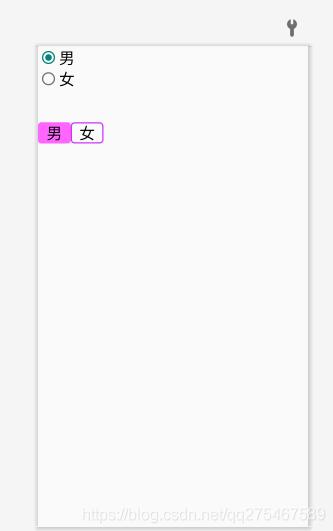
以上就是本文的全部內(nèi)容,希望對大家的學(xué)習(xí)有所幫助,也希望大家多多支持好吧啦網(wǎng)。
相關(guān)文章:
1. 什么是python的自省2. Springboot Druid 自定義加密數(shù)據(jù)庫密碼的幾種方案3. Spring Boot和Thymeleaf整合結(jié)合JPA實(shí)現(xiàn)分頁效果(實(shí)例代碼)4. 解決Android studio xml界面無法預(yù)覽問題5. 詳解Android studio 動態(tài)fragment的用法6. Vuex localStorage的具體使用7. IntelliJ IDEA安裝插件的方法步驟8. php模擬實(shí)現(xiàn)斗地主發(fā)牌9. Vue封裝一個TodoList的案例與瀏覽器本地緩存的應(yīng)用實(shí)現(xiàn)10. 使用Android studio查看Kotlin的字節(jié)碼教程
 網(wǎng)公網(wǎng)安備