Android Studio實(shí)現(xiàn)搜索欄
前言
一、何為自定義控件?系統(tǒng)自帶的控件都是直接或間接繼承自View的,View是Android中最基本的UI組件庫。當(dāng)系統(tǒng)的自帶控件無法滿足需求時(shí),依據(jù)控件的繼承結(jié)構(gòu)來制作自定義控件,例如:頂部搜索欄
二、制作步驟1.引入布局
如果在每一個(gè)Activity的布局中都編寫一個(gè)搜索欄,會(huì)導(dǎo)致代碼的重復(fù)。通過采用引入布局的形式,可以解決這個(gè)問題。首先在layout目錄下創(chuàng)建一個(gè)select.xml布局,代碼如下:
<?xml version='1.0' encoding='utf-8'?><LinearLayout xmlns:android='http://schemas.android.com/apk/res/android' android:orientation='horizontal' android:layout_width='match_parent' android:layout_height='50dp' android:background='@drawable/back001'> <ImageViewandroid: android:layout_marginTop='2dp'android:layout_width='46dp'android:layout_height='41dp'android:src='http://www.leifengta.com.cn/bcjs/@drawable/select_photo01' /> <EditTextandroid: android:layout_marginTop='6dp'android:layout_width='250dp'android:layout_height='35dp'android:layout_marginLeft='10dp' <!--采用edittext_shap01樣式-->android:background='@drawable/edittext_shape01'/> <ImageButtonandroid: <!-- 清除按鈕背景--> android:layout_marginTop='0dp'android:layout_width='53dp'android:layout_height='50dp' <!-- fitXY 的作用是“保持圖片長寬比例”-->android:scaleType='fitXY'android:src='http://www.leifengta.com.cn/bcjs/@drawable/select_photo02' /></LinearLayout>
2.布局解析
此處對上方的布局進(jìn)行補(bǔ)充:
1).設(shè)置布局背景為back001
android:background='@drawable/back001'
2).導(dǎo)入圖片select_photo01
為了使搜索欄不單調(diào),故導(dǎo)入圖片裝飾
android:src='http://www.leifengta.com.cn/bcjs/@drawable/select_photo01'
 3.
3.
3.采用edittext_shape01樣式
系統(tǒng)自帶的EditText僅是一條直線,此處將其變成圓型輸入框
android:background='@drawable/edittext_shape01'
變化前:

變化后:

edittext_shape01代碼如下:
<?xml version='1.0' encoding='utf-8'?><shape xmlns:android='http://schemas.android.com/apk/res/android' android:shape='rectangle' > <solidandroid:color='#FFFFFF' > </solid> <!-- 設(shè)置圓角 --> <cornersandroid:radius='3dp'android:bottomLeftRadius='15dp'android:bottomRightRadius='15dp'android:topLeftRadius='15dp'android:topRightRadius='15dp' > </corners> <!-- 設(shè)置邊框 --> <stroke android: android:color='#ff000000' /></shape>
4.導(dǎo)入圖片select_photo02裝飾
android:scaleType='fitXY'android:src='http://www.leifengta.com.cn/bcjs/@drawable/select_photo02'
注:fitXY較為重要!
測試
完成布局的編寫后,便可以將select01作為自定義控件,進(jìn)行調(diào)用:
<include layout='@layout/select01' />
只需要通過一行include語句,便可以引入搜索欄布局
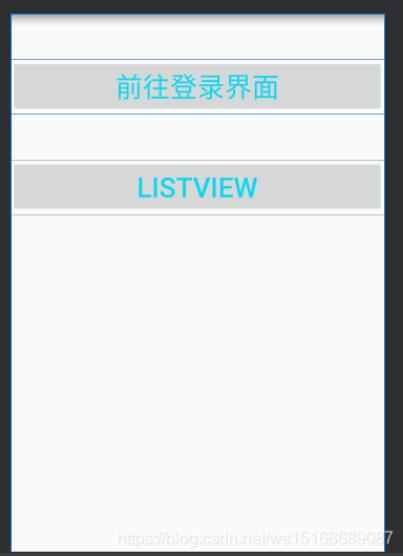
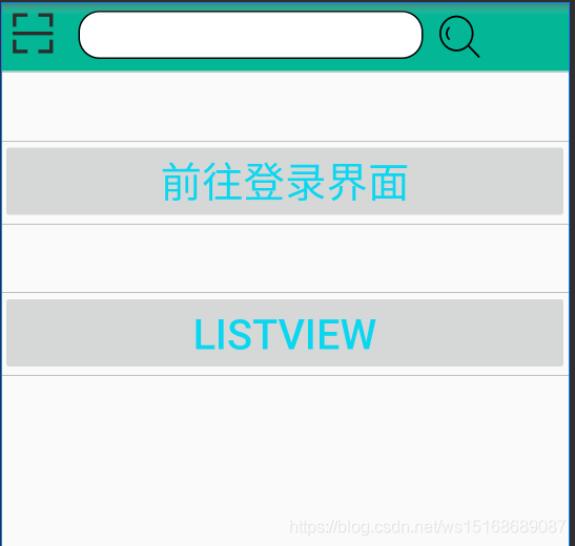
引入前后對比:
引入前
引入后
以上就是本文的全部內(nèi)容,希望對大家的學(xué)習(xí)有所幫助,也希望大家多多支持好吧啦網(wǎng)。
相關(guān)文章:
1. 編程語言PHP在Web開發(fā)領(lǐng)域的優(yōu)勢在哪?2. 基于android studio的layout的xml文件的創(chuàng)建方式3. 詳解Android studio 動(dòng)態(tài)fragment的用法4. 解決Android studio xml界面無法預(yù)覽問題5. Android如何加載Base64編碼格式圖片6. 什么是python的自省7. Spring Boot和Thymeleaf整合結(jié)合JPA實(shí)現(xiàn)分頁效果(實(shí)例代碼)8. .Net Core使用Coravel實(shí)現(xiàn)任務(wù)調(diào)度的完整步驟9. 在IDEA中實(shí)現(xiàn)同時(shí)運(yùn)行2個(gè)相同的java程序10. Vuex localStorage的具體使用

 網(wǎng)公網(wǎng)安備