Android實現(xiàn)全局懸浮框
本文實例為大家分享了Android實現(xiàn)全局懸浮框的具體代碼,供大家參考,具體內(nèi)容如下
效果圖:
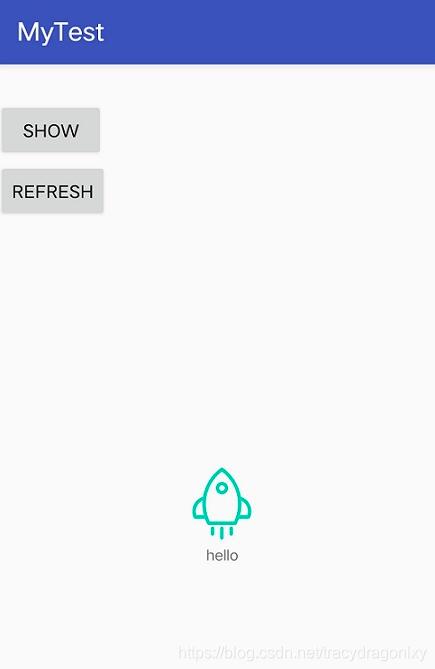
代碼實現(xiàn):
Androidmanifest.xml添加彈框權(quán)限
<uses-permission android:name='android.permission.SYSTEM_ALERT_WINDOW' />
自定義懸浮窗類FloatWindow.java
public class FloatWindow implements View.OnTouchListener { private Context mContext; private WindowManager.LayoutParams mWindowParams; private WindowManager mWindowManager; private View mFloatLayout; private float mInViewX; private float mInViewY; private float mDownInScreenX; private float mDownInScreenY; private float mInScreenX; private float mInScreenY; private TextView infoText; public FloatWindow(Context context) { this.mContext = context; initFloatWindow(); } private void initFloatWindow() { LayoutInflater inflater = LayoutInflater.from(mContext); if(inflater == null) return; mFloatLayout = (View) inflater.inflate(R.layout.layout_float, null); infoText = mFloatLayout.findViewById(R.id.textView); mFloatLayout.setOnTouchListener(this); mWindowParams = new WindowManager.LayoutParams(); mWindowManager = (WindowManager) mContext.getSystemService(Context.WINDOW_SERVICE); if (Build.VERSION.SDK_INT >= 26) {//8.0新特性 mWindowParams.type = WindowManager.LayoutParams.TYPE_APPLICATION_OVERLAY; }else{ mWindowParams.type = WindowManager.LayoutParams.TYPE_SYSTEM_ALERT; } mWindowParams.format = PixelFormat.RGBA_8888; mWindowParams.flags = WindowManager.LayoutParams.FLAG_NOT_FOCUSABLE; mWindowParams.gravity = Gravity.START | Gravity.TOP; mWindowParams.width = WindowManager.LayoutParams.WRAP_CONTENT; mWindowParams.height = WindowManager.LayoutParams.WRAP_CONTENT; } @Override public boolean onTouch(View view, MotionEvent motionEvent) { return floatLayoutTouch(motionEvent); } private boolean floatLayoutTouch(MotionEvent motionEvent) { switch (motionEvent.getAction()) { case MotionEvent.ACTION_DOWN: // 獲取相對View的坐標(biāo),即以此View左上角為原點 mInViewX = motionEvent.getX(); mInViewY = motionEvent.getY(); // 獲取相對屏幕的坐標(biāo),即以屏幕左上角為原點 mDownInScreenX = motionEvent.getRawX(); mDownInScreenY = motionEvent.getRawY() - getSysBarHeight(mContext); mInScreenX = motionEvent.getRawX(); mInScreenY = motionEvent.getRawY() - getSysBarHeight(mContext); break; case MotionEvent.ACTION_MOVE: // 更新浮動窗口位置參數(shù) mInScreenX = motionEvent.getRawX(); mInScreenY = motionEvent.getRawY() - getSysBarHeight(mContext); mWindowParams.x = (int) (mInScreenX- mInViewX); mWindowParams.y = (int) (mInScreenY - mInViewY); // 手指移動的時候更新小懸浮窗的位置 mWindowManager.updateViewLayout(mFloatLayout, mWindowParams); break; case MotionEvent.ACTION_UP: // 如果手指離開屏幕時,xDownInScreen和xInScreen相等,且yDownInScreen和yInScreen相等,則視為觸發(fā)了單擊事件。 if (mDownInScreenX == mInScreenX && mDownInScreenY == mInScreenY){ } break; } return true; } public void showFloatWindow(){ if (mFloatLayout.getParent() == null){ DisplayMetrics metrics = new DisplayMetrics(); // 默認(rèn)固定位置,靠屏幕右邊緣的中間 mWindowManager.getDefaultDisplay().getMetrics(metrics); mWindowParams.x = metrics.widthPixels; mWindowParams.y = metrics.heightPixels/2 - getSysBarHeight(mContext); mWindowManager.addView(mFloatLayout, mWindowParams); } } public void updateText(final String s) { infoText.setText(s); } public void hideFloatWindow(){ if (mFloatLayout.getParent() != null) mWindowManager.removeView(mFloatLayout); } public void setFloatLayoutAlpha(boolean alpha){ if (alpha) mFloatLayout.setAlpha((float) 0.5); else mFloatLayout.setAlpha(1); } // 獲取系統(tǒng)狀態(tài)欄高度 public static int getSysBarHeight(Context contex) { Class<?> c; Object obj; Field field; int x; int sbar = 0; try { c = Class.forName('com.android.internal.R$dimen'); obj = c.newInstance(); field = c.getField('status_bar_height'); x = Integer.parseInt(field.get(obj).toString()); sbar = contex.getResources().getDimensionPixelSize(x); } catch (Exception e1) { e1.printStackTrace(); } return sbar; }}
自定義懸浮窗界面布局文件layout_float.xml
<?xml version='1.0' encoding='utf-8'?><android.support.constraint.ConstraintLayout xmlns:android='http://schemas.android.com/apk/res/android' android:layout_width='match_parent' android:layout_height='match_parent' xmlns:app='http://schemas.android.com/apk/res-auto'> <ImageView android: android:layout_width='wrap_content' android:layout_height='wrap_content' android:src='http://www.leifengta.com.cn/bcjs/@mipmap/float_win' app:layout_constraintStart_toStartOf='parent' app:layout_constraintTop_toTopOf='parent'/> <TextView android: android:layout_width='wrap_content' android:layout_height='wrap_content' android:background='#00ffffff' android:text='hello' android:textSize='12sp' app:layout_constraintLeft_toLeftOf='@id/imageView' app:layout_constraintRight_toRightOf='@id/imageView' app:layout_constraintTop_toBottomOf='@id/imageView'/></android.support.constraint.ConstraintLayout>
在Activity中使用懸浮窗。
public class MainActivity extends AppCompatActivity { private Button btnShow; FloatWindow floatWindow; @Override protected void onCreate(Bundle savedInstanceState) { super.onCreate(savedInstanceState); // 權(quán)限判斷 if (Build.VERSION.SDK_INT >= 23) { if(!Settings.canDrawOverlays(getApplicationContext())) { // 啟動Activity讓用戶授權(quán) Intent intent = new Intent(Settings.ACTION_MANAGE_OVERLAY_PERMISSION,Uri.parse('package:' + getPackageName())); startActivityForResult(intent,10); } else { // 執(zhí)行6.0以上繪制代碼 initView(); } } else { // 執(zhí)行6.0以下繪制代碼 initView(); } } @Override protected void onResume() { super.onResume(); // 權(quán)限判斷 if (Build.VERSION.SDK_INT >= 23) { if(Settings.canDrawOverlays(getApplicationContext())) { initView(); } } else { //執(zhí)行6.0以下繪制代碼 initView(); } } private void initView() { setContentView(R.layout.activity_main); floatWindow = new FloatWindow(getApplicationContext()); btnShow = findViewById(R.id.btn_show); btnShow.setOnClickListener(new View.OnClickListener() { @Override public void onClick(View view) { if (null != floatWindow) { floatWindow.showFloatWindow(); } } }); Button btnrefresh = findViewById(R.id.btn_refresh); btnrefresh.setOnClickListener(new View.OnClickListener() { @Override public void onClick(View view) { int random = (int) (Math.random() * 10); if (null != floatWindow) { floatWindow.updateText(String.valueOf(random)); } } }); } @Override protected void onDestroy() { super.onDestroy(); if (null != floatWindow) { floatWindow.hideFloatWindow(); } }}
以上就是本文的全部內(nèi)容,希望對大家的學(xué)習(xí)有所幫助,也希望大家多多支持好吧啦網(wǎng)。
相關(guān)文章:
1. Android table布局開發(fā)實現(xiàn)簡單計算器2. jQuery 實現(xiàn)DOM元素拖拽交換位置的實例代碼3. 理解PHP5中static和const關(guān)鍵字4. php模擬實現(xiàn)斗地主發(fā)牌5. IntelliJ IDEA安裝插件的方法步驟6. spring acegi security 1.0.0 發(fā)布7. Vue封裝一個TodoList的案例與瀏覽器本地緩存的應(yīng)用實現(xiàn)8. Python random庫使用方法及異常處理方案9. .Net Core使用Coravel實現(xiàn)任務(wù)調(diào)度的完整步驟10. Vuex localStorage的具體使用
 網(wǎng)公網(wǎng)安備