android實(shí)現(xiàn)彈出提示框
本文實(shí)例為大家分享了anadroid實(shí)現(xiàn)彈出提示框的具體代碼,供大家參考,具體內(nèi)容如下
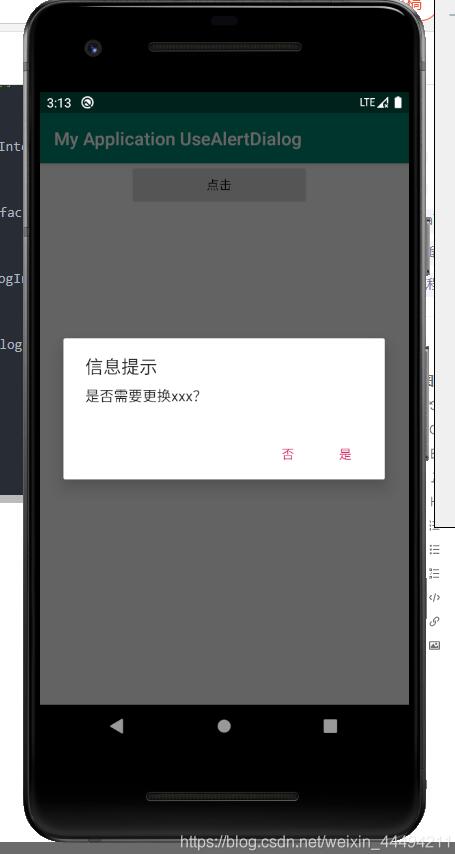
提示框是利用AlertDialog實(shí)現(xiàn)的。
代碼:
(設(shè)置在button的點(diǎn)擊事件中)
new AlertDialog.Builder(MainActivity.this).setTitle('信息提示')//設(shè)置對(duì)話框標(biāo)題 .setMessage('是否需要更換xxx?') .setPositiveButton('是', new DialogInterface.OnClickListener() {//添加確定按鈕 @Override public void onClick(DialogInterface dialog, int which) {//確定按鈕的響應(yīng)事件,點(diǎn)擊事件沒寫,自己添加 } }).setNegativeButton('否', new DialogInterface.OnClickListener() {//添加返回按鈕 @Override public void onClick(DialogInterface dialog, int which) {//響應(yīng)事件,點(diǎn)擊事件沒寫,自己添加 } }).show();//在按鍵響應(yīng)事件中顯示此對(duì)話框 } });
實(shí)現(xiàn)效果:
完整代碼:
package com.example.myapplicationusealertdialog;import androidx.appcompat.app.AppCompatActivity;import android.app.AlertDialog;import android.content.DialogInterface;import android.os.Bundle;import android.view.View;import android.widget.Button;public class MainActivity extends AppCompatActivity { Button bnt; @Override protected void onCreate(Bundle savedInstanceState) { super.onCreate(savedInstanceState); setContentView(R.layout.activity_main); bnt = findViewById(R.id.button); bnt.setOnClickListener(new View.OnClickListener() { @Override public void onClick(View view) { new AlertDialog.Builder(MainActivity.this).setTitle('信息提示')//設(shè)置對(duì)話框標(biāo)題 .setMessage('是否需要更換xxx?') .setPositiveButton('是', new DialogInterface.OnClickListener() {//添加確定按鈕 @Override public void onClick(DialogInterface dialog, int which) {//確定按鈕的響應(yīng)事件 } }).setNegativeButton('否', new DialogInterface.OnClickListener() {//添加返回按鈕 @Override public void onClick(DialogInterface dialog, int which) {//響應(yīng)事件 } }).show();//在按鍵響應(yīng)事件中顯示此對(duì)話框 } }); }}
<?xml version='1.0' encoding='utf-8'?><LinearLayout xmlns:android='http://schemas.android.com/apk/res/android' xmlns:app='http://schemas.android.com/apk/res-auto' xmlns:tools='http://schemas.android.com/tools' android:layout_width='match_parent' android:layout_height='match_parent' tools:context='.MainActivity'> <Button android:layout_width='200dp' android:layout_marginLeft='100dp' android:layout_height='wrap_content' android:text='點(diǎn)擊' android: /></LinearLayout>
其實(shí)AlertDialog可以添加其他的功能選項(xiàng),比如在提示框里面綁定xml布局顯示,再比如定義多個(gè)選擇按鈕什么的,這些大家可以自行學(xué)習(xí)。
以上就是本文的全部?jī)?nèi)容,希望對(duì)大家的學(xué)習(xí)有所幫助,也希望大家多多支持好吧啦網(wǎng)。
相關(guān)文章:
1. CentOS郵箱服務(wù)器搭建系列——SMTP服務(wù)器的構(gòu)建( Postfix )2. PHP基礎(chǔ)之生成器4——比較生成器和迭代器對(duì)象3. ASP新手必備的基礎(chǔ)知識(shí)4. Docker 啟動(dòng)Redis 并設(shè)置密碼的操作5. asp文件用什么軟件編輯6. 通過IEAD+Maven快速搭建SSM項(xiàng)目的過程(Spring + Spring MVC + Mybatis)7. JS中6個(gè)對(duì)象數(shù)組去重的方法8. vue+element開發(fā)一個(gè)谷歌插件的全過程9. 利用CSS制作3D動(dòng)畫10. Vue axios獲取token臨時(shí)令牌封裝案例

 網(wǎng)公網(wǎng)安備