android實現常駐通知欄遇到的問題及解決辦法
實現常駐通知欄時遇到的問題:
無論如何就是不顯示通知,查看日志發現貌似報錯了:
2020-06-28 14:11:34.923 6387-6387/xxx E/CrashReport: android.app.RemoteServiceException: Bad notification posted from package xxx: Couldn’t inflate contentViewsandroid.view.InflateException: Binary XML file line #2: Binary XML file line #2: Error inflating class android.support.constraint.ConstraintLayoutat android.app.ActivityThread$H.handleMessage(ActivityThread.java:1944)at android.os.Handler.dispatchMessage(Handler.java:106)at android.os.Looper.loop(Looper.java:192)at android.app.ActivityThread.main(ActivityThread.java:6815)at java.lang.reflect.Method.invoke(Native Method)at com.android.internal.os.RuntimeInit$MethodAndArgsCaller.run(RuntimeInit.java:549)at com.android.internal.os.ZygoteInit.main(ZygoteInit.java:818)
說的是布局報錯,所使用的布局如下:
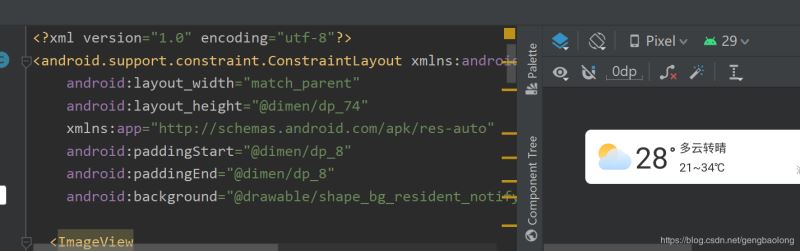
根據報錯信息來看,就是這個
android.support.constraint.ConstraintLayout
的問題了。
然后將布局的根view修改為RelativeLayout。
運行,報錯,,,,納尼?
2020-06-28 14:24:02.622 11436-11436/xxx E/CrashReport: android.app.RemoteServiceException: Bad notification posted from package xxx: Couldn’t inflate contentViewsandroid.view.InflateException: Binary XML file line #2: Binary XML file line #2: You must supply a layout_height attribute.at android.app.ActivityThread$H.handleMessage(ActivityThread.java:1944)at android.os.Handler.dispatchMessage(Handler.java:106)at android.os.Looper.loop(Looper.java:192)at android.app.ActivityThread.main(ActivityThread.java:6815)at java.lang.reflect.Method.invoke(Native Method)at com.android.internal.os.RuntimeInit$MethodAndArgsCaller.run(RuntimeInit.java:549)at com.android.internal.os.ZygoteInit.main(ZygoteInit.java:818)
雖然繼續報錯,但是發現跟第一次報的錯不同了,說明第一個報錯問題解決。
那么來細看第二個報錯信息:
Binary XML file line #2: You must supply a layout_height attribute.
看信息是說布局中缺少layout_height屬性,但是確認布局中設置了這屬性啊。。。
<?xml version='1.0' encoding='utf-8'?><RelativeLayout xmlns:android='http://schemas.android.com/apk/res/android' xmlns:app='http://schemas.android.com/apk/res-auto' android:layout_width='match_parent' android:layout_height='@dimen/dp_74' android:background='@drawable/shape_bg_resident_notify'> <ImageView android: android:layout_width='@dimen/dp_45' android:layout_height='@dimen/dp_45' android:layout_marginStart='@dimen/dp_10' android:background='@mipmap/weather_icon_blue_big_cloudy' android:layout_centerVertical='true'/> <TextView android: android:layout_width='wrap_content' android:layout_height='wrap_content' android:text='28' android:textSize='@dimen/sp_40' android:textColor='#ff333333' android:layout_toEndOf='@+id/iv_resident_weather' android:layout_centerVertical='true' android:layout_marginStart='@dimen/dp_5'/> <TextView android: android:layout_width='@dimen/dp_6' android:layout_height='@dimen/dp_6' android:layout_marginStart='@dimen/dp_3' android:layout_marginTop='@dimen/dp_24' android:layout_toEndOf='@+id/tv_resident_weather_temp' android:background='@drawable/shape_resident_weather_temp'/> <TextView android: android:layout_width='wrap_content' android:layout_height='wrap_content' android:text='多云轉晴' android:textSize='@dimen/sp_16' android:textColor='@color/color_333333' android:layout_marginTop='@dimen/dp_14' android:layout_marginStart='@dimen/dp_6' android:layout_toEndOf='@+id/tv_resident_degree' /> <TextView android: android:layout_width='wrap_content' android:layout_height='wrap_content' android:text='21~34℃' android:textColor='@color/color_333333' android:textSize='@dimen/sp_16' android:layout_marginTop='@dimen/dp_5' android:layout_below='@+id/tv_resident_weather_cond' android:layout_toEndOf='@+id/tv_resident_degree' android:layout_marginStart='@dimen/dp_6'/> <TextView android: android:layout_width='wrap_content' android:layout_height='wrap_content' android:text='空氣優' android:textSize='@dimen/sp_16' android:textColor='@color/color_333333' android:layout_alignParentEnd='true' android:layout_marginTop='14dp' android:layout_marginEnd='@dimen/dp_10'/> <ImageView android: android:layout_width='@dimen/dp_18' android:layout_height='@dimen/dp_18' android:src='http://www.leifengta.com.cn/bcjs/@drawable/ic_icon_aqi' android:layout_toStartOf='@+id/tv_resident_aqi' android:layout_marginEnd='@dimen/dp_5' android:layout_marginTop='@dimen/dp_16'/> <TextView android: android:layout_width='wrap_content' android:layout_height='wrap_content' android:text='浦東新區 14:33發布' android:textSize='@dimen/sp_12' android:textColor='@color/color_999999' android:layout_marginEnd='@dimen/dp_10' android:layout_alignParentEnd='true' android:layout_below='@+id/tv_resident_aqi' android:layout_marginTop='@dimen/dp_11'/> </RelativeLayout>
莫名奇妙啊簡直
然后仔細想想可能的原因:難不成是因為分辨率適配的問題?
就是沒有匹配到合適的分辨率的尺寸。那就試一下,把布局中所有引用@dimen的地方直接改為使用尺寸。
運行,成功!!!
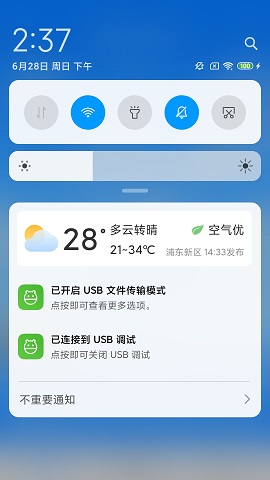
問題:發現有個布局上的問題
自定義通知欄設置了背景,寬度是match_parent,但是發現在某些手機上,如小米6(截圖所示),可以看到寬度竟然沒有充滿全屏。
但是在華為, vivo等手機上正常。
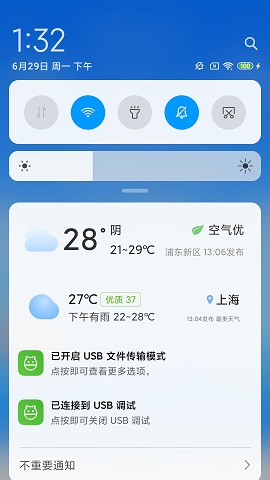
那就把這個背景去掉,自適應好了。
總結
到此這篇關于android實現常駐通知欄遇到的問題及解決辦法的文章就介紹到這了,更多相關android 常駐通知欄內容請搜索好吧啦網以前的文章或繼續瀏覽下面的相關文章希望大家以后多多支持好吧啦網!
相關文章:

 網公網安備
網公網安備