Android Studio 利用Splash制作APP啟動(dòng)界面的方法
最近又開始學(xué)習(xí)Android studio 了,在制作APP時(shí),都有一個(gè)啟動(dòng)的界面,看上去美觀且實(shí)用(也可以作為以后的廣告位←
那怎樣制作呢?
第一步:新建Splash
如圖,新建一個(gè)Empty Activity。
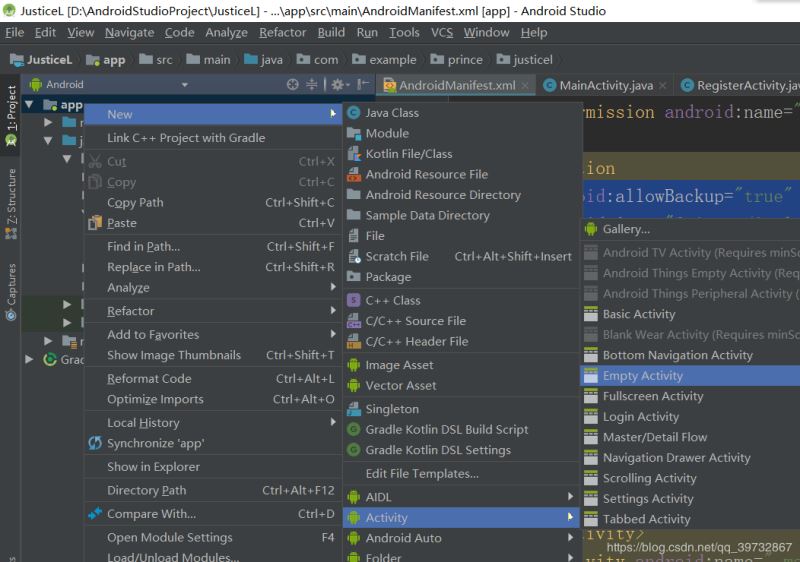
然后將名字改為SplashActivity。
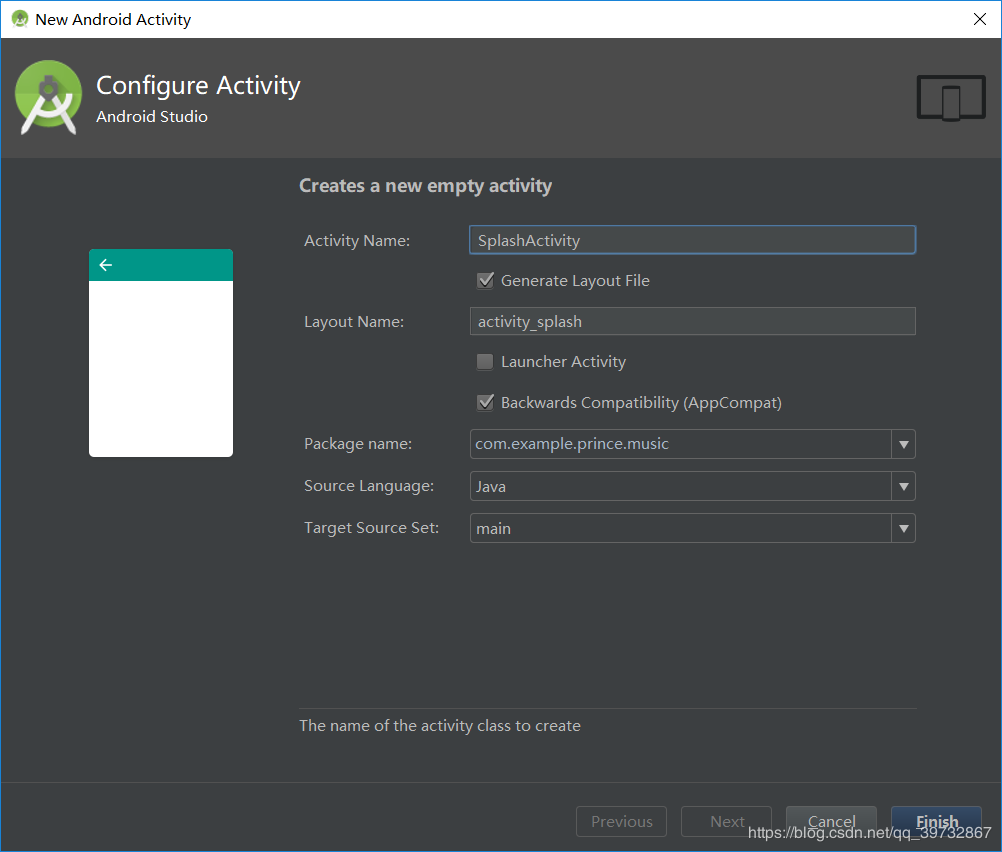
第二步:SplashActivity的內(nèi)容
如圖:
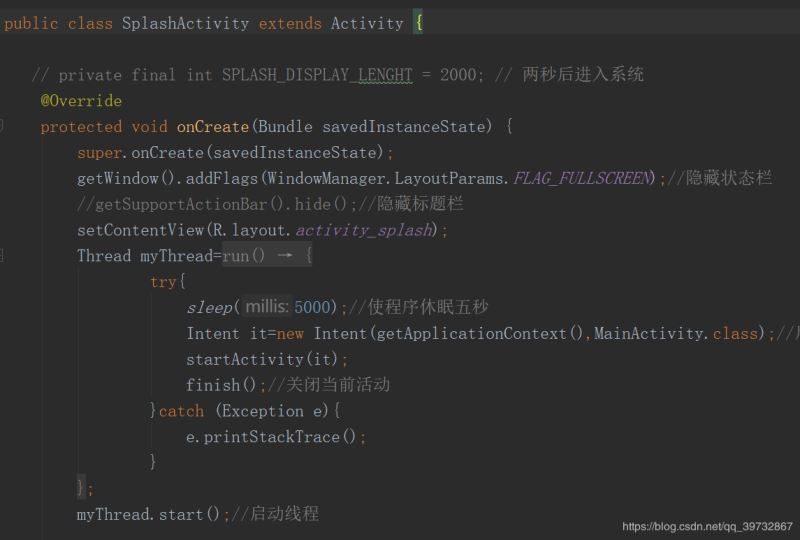
方便起見,我把代碼貼出來,代碼如下:
public class SplashActivity extends Activity { // private final int SPLASH_DISPLAY_LENGHT = 2000; // 兩秒后進(jìn)入系統(tǒng) @Override protected void onCreate(Bundle savedInstanceState) { super.onCreate(savedInstanceState); getWindow().addFlags(WindowManager.LayoutParams.FLAG_FULLSCREEN);//隱藏狀態(tài)欄 //getSupportActionBar().hide();//隱藏標(biāo)題欄 setContentView(R.layout.activity_splash); Thread myThread=new Thread(){//創(chuàng)建子線程 @Override public void run() { try{ sleep(5000);//使程序休眠五秒 Intent it=new Intent(getApplicationContext(),MainActivity.class);//啟動(dòng)MainActivity startActivity(it); finish();//關(guān)閉當(dāng)前活動(dòng) }catch (Exception e){ e.printStackTrace(); } } }; myThread.start();//啟動(dòng)線程 }}
第三步:activity_splash的內(nèi)容
你會(huì)發(fā)現(xiàn)在layout中多出一個(gè) acticity_splash,改變其背景為你想要的圖片,就可以了。
第四步:AndroidManifest中的內(nèi)容
我們?cè)贏ndroidManifest中可以看到下圖中的代碼段:
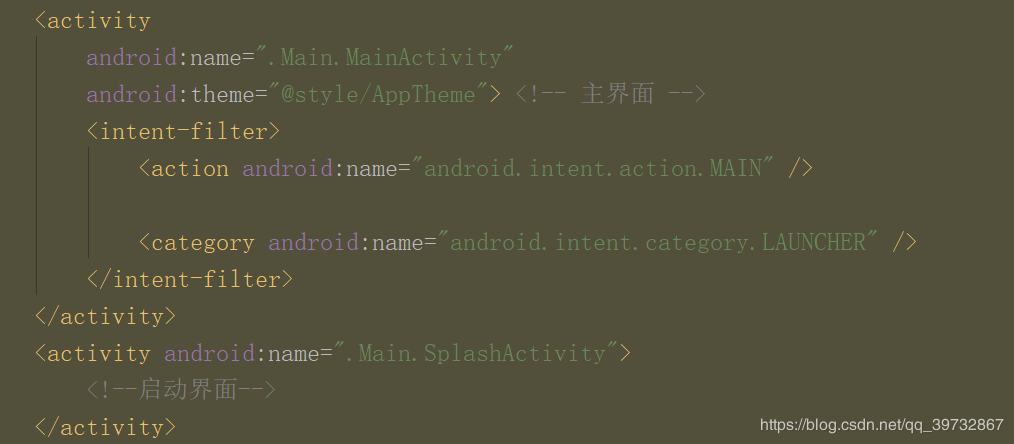
此時(shí)MainActivity是APP的啟動(dòng)界面,如果想讓SplasgActivity成為啟動(dòng)界面,
將這段代碼從MainActivity中剪貼至SplashActivity中就行了。
<intent-filter> <action android:name='android.intent.action.MAIN' /> <category android:name='android.intent.category.LAUNCHER' /> </intent-filter>
然后就可以運(yùn)行了。
總結(jié)
到此這篇關(guān)于Android Studio 利用Splash制作APP啟動(dòng)界面的文章就介紹到這了,更多相關(guān)android studio app啟動(dòng)界面內(nèi)容請(qǐng)搜索好吧啦網(wǎng)以前的文章或繼續(xù)瀏覽下面的相關(guān)文章希望大家以后多多支持好吧啦網(wǎng)!
相關(guān)文章:
1. ASP新手必備的基礎(chǔ)知識(shí)2. asp文件用什么軟件編輯3. CentOS郵箱服務(wù)器搭建系列——SMTP服務(wù)器的構(gòu)建( Postfix )4. PHP基礎(chǔ)之生成器4——比較生成器和迭代器對(duì)象5. JAVA 實(shí)現(xiàn)延遲隊(duì)列的方法6. JS中6個(gè)對(duì)象數(shù)組去重的方法7. Vue axios獲取token臨時(shí)令牌封裝案例8. 通過IEAD+Maven快速搭建SSM項(xiàng)目的過程(Spring + Spring MVC + Mybatis)9. js實(shí)現(xiàn)計(jì)算器功能10. 利用CSS制作3D動(dòng)畫

 網(wǎng)公網(wǎng)安備