Android制作登錄頁(yè)面并且記住賬號(hào)密碼功能的實(shí)現(xiàn)代碼
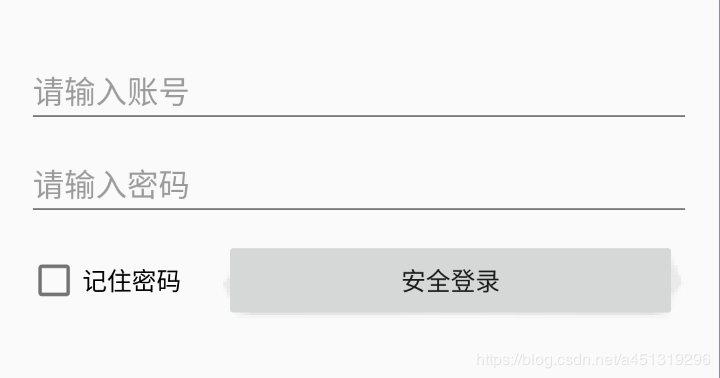
一、頁(yè)面搭建
<?xml version='1.0' encoding='utf-8'?><android.support.constraint.ConstraintLayout xmlns:android='http://schemas.android.com/apk/res/android' xmlns:app='http://schemas.android.com/apk/res-auto' xmlns:tools='http://schemas.android.com/tools' android:layout_width='match_parent' android:layout_height='match_parent'> <EditText android: android:layout_width='match_parent' android:layout_height='wrap_content' android:layout_marginStart='16dp' android:layout_marginLeft='16dp' android:layout_marginTop='32dp' android:layout_marginEnd='16dp' android:layout_marginRight='16dp' android:ems='10' android:hint='請(qǐng)輸入賬號(hào)' android:inputType='textPersonName' app:layout_constraintEnd_toEndOf='parent' app:layout_constraintStart_toStartOf='parent' app:layout_constraintTop_toTopOf='parent' /> <EditText android: android:layout_width='match_parent' android:layout_height='wrap_content' android:layout_marginStart='16dp' android:layout_marginLeft='16dp' android:layout_marginTop='8dp' android:layout_marginEnd='16dp' android:layout_marginRight='16dp' android:ems='10' android:hint='請(qǐng)輸入密碼' android:inputType='textPassword' app:layout_constraintEnd_toEndOf='parent' app:layout_constraintStart_toStartOf='parent' app:layout_constraintTop_toBottomOf='@+id/et_UserName' /> <CheckBox android: android:layout_width='wrap_content' android:layout_height='wrap_content' android:layout_marginTop='16dp' android:text='記住密碼' app:layout_constraintStart_toStartOf='@+id/et_Password' app:layout_constraintTop_toBottomOf='@+id/et_Password' /> <Button android: android:onClick='Login' android:layout_width='0dp' android:layout_height='wrap_content' android:layout_marginStart='24dp' android:layout_marginLeft='24dp' android:layout_marginEnd='24dp' android:layout_marginRight='24dp' android:text='安全登錄' app:layout_constraintBottom_toBottomOf='@+id/checkBox' app:layout_constraintEnd_toEndOf='parent' app:layout_constraintStart_toEndOf='@+id/checkBox' app:layout_constraintTop_toTopOf='@+id/checkBox' /></android.support.constraint.ConstraintLayout>
二、代碼實(shí)現(xiàn)
package com.hiscene.test;import android.support.v7.app.AppCompatActivity;import android.os.Bundle;import android.text.TextUtils;import android.view.View;import android.widget.CheckBox;import android.widget.EditText;import android.widget.Toast;import java.io.BufferedReader;import java.io.BufferedWriter;import java.io.File;import java.io.FileNotFoundException;import java.io.FileOutputStream;import java.io.FileReader;import java.io.OutputStream;import java.io.OutputStreamWriter;public class MainActivity extends AppCompatActivity { EditText et_userName; EditText et_password; CheckBox checkBox; @Override protected void onCreate(Bundle savedInstanceState) { super.onCreate(savedInstanceState); setContentView(R.layout.login_layout); et_userName = findViewById(R.id.et_UserName); et_password = findViewById(R.id.et_Password); checkBox = findViewById(R.id.checkBox); LoadInfo(); } private void LoadInfo() { File file=new File('data/data/com.hiscene.test/usre.txt'); if (!file.exists()) return; try { FileReader reader = new FileReader(file); BufferedReader br=new BufferedReader(reader); String text=br.readLine(); String[] arr=text.split('#'); et_userName.setText(arr[0]); et_password.setText(arr[1]); checkBox.setChecked(true); br.close(); }catch (Exception e) { e.printStackTrace(); } } public void Login(View view) { String userName=et_userName.getText().toString().trim(); String password= et_password.getText().toString().trim(); if (TextUtils.isEmpty(userName)|| TextUtils.isEmpty(password)) { Toast.makeText(MainActivity.this, '用戶名或密碼不能為空!', Toast.LENGTH_SHORT).show(); return; } if (checkBox.isChecked()) { File file=new File('data/data/com.hiscene.test/usre.txt'); try {OutputStream out=new FileOutputStream(file);OutputStreamWriter osw=new OutputStreamWriter(out,'UTF-8');BufferedWriter writer=new BufferedWriter(osw);writer.write(userName+'#'+password);writer.flush();writer.close(); } catch (Exception e) {e.printStackTrace(); } } }}
總結(jié)
到此這篇關(guān)于Android制作登錄頁(yè)面并且記住賬號(hào)密碼功能的實(shí)現(xiàn)代碼的文章就介紹到這了,更多相關(guān)android 登錄頁(yè)面記住密碼內(nèi)容請(qǐng)搜索好吧啦網(wǎng)以前的文章或繼續(xù)瀏覽下面的相關(guān)文章希望大家以后多多支持好吧啦網(wǎng)!
相關(guān)文章:
1. CentOS郵箱服務(wù)器搭建系列——SMTP服務(wù)器的構(gòu)建( Postfix )2. PHP基礎(chǔ)之生成器4——比較生成器和迭代器對(duì)象3. ASP新手必備的基礎(chǔ)知識(shí)4. Docker 啟動(dòng)Redis 并設(shè)置密碼的操作5. asp文件用什么軟件編輯6. 通過(guò)IEAD+Maven快速搭建SSM項(xiàng)目的過(guò)程(Spring + Spring MVC + Mybatis)7. JS中6個(gè)對(duì)象數(shù)組去重的方法8. vue+element開發(fā)一個(gè)谷歌插件的全過(guò)程9. 利用CSS制作3D動(dòng)畫10. Vue axios獲取token臨時(shí)令牌封裝案例

 網(wǎng)公網(wǎng)安備