Android實現通訊錄功能
本文實例為大家分享了Android通訊錄案例,供大家參考,具體內容如下
實戰演練——通訊錄
1、功能描述:通過SQLite實現數據庫的增刪改查
2、技術要點:SQLite的基本操作
3、實現步驟:
① 創建一個類繼承SQLiteOpenHelper② 重寫父類構造方法、onCreate()、onUpgrade()③ 增刪改查
4、效果圖
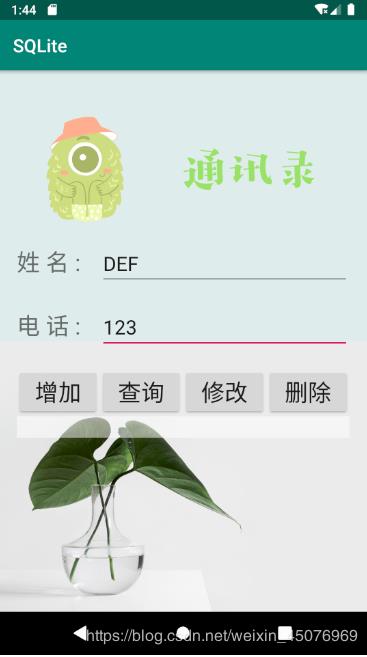
5、案例代碼
MyHelper.java
package com.example.sqlite;import android.content.Context;import android.database.sqlite.SQLiteDatabase;import android.database.sqlite.SQLiteOpenHelper;import androidx.annotation.Nullable;public class MyHelper extends SQLiteOpenHelper { public MyHelper(@Nullable Context context) { super(context, 'test.db', null, 1); } //當數據庫第一次創建的時候執行 @Override public void onCreate(SQLiteDatabase db) { db.execSQL('CREATE TABLE information(_id INTEGER PRIMARY KEY AUTOINCREMENT ,name VARCHAR(20),phone VARCHAR(20))'); } @Override public void onUpgrade(SQLiteDatabase db, int oldVersion, int newVersion) { }}
MainActivity.java
package com.example.sqlite;import androidx.appcompat.app.AppCompatActivity;import android.content.ContentValues;import android.database.Cursor;import android.database.sqlite.SQLiteDatabase;import android.os.Bundle;import android.view.View;import android.widget.Button;import android.widget.TextView;import android.widget.Toast;public class MainActivity extends AppCompatActivity implements View.OnClickListener { private TextView name; private TextView phone; private Button btnAdd; private Button btnDel; private Button btnUqd; private Button btnSel; private String uPhone; private String uName; private MyHelper myHelper; private SQLiteDatabase db; private TextView show; private ContentValues contentValues; @Override protected void onCreate(Bundle savedInstanceState) { super.onCreate(savedInstanceState); setContentView(R.layout.activity_main); myHelper = new MyHelper(this); init(); } private void init() { show = findViewById(R.id.show); name = findViewById(R.id.name); phone = findViewById(R.id.phone); btnAdd = findViewById(R.id.insert); btnDel = findViewById(R.id.delete); btnUqd = findViewById(R.id.update); btnSel = findViewById(R.id.select); btnAdd.setOnClickListener(this); btnDel.setOnClickListener(this); btnUqd.setOnClickListener(this); btnSel.setOnClickListener(this); } @Override public void onClick(View v) { switch (v.getId()) { case R.id.select:db = myHelper.getReadableDatabase();Cursor cursor = db.query('information', null, null, null, null, null, null);if (cursor.getCount() == 0) { Toast.makeText(this, '沒有數據', Toast.LENGTH_LONG).show();} else { cursor.moveToFirst(); show.setText('Name:' + cursor.getString(1) + 'Tel:' + cursor.getString(2));}while (cursor.moveToNext()) { show.append('n' + 'Name' + cursor.getString(1) + 'Tel' + cursor.getString(2));}cursor.close();db.close();break; case R.id.insert:uName = name.getText().toString();uPhone = phone.getText().toString();db = myHelper.getReadableDatabase();contentValues = new ContentValues();contentValues.put('name', uName);contentValues.put('phone', uPhone);db.insert('information', null, contentValues);db.close();break; case R.id.update:db = myHelper.getReadableDatabase();contentValues = new ContentValues();contentValues.put('phone', uPhone = phone.getText().toString());db.update('information', contentValues, 'name=?', new String[]{name.getText().toString()});db.close();break; case R.id.delete:db = myHelper.getReadableDatabase();db.delete('information', null, null);Toast.makeText(this, '信息已經刪除', Toast.LENGTH_LONG).show();show.setText('');db.close();break; } }}
activity_main.xml
<?xml version='1.0' encoding='utf-8'?><RelativeLayout xmlns:android='http://schemas.android.com/apk/res/android' xmlns:app='http://schemas.android.com/apk/res-auto' xmlns:tools='http://schemas.android.com/tools' android:layout_width='match_parent' android:layout_height='match_parent' tools:context='.MainActivity' android:background='@drawable/background'> <LinearLayout android:layout_width='match_parent' android:layout_height='match_parent' android:orientation='vertical' > <LinearLayout android:layout_width='match_parent' android:layout_height='wrap_content' android:orientation='horizontal' > <ImageViewandroid:layout_width='160dp'android:layout_height='120dp'android:layout_marginTop='50dp'android:layout_marginLeft='20dp'android:src='http://www.leifengta.com.cn/bcjs/@drawable/expression'></ImageView> <ImageViewandroid:layout_width='160dp'android:layout_height='120dp'android:layout_marginTop='50dp'android:layout_marginLeft='20dp'android:src='http://www.leifengta.com.cn/bcjs/@drawable/text'></ImageView> </LinearLayout> <LinearLayout android:layout_width='match_parent' android:layout_height='wrap_content' android:orientation='horizontal' android:layout_marginTop='20dp' android:paddingHorizontal='20dp' > <TextViewandroid:layout_width='0dp'android:layout_height='wrap_content'android:layout_weight='1'android:text='姓 名 :'android:textSize='26sp'app:layout_constraintBottom_toBottomOf='parent'app:layout_constraintLeft_toLeftOf='parent'app:layout_constraintRight_toRightOf='parent'app:layout_constraintTop_toTopOf='parent' /> <EditTextandroid: android:layout_width='0dp'android:layout_weight='3'android:layout_height='wrap_content'android:hint='請輸入姓名'android:textSize='22sp'></EditText> </LinearLayout> <LinearLayout android:layout_width='match_parent' android:layout_height='wrap_content' android:orientation='horizontal' android:layout_marginTop='20dp' android:paddingHorizontal='20dp' > <TextViewandroid:layout_width='0dp'android:layout_height='wrap_content'android:layout_weight='1'android:text='電 話 :'android:textSize='26sp'app:layout_constraintBottom_toBottomOf='parent'app:layout_constraintLeft_toLeftOf='parent'app:layout_constraintRight_toRightOf='parent'app:layout_constraintTop_toTopOf='parent' /> <EditTextandroid: android:layout_width='0dp'android:layout_weight='3'android:layout_height='wrap_content'android:hint='請輸入手機號碼'android:textSize='22sp'></EditText> </LinearLayout> <LinearLayout android:layout_width='match_parent' android:layout_height='wrap_content' android:orientation='horizontal' android:layout_marginTop='20dp' android:paddingHorizontal='20dp' > <Buttonandroid: android:layout_width='0dp'android:layout_weight='1'android:layout_height='wrap_content'android:text='增加'android:textSize='26sp'></Button> <Buttonandroid: android:layout_width='0dp'android:layout_weight='1'android:layout_height='wrap_content'android:text='查詢'android:textSize='26sp'></Button> <Buttonandroid: android:layout_width='0dp'android:layout_weight='1'android:layout_height='wrap_content'android:text='修改'android:textSize='26sp'></Button> <Buttonandroid: android:layout_width='0dp'android:layout_weight='1'android:layout_height='wrap_content'android:text='刪除'android:textSize='26sp'></Button> </LinearLayout> <TextView android: android:layout_width='match_parent' android:layout_height='wrap_content' android:gravity='center' android:textSize='18sp' android:background='#80ffffff' android:layout_marginHorizontal='20dp' ></TextView> </LinearLayout></RelativeLayout>
以上就是本文的全部內容,希望對大家的學習有所幫助,也希望大家多多支持好吧啦網。
相關文章:

 網公網安備
網公網安備