基于Android studio3.6的JNI教程之helloworld思路詳解
jdk環(huán)境變量配置:
path中增加下面2個(gè)路徑,也就是android studio的路徑,android有自帶的jdk。
E:AndroidAndroid StudiojrebinE:AndroidAndroid Studiobin
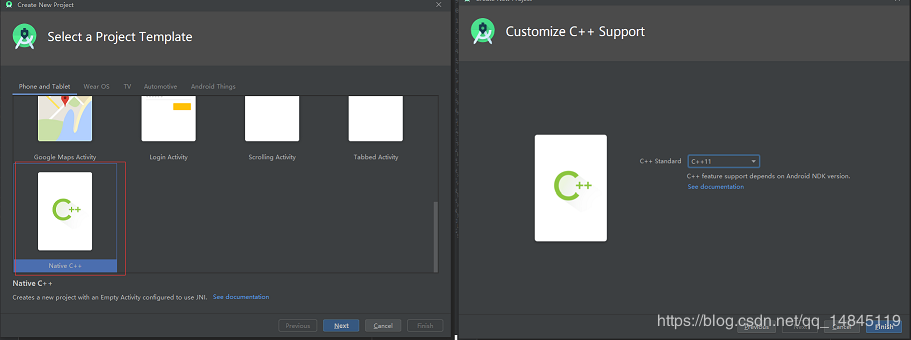
新建工程:
一定要選擇Native c++類型,最后要選c++11支持。
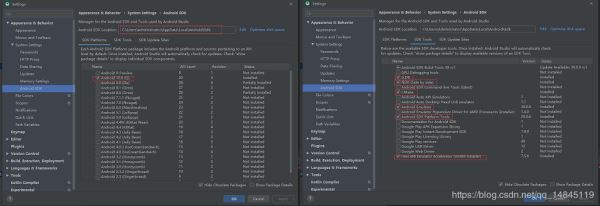
SDK設(shè)置:
File->Settings
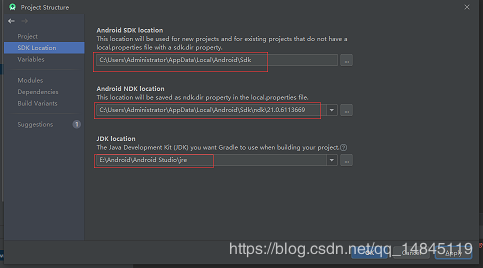
File->Project Structure
首先確定工程的目錄結(jié)構(gòu),然后嘗試運(yùn)行一下工程,使用模擬器,確保工程沒問題,
在MainActivity的同級(jí)目錄,新建一個(gè)hello.java,然后做一個(gè)簡(jiǎn)單的實(shí)現(xiàn),
package com.example.myapplication; public class hello { public native int add(int i, int j);}
使用android studio自帶的Terminal進(jìn)入該hello.java所在目錄,執(zhí)行,
javac hello.java
Terminal下回到app/src/main所在目錄,執(zhí)行,
javah -d jni -classpath ./java com.example.myapplication.hello
此時(shí),會(huì)在main目錄下面生成一個(gè)和cpp,java同級(jí)的目錄jni。
在該目錄結(jié)構(gòu)里面新建hello.cpp。
將com_example_myapplication_hello.h中的內(nèi)容復(fù)制進(jìn)hello.cpp中,并且進(jìn)行方法的實(shí)現(xiàn),
#include <jni.h>/* Header for class com_example_myapplication_hello */ #ifndef _Included_com_example_myapplication_hello#define _Included_com_example_myapplication_hello#ifdef __cplusplusextern 'C' {#endif/* * Class: com_example_myapplication_hello * Method: add * Signature: (II)I */ #include 'com_example_myapplication_hello.h' JNIEXPORT jint JNICALL Java_com_example_myapplication_hello_add (JNIEnv *, jobject, jint i, jint j){return i+j;} #ifdef __cplusplus}#endif#endif
將com_example_myapplication_hello.h,hello.cpp這連個(gè)文件復(fù)制到cpp所在的目錄,
然后修改CMakeLists.txt,增加,
add_library( # Sets the name of the library. hello # Sets the library as a shared library. SHARED # Provides a relative path to your source file(s). hello.cpp )
修改target_link_libraries如下,
target_link_libraries( # Specifies the target library. native-lib hello # Links the target library to the log library # included in the NDK. ${log-lib} )
修改hello.java的調(diào)用方式,
package com.example.myapplication; public class hello { static { System.loadLibrary('hello'); } public native int add(int i, int j);}
修改MainActivity.java中的onCreate函數(shù),
protected void onCreate(Bundle savedInstanceState) { super.onCreate(savedInstanceState); setContentView(R.layout.activity_main); // Example of a call to a native method TextView tv = findViewById(R.id.sample_text); //tv.setText(stringFromJNI()); tv.setText('hello 9+10= ' + new hello().add(9, 10)); }
然后,rebuild project,沒有錯(cuò)誤后,然后run app。
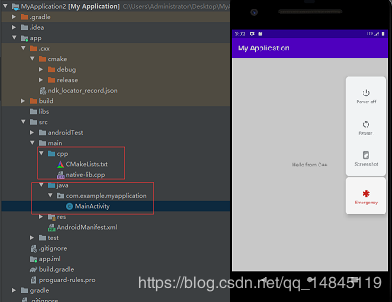
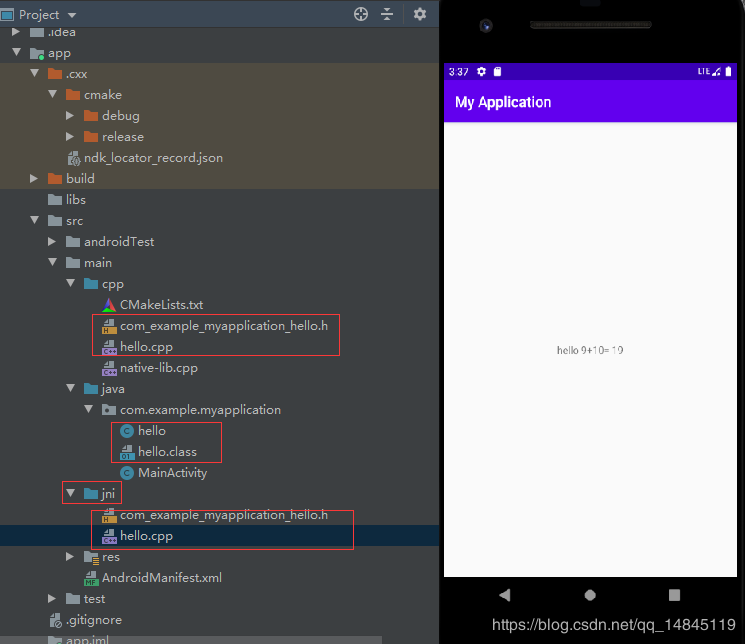
最終程序整體目錄結(jié)構(gòu),以及運(yùn)行效果,
JNI的整體流程思路:
Java先定義一個(gè)類,類中定義一個(gè)需要c++來實(shí)現(xiàn)的方法.通過javah生成需要c++實(shí)現(xiàn)的.h的c++頭文件實(shí)現(xiàn).h的c++頭文件中定義的方法Cmake編譯運(yùn)行
總結(jié)
到此這篇關(guān)于基于Android studio3.6的JNI教程之helloworld思路詳解的文章就介紹到這了,更多相關(guān)android studio JNI helloworld內(nèi)容請(qǐng)搜索好吧啦網(wǎng)以前的文章或繼續(xù)瀏覽下面的相關(guān)文章希望大家以后多多支持好吧啦網(wǎng)!
相關(guān)文章:
1. 編程語言PHP在Web開發(fā)領(lǐng)域的優(yōu)勢(shì)在哪?2. 詳解Android studio 動(dòng)態(tài)fragment的用法3. Android如何加載Base64編碼格式圖片4. 解決Android studio xml界面無法預(yù)覽問題5. Spring Boot和Thymeleaf整合結(jié)合JPA實(shí)現(xiàn)分頁(yè)效果(實(shí)例代碼)6. 什么是python的自省7. 基于android studio的layout的xml文件的創(chuàng)建方式8. 在IDEA中實(shí)現(xiàn)同時(shí)運(yùn)行2個(gè)相同的java程序9. .Net Core使用Coravel實(shí)現(xiàn)任務(wù)調(diào)度的完整步驟10. 圖文詳解vue中proto文件的函數(shù)調(diào)用

 網(wǎng)公網(wǎng)安備