文章詳情頁
解決Android Studio電腦不支持HAXM的問題
瀏覽:166日期:2022-09-26 17:18:09
測試APP時出現以下錯誤信息:
Intel HAXM is required to run this AVD.
Your CPU does not support required features (VT-x or SVM).
Unfortunately, your computer does not support hardware accelerated virtualization.Here are some of your options: 1) Use a physical device for testing 2) Develop on a Windows/OSX computer with an Intel processor that supports VT-x and NX 3) Develop on a Linux computer that supports VT-x or SVM 4) Use an Android Virtual Device based on an ARM system image (This is 10x slower than hardware accelerated virtualization)
解決方案是使用基于ARM的系統映像。操作方法如圖:
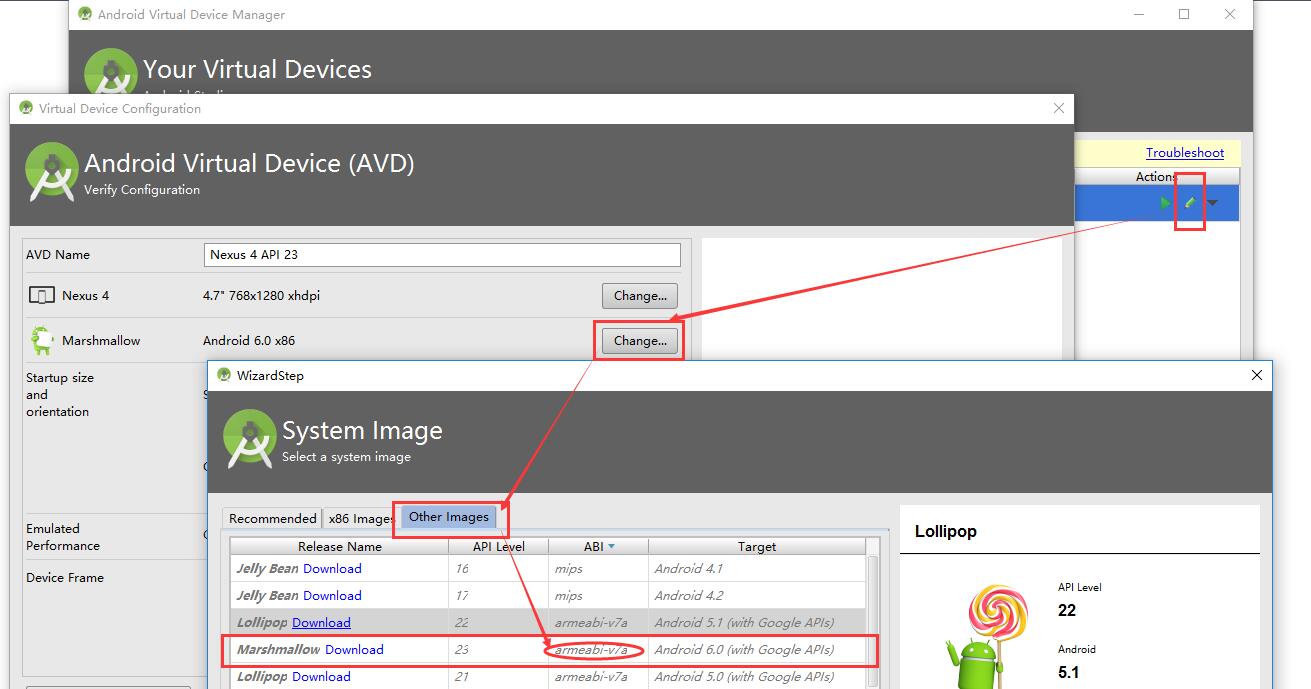
這樣就沒問題了。
總結
到此這篇關于解決Android Studio電腦不支持HAXM的問題的文章就介紹到這了,更多相關Android Studio電腦不支持HAXM內容請搜索好吧啦網以前的文章或繼續瀏覽下面的相關文章希望大家以后多多支持好吧啦網!
標簽:
Android
上一條:Android Studio 中運行 groovy 程序的方法圖文詳解下一條:Android Studio報錯unable to access android sdk add-on list解決方案
相關文章:
排行榜

 網公網安備
網公網安備