vue-cropper插件實現圖片截取上傳組件封裝
基于vue-cropper插件實現圖片截取上傳組件封裝的具體代碼,供大家參考,具體內容如下
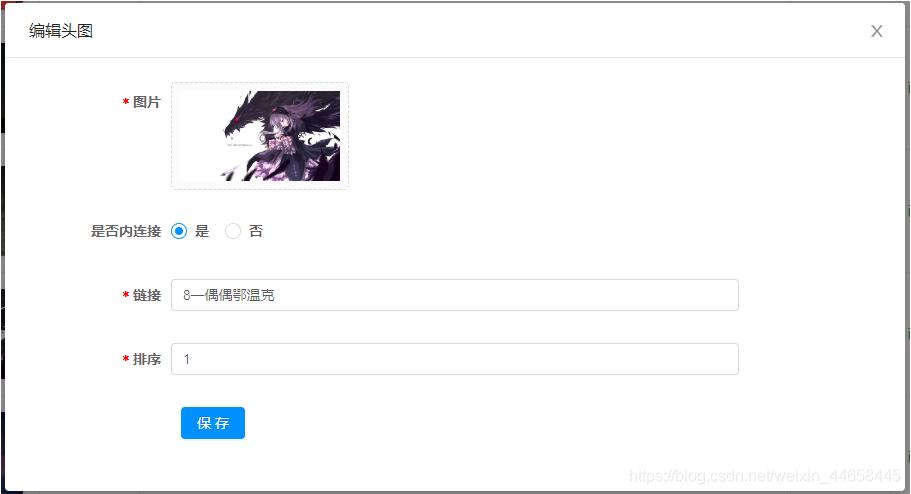
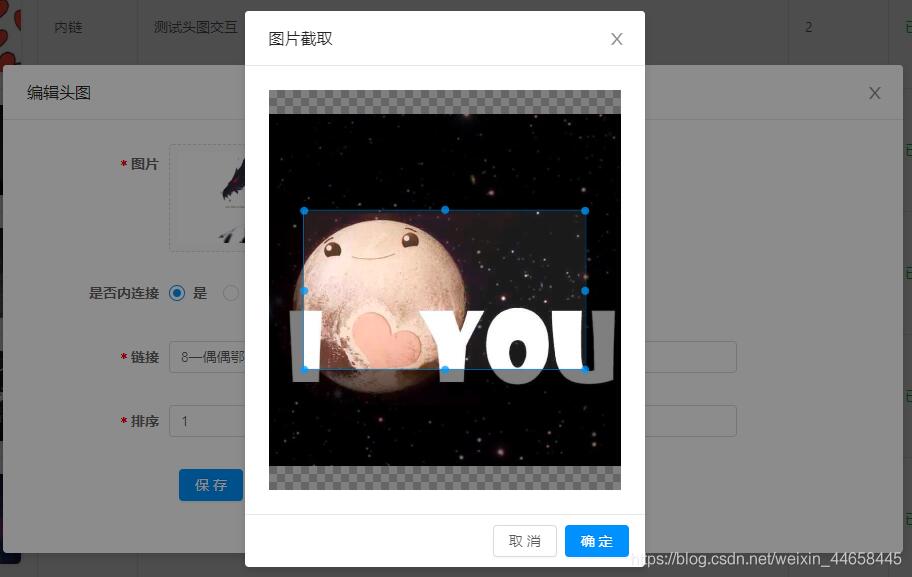
需求場景:后臺開發需要上傳圖片并進行相應比例尺寸圖片的截取,本組件開發采用Ant Design Vue組件庫搭配vue-cropper插件進行封裝
實現如下
html
<template> <div> <a-upload name='avatar' list-type='picture-card' :show-upload-list='false' :custom-request='customRequest' :before-upload='beforeUpload' : > <imgv-if='imageUrl && !loading':src='http://www.leifengta.com.cn/bcjs/imageUrl'alt='avatar': /> <div v-else><a-icon :type='loading ? ’loading’ : ’plus’' /><div class='ant-upload-text'>上傳圖片</div> </div> </a-upload> <a-modal v-model='imageCut.isShowModal' @ok='finish' @cancel='imageCut.close' > <div v-if='imageCut.isShowModal'><div style='text-align:center'> <vueCropper ref='cropper' :img='imageCut.imgFile' :outputSize='outputSize' :outputType='outputType' :info='info' :full='full' :canMove='canMove' :canMoveBox='canMoveBox' :original='original' :autoCrop='autoCrop' :fixed='fixed' :fixedNumber='fixedNumber' :centerBox='centerBox' :infoTrue='infoTrue' :fixedBox='fixedBox' ></vueCropper></div> </div> </a-modal> </div></template>
js
<script>import { uploadImage } from ’@/api/common’import { VueCropper } from 'vue-cropper';export default { name: ’ImageUpload’, components: { VueCropper }, data() { return { loading: false, imageCut: {isShowModal: false,imgFile: ’’,init: imgFile => { this.imageCut.imgFile = imgFile this.imageCut.isShowModal = true},close: () => { this.imageCut.imgFile = ’’ this.imageCut.isShowModal = false} } } }, props: { imageUrl: String, width: { type: String, default: ’100px’ }, height: { type: String, default: ’100px’ }, canCut: { type: Boolean, default: false }, info: { type: Boolean, default: false }, // 裁剪框的大小信息 outputSize: { type: Number, default: 0.8 }, // 裁剪生成圖片的質量 outputType: { type: String, default: ’jpeg’ }, // 裁剪生成圖片的格式 canScale: { type: Boolean, default: true }, // 圖片是否允許滾輪縮放 autoCrop: { type: Boolean, default: true }, // 是否默認生成截圖框 // autoCropWidth: 300, // 默認生成截圖框寬度 // autoCropHeight: 200, // 默認生成截圖框高度 fixedBox: { type: Boolean, default: false }, // 固定截圖框大小 不允許改變 fixed: { type: Boolean, default: true }, // 是否開啟截圖框寬高固定比例 fixedNumber: { type: Array, default: () => [1, 1] }, // 截圖框的寬高比例 full: { type: Boolean, default: true }, // 是否輸出原圖比例的截圖 canMove: { type: Boolean, default: false }, canMoveBox: { type: Boolean, default: true }, // 截圖框能否拖動 original: { type: Boolean, default: false }, // 上傳圖片按照原始比例渲染 centerBox: { type: Boolean, default: true }, // 截圖框是否被限制在圖片里面 infoTrue: { type: Boolean, default: true } // true 為展示真實輸出圖片寬高 false 展示看到的截圖框寬高 }, methods: { beforeUpload(file) { const isJpgOrPng = file.type === ’image/jpeg’ || file.type === ’image/png’ if (!isJpgOrPng) {this.$message.error(’請上傳JPG或PNG文件!’) } const isLt2M = file.size / 1024 / 1024 < 2 if (!isLt2M) {this.$message.error(’請上傳2MB以下文件!’) } return isJpgOrPng && isLt2M }, customRequest(file) { if (this.canCut) {this.readFile(file.file) } else {this.loading = trueconst formData = new FormData()formData.append(’fileIdcard’, file.file)uploadImage(formData).then(res => { this.loading = false this.$emit(’uploadSuccess’, res.ossUrl)}) } }, readFile(file) { var reader = new FileReader() reader.readAsDataURL(file) reader.onload = () => {this.imageCut.init(reader.result) } }, finish() { this.$refs.cropper.getCropBlob(data => {this.loading = true// 上傳阿里云服務器const formData = new FormData()formData.append(’fileIdcard’, data)uploadImage(formData).then(res => { this.imageCut.close() this.loading = false this.$emit(’uploadSuccess’, res.ossUrl)}) }) } }}</script>
css
<style lang='less'>.avatar-uploader > .ant-upload { width: 100%; height: 100%;}.ant-upload-select-picture-card i { font-size: 32px; color: #999;}.ant-upload-select-picture-card .ant-upload-text { margin-top: 8px; color: #666;}.cropper-content { .cropper { width: auto; height: 400px; }}</style>
組件使用及說明
<image-upload:imageUrl='form.diagramUrl'@uploadSuccess='uploadSuccess' :can-edit='canCut':fixed-number='[16,9]' />
組件調用時需傳入canEdit屬性,指定組件是否啟動圖片選取后的裁剪功能,默認值為不啟用裁剪;需裁剪時可傳入fixedNumber屬性,定義裁剪框的寬高比
以上就是本文的全部內容,希望對大家的學習有所幫助,也希望大家多多支持好吧啦網。
相關文章:
 網公網安備
網公網安備