Vue中引入svg圖標的兩種方式
Vue中引入svg圖標的方式
Vue中引入svg圖標的方式一安裝
yarn add svg-sprite-loader --dev
svg組件

index.vue
<!-- svg組件 --><template> <svg : aria-hidden='true'> <use :xlink:href='http://www.leifengta.com.cn/bcjs/iconName' /> </svg></template><script>export default { name: ’SvgIcon’, props: { // svg 的名稱 svgName: { type: String, required: true } }, computed: { iconName () { return `#icon-${this.svgName}` }, svgClass () { if (this.svgName) { return ’svg-icon’ + this.svgName } else { return ’svg-icon’ } } }}</script><style lang='less' scoped>.svg-icon { width: 100px; height: 100px; vertical-align: -0.15em; fill: currentColor; overflow: hidden;}</style>
注冊到全局

index.js
import Vue from ’vue’import SvgIcon from ’@/components/SvgIcon’// 注冊到全局Vue.component(’svg-icon’, SvgIcon)const requireAll = requireContext => requireContext.keys().map(requireContext)const req = require.context(’./svg’, false, /.svg$/)requireAll(req)
vue.config.js
module.exports = {chainWebpack: config => { config.module .rule(’svg’) .exclude.add(resolve(’src/assets/icons’)) .end() config.module .rule(’icons’) .test(/.svg$/) .include.add(resolve(’src/assets/icons’)) .end() .use(’svg-sprite-loader’) .loader(’svg-sprite-loader’) .options({ symbolId: ’icon-[name]’ }) .end()} }
頁面中使用
<!-- svg-name為svg名 --><svg-icon svg-name='ic_home_news' />Vue中引入svg圖標的方式二
npm install svg-sprite-loader --save-dev
vue.config.js中添加如下代碼
const path = require(’path’);function resolve(dir) { // __dirname項目根目錄的絕對路徑 return path.join(__dirname, dir);}module.exports = { chainWebpack: config => { const svgRule = config.module.rule(’svg’); // 清除已有的所有l(wèi)oader // 如果你不這樣做,接下來的loader會附加在該規(guī)則現(xiàn)有的loader之后 svgRule.uses.clear(); svgRule .test(/.svg$/) .include.add(path.resolve(__dirname, ’./src/icons/svg’)) .end() .use(’svg-sprite-loader’) .loader(’svg-sprite-loader’) .options({ symbolId: ’icon-[name]’ }); const fileRule = config.module.rule(’file’); fileRule.uses.clear(); fileRule .test(/.svg$/) .exclude.add(path.resolve(__dirname, ’./src/icons/svg’)) .end() .use(’file-loader’) .loader(’file-loader’); },}
建立如下的文件目錄
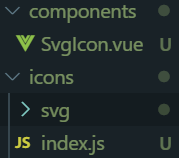
SvgIcon.vue代碼
<template> <svg : xmlns='http://www.w3.org/2000/svg'> <use :xlink:href='http://www.leifengta.com.cn/bcjs/iconName' xmlns:xlink='http://www.w3.org/1999/xlink' /> </svg></template><script>export default { name: ’SvgIcon’, props: { iconClass: { type: String, required: true }, className: { type: String, default: ’’ } }, computed: { iconName() { return `#icon-${this.iconClass}`; }, svgClass() { if (this.className) { return ’svg-icon ’ + this.className; } else { return ’svg-icon’; } } }};</script><style scoped>.svg-icon { width: 1em; height: 1em; vertical-align: -0.15em; fill: currentColor; overflow: hidden;}</style>
svg文件夾下放svg圖標
index.js代碼
import Vue from ’vue’;import SvgIcon from ’@/components/SvgIcon’; // svg組件// register globallyVue.component(’svg-icon’, SvgIcon);const req = require.context(’./svg’, false, /.svg$/);const requireAll = requireContext => requireContext.keys().map(requireContext);requireAll(req);
最后在main.js中引入
import ’./icons’;
在頁面中使用svg
icon-class是svg圖標名 class-name是你要自定義的class類名
<svg-icon icon- class-name='icon'></svg-icon>總結(jié)
到此這篇關(guān)于Vue中引入svg圖標的兩種方式的文章就介紹到這了,更多相關(guān)Vue引入svg圖標內(nèi)容請搜索好吧啦網(wǎng)以前的文章或繼續(xù)瀏覽下面的相關(guān)文章希望大家以后多多支持好吧啦網(wǎng)!
相關(guān)文章:
1. IntelliJ IDEA安裝插件的方法步驟2. 理解PHP5中static和const關(guān)鍵字3. php模擬實現(xiàn)斗地主發(fā)牌4. spring acegi security 1.0.0 發(fā)布5. Vue封裝一個TodoList的案例與瀏覽器本地緩存的應(yīng)用實現(xiàn)6. Vuex localStorage的具體使用7. jQuery 實現(xiàn)DOM元素拖拽交換位置的實例代碼8. .Net Core使用Coravel實現(xiàn)任務(wù)調(diào)度的完整步驟9. vue 使用localstorage實現(xiàn)面包屑的操作10. MyBatis中的JdbcType映射使用詳解

 網(wǎng)公網(wǎng)安備