vue el-tree 默認(rèn)展開(kāi)第一個(gè)節(jié)點(diǎn)的實(shí)現(xiàn)代碼
vue 的樹(shù)形控件 el-tree 可以用來(lái)方便地實(shí)現(xiàn)樹(shù)形控件,但是官方文檔中,關(guān)于控件的默認(rèn)展開(kāi)只有默認(rèn)展開(kāi)全部或者默認(rèn)全部關(guān)閉,如下所示:
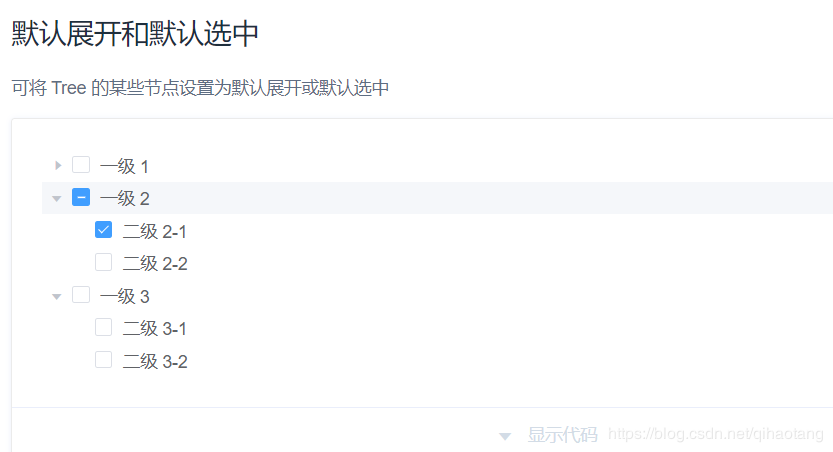
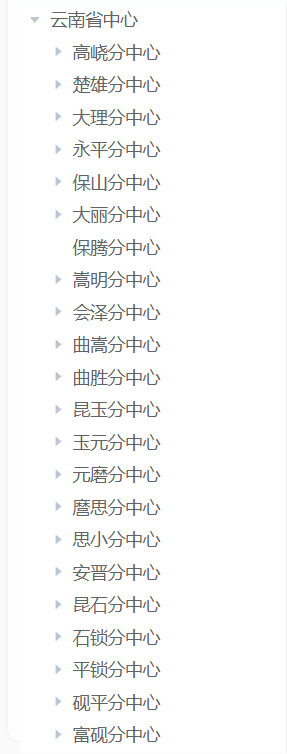
對(duì)于指定節(jié)點(diǎn)的展開(kāi),需要指定其id,從而通過(guò) default-expanded-keys 設(shè)置默認(rèn)展開(kāi)的節(jié)點(diǎn)。對(duì)于后臺(tái)返回的數(shù)據(jù),默認(rèn)展開(kāi)其第一層的第一個(gè),其實(shí)很簡(jiǎn)單:對(duì)于獲取到的后臺(tái)數(shù)據(jù),將其第一層節(jié)點(diǎn)添加到數(shù)組中,將 default-expanded-keys 綁定數(shù)組,從而設(shè)置默認(rèn)展開(kāi)的節(jié)點(diǎn)。實(shí)際應(yīng)用:默認(rèn)展開(kāi)第一層節(jié)點(diǎn)中的第一個(gè)節(jié)點(diǎn):
<template> <section> <!-- 機(jī)構(gòu)類型編碼表 --> <el-row align='left'> <div class=’treeClass’> <el-tree :data='treeData' :props='defaultProps' @node-click='handleNodeClick' highlight-current node-key='id' :default-expanded-keys='treeExpandData'> </el-tree> </div> </el-row> </section></template><script>export default { data() { return { treeData:[], //后臺(tái)返回的tree樹(shù)列表 treeExpandData:[], //自己定義的用于接收tree樹(shù)id的數(shù)組 provincialCenterId:’’, defaultProps: { children: ’item’, label: ’name’, }, } }, created(){ this.getEquipmentList() }, methods: { // 獲取樹(shù)形結(jié)構(gòu)默認(rèn)展開(kāi)節(jié)點(diǎn) getRoleTreeRootNode(provincialCenterId) { this.treeExpandData.push(provincialCenterId) }, //獲取tree樹(shù)列表 getEquipmentList: function(params){ this.listLoading = true this.$api.ckApi.treeList({typeTag:true}).then((res)=>{ if(res.code==200){ this.treeData = res.resultDownload; this.provincialCenterId = this.treeData[0].id //默認(rèn)展開(kāi)第一個(gè)節(jié)點(diǎn) this.getRoleTreeRootNode(this.provincialCenterId) this.listLoading = false }else{ this.$message.error(res) } }) }, }</script>
效果圖:
總結(jié)
到此這篇關(guān)于vue el-tree 默認(rèn)展開(kāi)第一個(gè)節(jié)點(diǎn)的實(shí)現(xiàn)代碼的文章就介紹到這了,更多相關(guān)vue el-tree默認(rèn)展開(kāi)節(jié)點(diǎn)內(nèi)容請(qǐng)搜索好吧啦網(wǎng)以前的文章或繼續(xù)瀏覽下面的相關(guān)文章希望大家以后多多支持好吧啦網(wǎng)!
相關(guān)文章:
1. ASP新手必備的基礎(chǔ)知識(shí)2. Docker 啟動(dòng)Redis 并設(shè)置密碼的操作3. CentOS郵箱服務(wù)器搭建系列——SMTP服務(wù)器的構(gòu)建( Postfix )4. asp文件用什么軟件編輯5. PHP基礎(chǔ)之生成器4——比較生成器和迭代器對(duì)象6. vue限制輸入數(shù)字或者保留兩位小數(shù)實(shí)現(xiàn)7. 利用CSS制作3D動(dòng)畫(huà)8. python 實(shí)現(xiàn)有道翻譯功能9. JS中6個(gè)對(duì)象數(shù)組去重的方法10. 用PyCharm輕松安裝Python插件

 網(wǎng)公網(wǎng)安備