SpringBoot+Spring Security無法實(shí)現(xiàn)跨域的解決方案
import org.slf4j.Logger;import org.slf4j.LoggerFactory;import org.springframework.beans.factory.annotation.Value;import org.springframework.boot.autoconfigure.AutoConfigureBefore;import org.springframework.context.annotation.Configuration;import org.springframework.format.FormatterRegistry;import org.springframework.web.servlet.config.annotation.*;@Configuration@AutoConfigureBefore(SecurityConfig.class)public class MyMvcConfigurer implements WebMvcConfigurer { public void addCorsMappings(CorsRegistry registry){LOGGER.info('跨域已設(shè)置');registry.addMapping('/**').allowedOrigins('*').allowedMethods('*').allowedHeaders('*').allowCredentials(true).maxAge(3600); }}
整合Security時(shí)發(fā)現(xiàn)只用上述方法前后端分離時(shí)仍存在跨域問題,
解決方法如下:@Configuration@AutoConfigureBefore(Swagger2Configuration.class)@EnableWebSecurity@EnableGlobalMethodSecurity(prePostEnabled = true)@Order(-1)public class SecurityConfig extends WebSecurityConfigurerAdapter { @Override protected void configure(HttpSecurity http) throws Exception {http.formLogin().loginProcessingUrl('/user/login').loginPage('/singIn.html').successHandler(moyuAuthenticationSuccessHandler).failureHandler(moyuAuthenticationFailureHandler).and().apply(moyuSocialSecurityConfig).and().rememberMe().tokenRepository(persistentTokenRepository()).tokenValiditySeconds(3600*24*7).userDetailsService(userDetailsService).and().authorizeRequests().antMatchers('/user/login','/login','/singIn.html','**','/**').permitAll().anyRequest().authenticated().and().cors().and().csrf().disable(); }}重點(diǎn)加入代碼:
.and() .cors()//新加入 .and() .csrf().disable();引用Spring Security 項(xiàng)目的跨域處理
最近項(xiàng)目采用了前后端分離的框架,前端和后臺(tái)接口沒有部署到一個(gè)站點(diǎn),出現(xiàn)了跨域問題,什么是跨域,這里就不再贅述,直接說解決辦法。
Spring 解決跨域的方式有很多,個(gè)人采用了Crosfilter的方式具體代碼如下:
@Bean public CorsFilter corsFilter() {final UrlBasedCorsConfigurationSource urlBasedCorsConfigurationSource = new UrlBasedCorsConfigurationSource();final CorsConfiguration corsConfiguration = new CorsConfiguration();corsConfiguration.setAllowCredentials(true);corsConfiguration.addAllowedOrigin('*');corsConfiguration.addAllowedHeader('*');corsConfiguration.addAllowedMethod('*');urlBasedCorsConfigurationSource.registerCorsConfiguration('/**', corsConfiguration);return new CorsFilter(urlBasedCorsConfigurationSource); }
配置完成后,測(cè)試調(diào)用,報(bào)錯(cuò)401,依然不行。網(wǎng)上查資料得知,跨域請(qǐng)求會(huì)進(jìn)行兩次。具體流程見下圖:
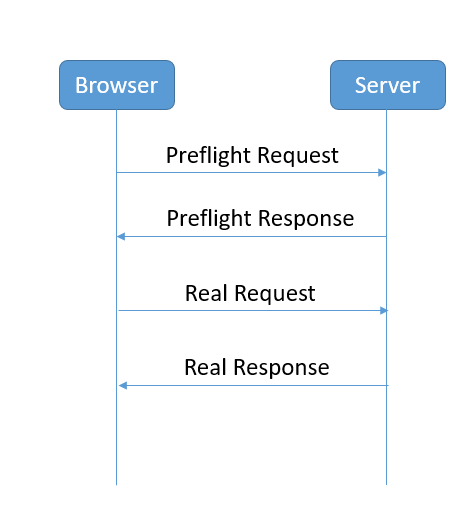
每次跨域請(qǐng)求,真正請(qǐng)求到達(dá)后端之前,瀏覽器都會(huì)先發(fā)起一個(gè)preflight request,請(qǐng)求方式為OPTIONS 詢問服務(wù)端是否接受該跨域請(qǐng)求,具體參數(shù)如下圖:
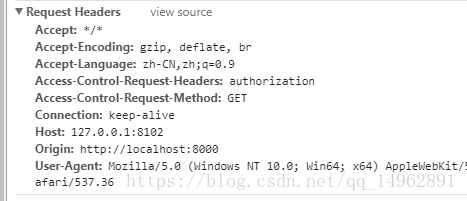
但是該請(qǐng)求不能攜帶cookie和自己定義的header。
由于項(xiàng)目中引入了Spring security ,而我使用的token傳遞方式是在header中使用authorization 字段,這樣依賴Spring Security攔截到 preflight request 發(fā)現(xiàn)它沒有攜帶token,就會(huì)報(bào)錯(cuò)401,沒有授權(quán)。
解決這個(gè)問題很簡單,可以使用以下配置讓Spring security 不校驗(yàn)preflight request 。
@Override public void configure(HttpSecurity http) throws Exception {ExpressionUrlAuthorizationConfigurer<HttpSecurity>.ExpressionInterceptUrlRegistry registry = http.authorizeRequests();registry.requestMatchers(CorsUtils::isPreFlightRequest).permitAll();//讓Spring security放行所有preflight request }
再試就搞定了,但是后端直接配置支持跨域會(huì)導(dǎo)致兩次請(qǐng)求。還使用另一種方式,使用Nginx 轉(zhuǎn)發(fā)一下請(qǐng)求也可以。
以上為個(gè)人經(jīng)驗(yàn),希望能給大家一個(gè)參考,也希望大家多多支持好吧啦網(wǎng)。
相關(guān)文章:
1. ASP新手必備的基礎(chǔ)知識(shí)2. CentOS郵箱服務(wù)器搭建系列——SMTP服務(wù)器的構(gòu)建( Postfix )3. PHP基礎(chǔ)之生成器4——比較生成器和迭代器對(duì)象4. asp文件用什么軟件編輯5. Vue axios獲取token臨時(shí)令牌封裝案例6. 利用CSS制作3D動(dòng)畫7. golang中json小談之字符串轉(zhuǎn)浮點(diǎn)數(shù)的操作8. js實(shí)現(xiàn)計(jì)算器功能9. 通過IEAD+Maven快速搭建SSM項(xiàng)目的過程(Spring + Spring MVC + Mybatis)10. JS中6個(gè)對(duì)象數(shù)組去重的方法
 網(wǎng)公網(wǎng)安備