Springboot 實(shí)現(xiàn)數(shù)據(jù)庫備份還原的方法
之前對(duì)電腦重裝了一下,結(jié)果IDEA的項(xiàng)目目錄沒有備份,導(dǎo)致有幾個(gè)平時(shí)會(huì)拿來參考的項(xiàng)目都丟失了,尤其有一個(gè)自己寫的Springboot項(xiàng)目當(dāng)初沒有備份,這次是徹底無緣再見了,有的東西可以對(duì)外(開源)的還是放在博客園這些地方記錄一下比較不錯(cuò),偶爾再遇到這樣的問題Ctrl+C&Ctrl+V即可解決了。
這回記錄一下Springboot實(shí)現(xiàn)對(duì)數(shù)據(jù)庫進(jìn)行一個(gè)備份和通過備份數(shù)據(jù)對(duì)數(shù)據(jù)庫進(jìn)行恢復(fù)。當(dāng)然不限于Springboot,對(duì)數(shù)據(jù)庫備份還原中的代碼,Java 相關(guān)的都可以使用。
備份數(shù)據(jù)庫
備份通過命令行對(duì)數(shù)據(jù)庫導(dǎo)出到指定目錄即可。我這里是一個(gè)Get請(qǐng)求,頁面需要展示備份文件名稱、大小和備份時(shí)間,代碼中使用的log是Slf4j,最終界面效果如圖:
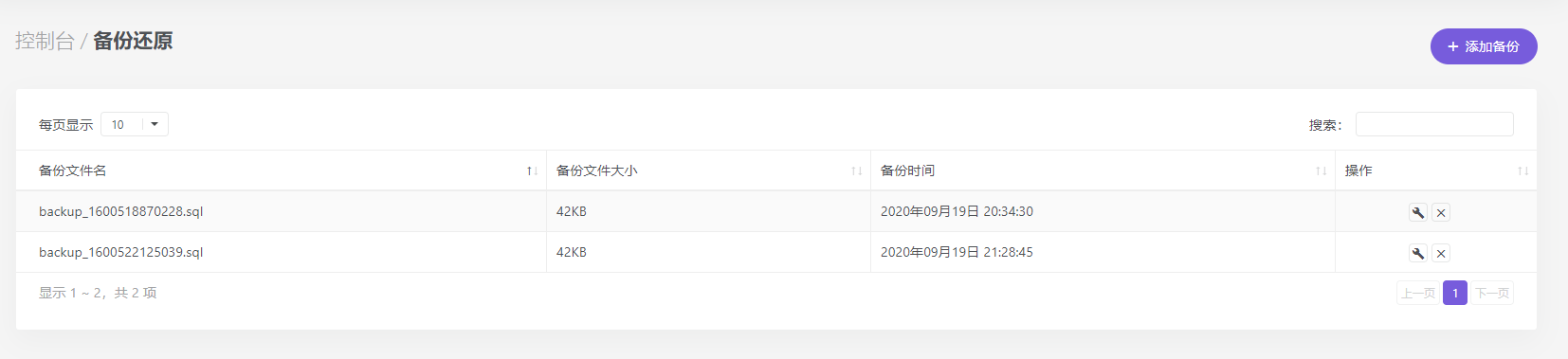
代碼對(duì)我的原代碼有所改動(dòng),關(guān)于備份文件的存放目錄,我配置在了application.properties配置文件中,通過一個(gè)配置類ProjectUrlConfig去獲取,代碼中的projectUrlConfig.getBackPath()即為文件目錄,與fileName拼接成完整的路徑。
/* 備份數(shù)據(jù)庫 */ @GetMapping('backupSQL') public ModelAndView backupSQL(Map<String, Object> map){ String fileName = 'backup_' + new Date().getTime() + '.sql'; String cmd = 'mysqldump -uroot -p123456 dbName > ' + projectUrlConfig.getBackPath() + fileName; //-u后的root為mysql數(shù)據(jù)庫用戶名,-p后接的123456為該用戶密碼,注意不要有空格;dbName填寫需要備份數(shù)據(jù)的數(shù)據(jù)庫名稱,大于號(hào)后接生成文件路徑 try { Runtime.getRuntime().exec(cmd); }catch (Exception e){ log.error('【備份數(shù)據(jù)庫】失敗:{}', e.getMessage()); map.put('msg', e.getMessage()); return new ModelAndView('common/error', map); } log.info('【備份數(shù)據(jù)庫】成功,SQL文件:{}', fileName); map.put('msg','備份數(shù)據(jù)庫成功');return new ModelAndView('common/success', map); }
恢復(fù)數(shù)據(jù)庫
備份雖然在cmd命令行中使用 “mysql -uroot -p123456 dbName < SQL文件路徑” 可以對(duì)數(shù)據(jù)庫還原,嘗試使用時(shí)沒有發(fā)現(xiàn)報(bào)錯(cuò)但數(shù)據(jù)庫并未還原,最后通過OutputStreamWriter 來實(shí)現(xiàn)。
@GetMapping('rollback') public ModelAndView rollback(@RequestParam('filename') String fileName, Map<String, Object> map){ String path = projectUrlConfig.getBackPath() + fileName; try { Runtime runtime = Runtime.getRuntime(); Process process = runtime.exec('mysql -uroot -p123456 --default-character-set=utf8 dbName'); OutputStream outputStream = process.getOutputStream(); FileInputStream fis = new FileInputStream(path); InputStreamReader isr = new InputStreamReader(fis, 'utf-8'); BufferedReader br = new BufferedReader(isr); String str = null; StringBuffer sb = new StringBuffer(); while ((str = br.readLine()) != null) {sb.append(str + 'rn'); } str = sb.toString(); OutputStreamWriter writer = new OutputStreamWriter(outputStream,'utf-8'); writer.write(str); writer.flush(); if(writer!=null){writer.close(); } if(br!=null){br.close(); } if(isr!=null){isr.close(); } if(fis!=null){fis.close(); } if(outputStream!=null){outputStream.close(); } }catch (Exception e){ log.error('【還原數(shù)據(jù)庫】失敗:{}', e.getMessage()); map.put('msg', e.getMessage()); return new ModelAndView('common/error', map); } log.info('【還原數(shù)據(jù)庫】成功,還原文件:{}', fileName); map.put('msg','還原數(shù)據(jù)庫成功');return new ModelAndView('common/success', map); }
以上即可對(duì)數(shù)據(jù)庫進(jìn)行備份與恢復(fù),但是也只是適用于較小的數(shù)據(jù)庫。
參考文章:https://blog.csdn.net/duli3554197/article/details/89468758
總結(jié)
到此這篇關(guān)于Springboot 實(shí)現(xiàn)數(shù)據(jù)庫備份還原的文章就介紹到這了,更多相關(guān)Springboot 數(shù)據(jù)庫備份還原內(nèi)容請(qǐng)搜索好吧啦網(wǎng)以前的文章或繼續(xù)瀏覽下面的相關(guān)文章希望大家以后多多支持好吧啦網(wǎng)!
相關(guān)文章:
1. Android table布局開發(fā)實(shí)現(xiàn)簡單計(jì)算器2. IntelliJ IDEA安裝插件的方法步驟3. 理解PHP5中static和const關(guān)鍵字4. php模擬實(shí)現(xiàn)斗地主發(fā)牌5. spring acegi security 1.0.0 發(fā)布6. MyBatis中的JdbcType映射使用詳解7. vue 使用localstorage實(shí)現(xiàn)面包屑的操作8. Python random庫使用方法及異常處理方案9. .Net Core使用Coravel實(shí)現(xiàn)任務(wù)調(diào)度的完整步驟10. Vuex localStorage的具體使用
 網(wǎng)公網(wǎng)安備