SpringBoot實(shí)現(xiàn)發(fā)送郵件功能過程圖解
首先創(chuàng)建一個(gè)郵箱賬號(hào),建議@126.com,@163.com,@qq.com 都可以
開啟smtp,以下是使用圖解:
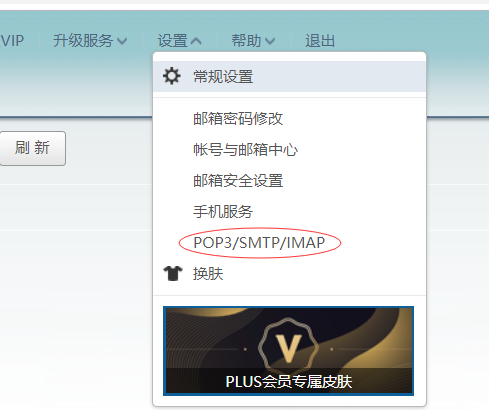
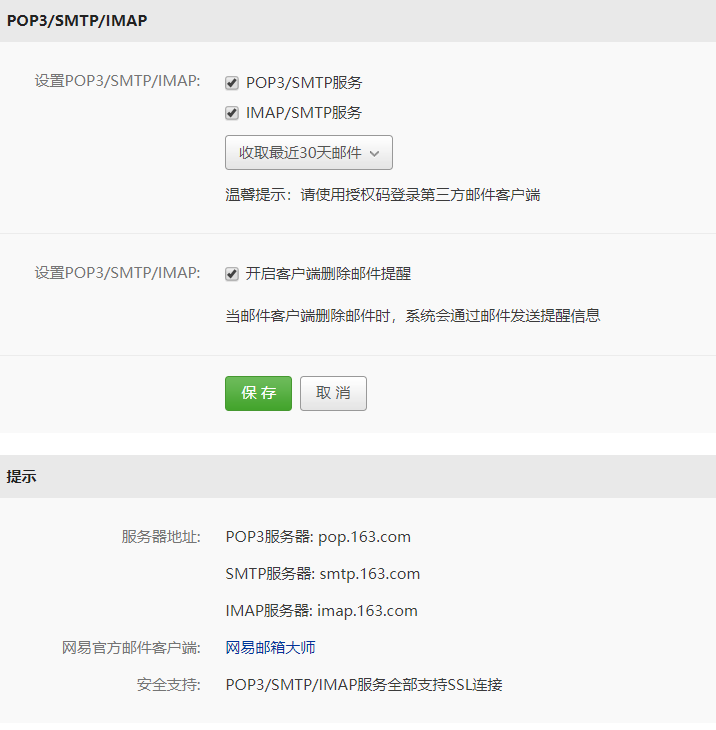
創(chuàng)建SpringBoot項(xiàng)目導(dǎo)入依賴
<dependency> <groupId>org.springframework.boot</groupId> <artifactId>spring-boot-starter-web</artifactId> </dependency> <!-- 支持發(fā)送郵件 --> <dependency> <groupId>org.springframework.boot</groupId> <artifactId>spring-boot-starter-mail</artifactId> </dependency>
application.properties文件中配置:
spring.mail.default-encoding=UTF-8spring.mail.host=smtp.163.com#發(fā)送者的郵箱密碼spring.mail.password=xxxxx#端口spring.mail.port=25#協(xié)議spring.mail.protocol=smtp#發(fā)送者的郵箱賬號(hào)spring.mail.username=xxxxxxx@163.comserver.port=8081
以文本的形式發(fā)送:
package com.example.demo; import org.springframework.beans.factory.annotation.Autowired;import org.springframework.beans.factory.annotation.Value;import org.springframework.mail.SimpleMailMessage;import org.springframework.mail.javamail.JavaMailSender;import org.springframework.web.bind.annotation.GetMapping;import org.springframework.web.bind.annotation.RestController; /** * @author * @site * @company * @create 2020-03-07 1:06 */@RestControllerpublic class MailController { @Autowired JavaMailSender jsm; @Value('${spring.mail.username}') private String username; @GetMapping('/send') public String send(){ //建立郵箱消息 SimpleMailMessage message = new SimpleMailMessage(); //發(fā)送者 message.setFrom(username); //接收者 message.setTo('1352192872@qq.com'); //發(fā)送標(biāo)題 message.setSubject('測試'); //發(fā)送內(nèi)容 message.setText('測試數(shù)據(jù)'); jsm.send(message); return '1'; }}
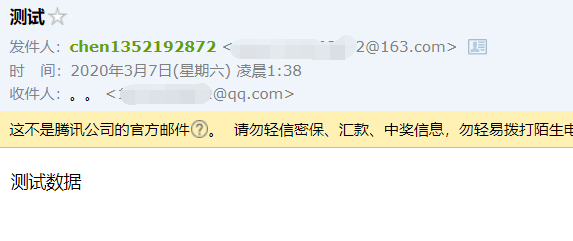
結(jié)果:
發(fā)送方:
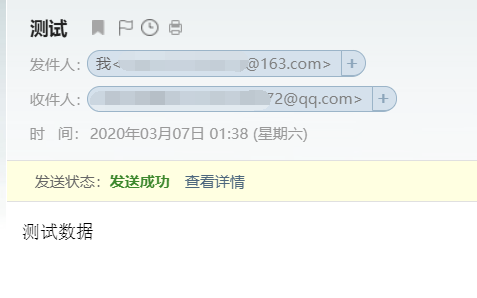
接收方:
以上就是本文的全部內(nèi)容,希望對(duì)大家的學(xué)習(xí)有所幫助,也希望大家多多支持好吧啦網(wǎng)。
相關(guān)文章:
1. ASP新手必備的基礎(chǔ)知識(shí)2. PHP基礎(chǔ)之生成器4——比較生成器和迭代器對(duì)象3. CentOS郵箱服務(wù)器搭建系列——SMTP服務(wù)器的構(gòu)建( Postfix )4. asp文件用什么軟件編輯5. JAVA 實(shí)現(xiàn)延遲隊(duì)列的方法6. Vue axios獲取token臨時(shí)令牌封裝案例7. js實(shí)現(xiàn)計(jì)算器功能8. JS中6個(gè)對(duì)象數(shù)組去重的方法9. 利用CSS制作3D動(dòng)畫10. 通過IEAD+Maven快速搭建SSM項(xiàng)目的過程(Spring + Spring MVC + Mybatis)
 網(wǎng)公網(wǎng)安備