javascript實現(xiàn)放大鏡功能
本文實例為大家分享了javascript實現(xiàn)放大鏡功能的具體代碼,供大家參考,具體內(nèi)容如下
描述:當(dāng)鼠標在小圖片上移動時,通過捕捉鼠標在小圖片上的位置, 使放大鏡的移動方向與大圖的水平和垂直方向相反
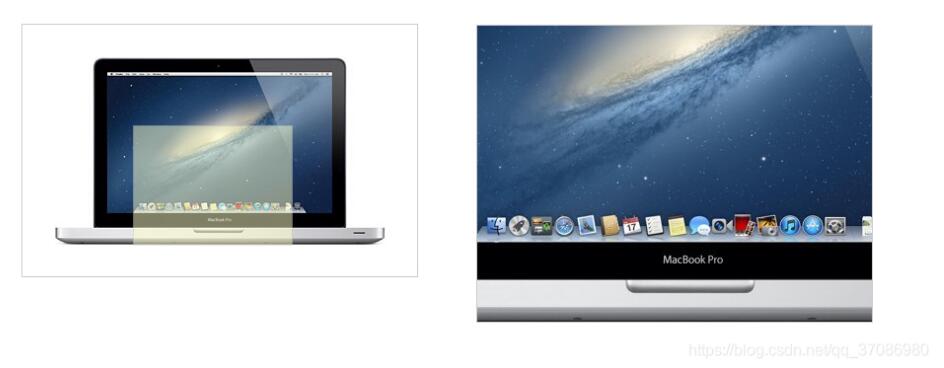
如何設(shè)計
頁面元素 技術(shù)要點:事件捕捉和定位 難點:計算涉及技術(shù)
onmouseover:當(dāng)鼠標指針移動到指定的對象上時發(fā)生 onmouseout:鼠標指針移出指定對象時發(fā)生 onmousemove:鼠標指針移動時發(fā)生 offsetLeft | offsetTop | offsetWidth | offsetHeight event.clientX | event.clientY偏移量與style.left
style.left返回字符串,例如30px,而offsetLeft返回數(shù)字30。 style.left可以讀和寫,offsetLeft是只讀的。如果我們想改變div的位置,我們可以修改style.left. style.left應(yīng)事先定義,否則值為空。需要考慮
如何使小畫面上的放大鏡與大圖同步移動 IE兼容性問題代碼實現(xiàn)
<!DOCTYPE html><html lang='en'><head> <meta charset='UTF-8'> <meta name='viewport' content='width=device-width, initial-scale=1.0'> <title>Magnifier Effect</title> <style> *{ margin: 0; padding: 0; } #wrap{ width: 400px; height: 255px; margin: 50px; border: 1px solid #ccc; display: block; position: relative; } #small-box{ position: relative; z-index: 1; } #float-box{ width: 160px; height: 120px; position: absolute; background-color: #ffffcc; border:1px solid #ccc; filter: alpha(opacity = 50); opacity: .5; display: none; } #mask{ position: absolute; display: block; width: 400px; height: 255px; z-index: 10; background-color: #ffffff; filter: alpha(opacity = 0); opacity: 0; cursor: move; } #big-box{ position: absolute; top: 0; left: 460px; width: 400px; height: 300px; overflow: hidden; border: 1px solid #ccc; z-index: 1; display: none; } #big-box img{ position: absolute; z-index: 5; } </style></head><script> // 頁面加載完畢之后執(zhí)行 window.onload = function(){ // 獲取父元素wrap, 小盒子,遮罩層, 放大鏡, 大盒子, 大圖片 var wrap = document.getElementById(’wrap’); var smallBox = document.getElementById(’small-box’); var mask = document.getElementById(’mask’); var floatBox = document.getElementById(’float-box’); var bigBox = document.getElementById(’big-box’); var bigImg = bigBox.getElementsByTagName(’img’)[0]; console.log(wrap, smallBox, mask, floatBox, bigBox, bigImg); // 鼠標移動到小盒子上時, 放大鏡顯示, 大盒子顯示 mask.onmouseover = function(){ floatBox.style.display = ’block’; bigBox.style.display = ’block’; } // 鼠標移出小盒子時, 放大鏡隱藏, 大盒子隱藏 mask.onmouseout = function(){ floatBox.style.display = ’none’; bigBox.style.display = ’none’; } // 添加鼠標移動事件 mask.onmousemove = function(ev){ // 獲取當(dāng)前鼠標移動的位置并考慮IE兼容性 var _event = ev || window.event; // 獲取放大鏡向左移動的距離 var left = _event.clientX - wrap.offsetLeft - smallBox.offsetLeft - floatBox.offsetWidth / 2; var top = _event.clientY - wrap.offsetTop - smallBox.offsetTop - floatBox.offsetHeight / 2; // console.log(left, top); // 考慮邊界情況 if(left < 0){ left = 0; }else if(left > (mask.offsetWidth - floatBox.offsetWidth)){ left = mask.offsetWidth - floatBox.offsetWidth; } if(top < 0){ top = 0; }else if(top > (mask.offsetHeight - floatBox.offsetHeight)){ top = mask.offsetHeight - floatBox.offsetHeight; } floatBox.style.left = left + ’px’; floatBox.style.top = top + ’px’; // calculate percentage var percentX = left / (mask.offsetWidth - floatBox.offsetWidth); var percentY = top / (mask.offsetHeight - floatBox.offsetHeight); // calculate displacement of big image, big image has opposite direction of magnifying glass bigImg.style.left = -percentX * (bigImg.offsetWidth - bigBox.offsetWidth) + ’px’; bigImg.style.top = -percentY * (bigImg.offsetHeight - bigBox.offsetHeight) + ’px’; } }</script><body> <div id='wrap'> <div id='small-box'> <div id='mask'></div> <div id='float-box'></div> <img src='http://www.leifengta.com.cn/bcjs/img/macbook-small.jpg' alt='smallMac'> </div> <div id='big-box'> <img src='http://www.leifengta.com.cn/bcjs/img/macbook-big.jpg' alt='bigMac'> </div> </div></body></html>
以上就是本文的全部內(nèi)容,希望對大家的學(xué)習(xí)有所幫助,也希望大家多多支持好吧啦網(wǎng)。
相關(guān)文章:
1. Android table布局開發(fā)實現(xiàn)簡單計算器2. IntelliJ IDEA安裝插件的方法步驟3. 理解PHP5中static和const關(guān)鍵字4. php模擬實現(xiàn)斗地主發(fā)牌5. spring acegi security 1.0.0 發(fā)布6. MyBatis中的JdbcType映射使用詳解7. vue 使用localstorage實現(xiàn)面包屑的操作8. Python random庫使用方法及異常處理方案9. .Net Core使用Coravel實現(xiàn)任務(wù)調(diào)度的完整步驟10. Vuex localStorage的具體使用
 網(wǎng)公網(wǎng)安備