手把手帶你入門 Spring Security的具體流程
Spring Security 是 Spring 家族中的一個安全管理框架,實際上,在 Spring Boot 出現之前,Spring Security 就已經發展了多年了,但是使用的并不多,安全管理這個領域,一直是 Shiro 的天下。
相對于 Shiro,在 SSM/SSH 中整合 Spring Security 都是比較麻煩的操作,所以,Spring Security 雖然功能比 Shiro 強大,但是使用反而沒有 Shiro 多(Shiro 雖然功能沒有 Spring Security 多,但是對于大部分項目而言,Shiro 也夠用了)。
自從有了 Spring Boot 之后,Spring Boot 對于 Spring Security 提供了 自動化配置方案,可以零配置使用 Spring Security。
因此,一般來說,常見的安全管理技術棧的組合是這樣的:
SSM + Shiro Spring Boot/Spring Cloud + Spring Security注意,這只是一個推薦的組合而已,如果單純從技術上來說,無論怎么組合,都是可以運行的。
我們來看下具體使用。
1.項目創建
在 Spring Boot 中使用 Spring Security 非常容易,引入依賴即可:
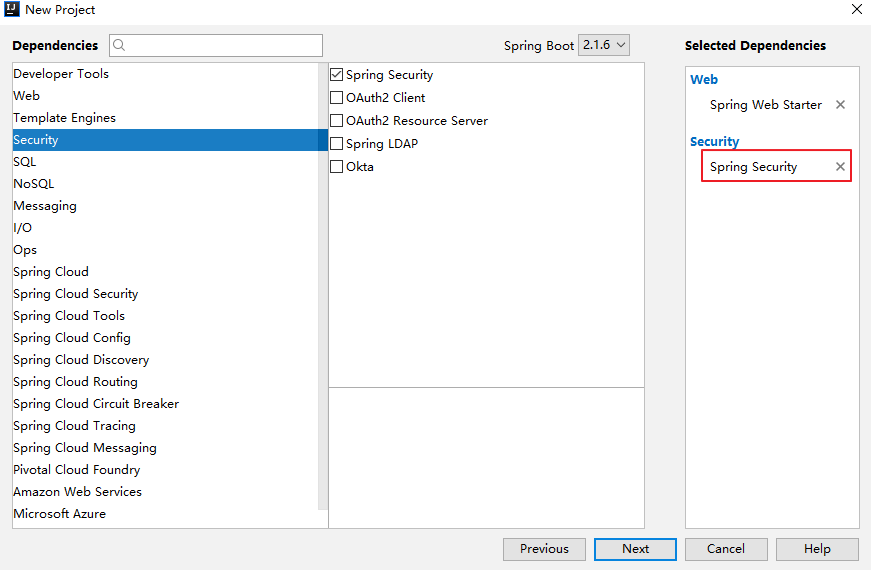
pom.xml 中的 Spring Security 依賴:
<dependency> <groupId>org.springframework.boot</groupId> <artifactId>spring-boot-starter-security</artifactId></dependency>
只要加入依賴,項目的所有接口都會被自動保護起來。
2.初次體驗
我們創建一個 HelloController:
@RestControllerpublic class HelloController { @GetMapping('/hello') public String hello() { return 'hello'; }}
訪問 /hello ,需要登錄之后才能訪問。
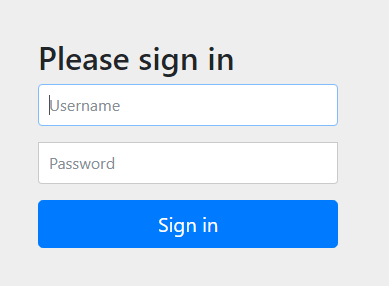
當用戶從瀏覽器發送請求訪問 /hello 接口時,服務端會返回 302 響應碼,讓客戶端重定向到 /login 頁面,用戶在 /login 頁面登錄,登陸成功之后,就會自動跳轉到 /hello 接口。
另外,也可以使用 POSTMAN 來發送請求,使用 POSTMAN 發送請求時,可以將用戶信息放在請求頭中(這樣可以避免重定向到登錄頁面):
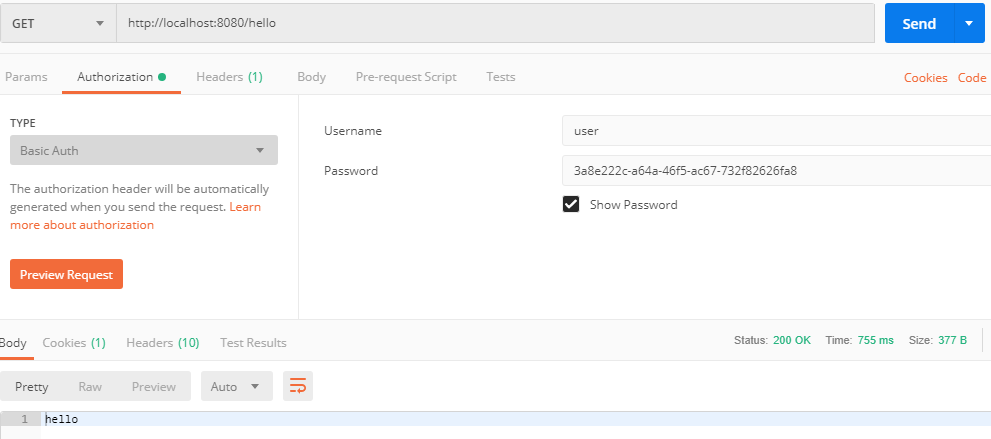
通過以上兩種不同的登錄方式,可以看出,Spring Security 支持兩種不同的認證方式:
可以通過 form 表單來認證 可以通過 HttpBasic 來認證3.用戶名配置
默認情況下,登錄的用戶名是 user ,密碼則是項目啟動時隨機生成的字符串,可以從啟動的控制臺日志中看到默認密碼:
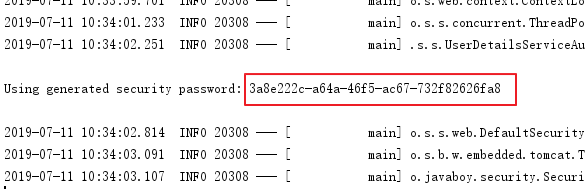
這個隨機生成的密碼,每次啟動時都會變。對登錄的用戶名/密碼進行配置,有三種不同的方式:
在 application.properties 中進行配置 通過 Java 代碼配置在內存中 通過 Java 從數據庫中加載前兩種比較簡單,第三種代碼量略大,本文就先來看看前兩種,第三種后面再單獨寫文章介紹,也可以參考我的微人事項目。
3.1 配置文件配置用戶名/密碼
可以直接在 application.properties 文件中配置用戶的基本信息:
spring.security.user.name=javaboyspring.security.user.password=123
配置完成后,重啟項目,就可以使用這里配置的用戶名/密碼登錄了。
3.2 Java 配置用戶名/密碼
也可以在 Java 代碼中配置用戶名密碼,首先需要我們創建一個 Spring Security 的配置類,集成自 WebSecurityConfigurerAdapter 類,如下:
@Configurationpublic class SecurityConfig extends WebSecurityConfigurerAdapter { @Override protected void configure(AuthenticationManagerBuilder auth) throws Exception { //下面這兩行配置表示在內存中配置了兩個用戶 auth.inMemoryAuthentication() .withUser('javaboy').roles('admin').password('$2a$10$OR3VSksVAmCzc.7WeaRPR.t0wyCsIj24k0Bne8iKWV1o.V9wsP8Xe') .and() .withUser('lisi').roles('user').password('$2a$10$p1H8iWa8I4.CA.7Z8bwLjes91ZpY.rYREGHQEInNtAp4NzL6PLKxi'); } @Bean PasswordEncoder passwordEncoder() { return new BCryptPasswordEncoder(); }}
這里我們在 configure 方法中配置了兩個用戶,用戶的密碼都是加密之后的字符串(明文是 123),從 Spring5 開始,強制要求密碼要加密,如果非不想加密,可以使用一個過期的 PasswordEncoder 的實例 NoOpPasswordEncoder,但是不建議這么做,畢竟不安全。
Spring Security 中提供了 BCryptPasswordEncoder 密碼編碼工具,可以非常方便的實現密碼的加密加鹽,相同明文加密出來的結果總是不同,這樣就不需要用戶去額外保存鹽的字段了,這一點比 Shiro 要方便很多。
4.登錄配置
對于登錄接口,登錄成功后的響應,登錄失敗后的響應,我們都可以在 WebSecurityConfigurerAdapter 的實現類中進行配置。例如下面這樣:
@Configurationpublic class SecurityConfig extends WebSecurityConfigurerAdapter { @Autowired VerifyCodeFilter verifyCodeFilter; @Override protected void configure(HttpSecurity http) throws Exception { http.addFilterBefore(verifyCodeFilter, UsernamePasswordAuthenticationFilter.class); http .authorizeRequests()//開啟登錄配置 .antMatchers('/hello').hasRole('admin')//表示訪問 /hello 這個接口,需要具備 admin 這個角色 .anyRequest().authenticated()//表示剩余的其他接口,登錄之后就能訪問 .and() .formLogin() //定義登錄頁面,未登錄時,訪問一個需要登錄之后才能訪問的接口,會自動跳轉到該頁面 .loginPage('/login_p') //登錄處理接口 .loginProcessingUrl('/doLogin') //定義登錄時,用戶名的 key,默認為 username .usernameParameter('uname') //定義登錄時,用戶密碼的 key,默認為 password .passwordParameter('passwd') //登錄成功的處理器 .successHandler(new AuthenticationSuccessHandler() { @Override public void onAuthenticationSuccess(HttpServletRequest req, HttpServletResponse resp, Authentication authentication) throws IOException, ServletException { resp.setContentType('application/json;charset=utf-8'); PrintWriter out = resp.getWriter(); out.write('success'); out.flush(); } }) .failureHandler(new AuthenticationFailureHandler() { @Override public void onAuthenticationFailure(HttpServletRequest req, HttpServletResponse resp, AuthenticationException exception) throws IOException, ServletException { resp.setContentType('application/json;charset=utf-8'); PrintWriter out = resp.getWriter(); out.write('fail'); out.flush(); } }) .permitAll()//和表單登錄相關的接口統統都直接通過 .and() .logout() .logoutUrl('/logout') .logoutSuccessHandler(new LogoutSuccessHandler() { @Override public void onLogoutSuccess(HttpServletRequest req, HttpServletResponse resp, Authentication authentication) throws IOException, ServletException { resp.setContentType('application/json;charset=utf-8'); PrintWriter out = resp.getWriter(); out.write('logout success'); out.flush(); } }) .permitAll() .and() .httpBasic() .and() .csrf().disable(); }}
我們可以在 successHandler 方法中,配置登錄成功的回調,如果是前后端分離開發的話,登錄成功后返回 JSON 即可,同理,failureHandler 方法中配置登錄失敗的回調,logoutSuccessHandler 中則配置注銷成功的回調。
5.忽略攔截
如果某一個請求地址不需要攔截的話,有兩種方式實現:
設置該地址匿名訪問 直接過濾掉該地址,即該地址不走 Spring Security 過濾器鏈推薦使用第二種方案,配置如下:
@Configurationpublic class SecurityConfig extends WebSecurityConfigurerAdapter { @Override public void configure(WebSecurity web) throws Exception { web.ignoring().antMatchers('/vercode'); }}
Spring Security 另外一個強大之處就是它可以結合 OAuth2 ,玩出更多的花樣出來,這些我們在后面的文章中再和大家細細介紹。
到此這篇關于手把手帶你入門 Spring Security的文章就介紹到這了,更多相關入門 Spring Security內容請搜索好吧啦網以前的文章或繼續瀏覽下面的相關文章希望大家以后多多支持好吧啦網!
相關文章:

 網公網安備
網公網安備