Android AlertDialog的幾種用法詳解
xml代碼:
<?xml version='1.0' encoding='utf-8'?><LinearLayout xmlns:android='http://schemas.android.com/apk/res/android' xmlns:app='http://schemas.android.com/apk/res-auto' xmlns:tools='http://schemas.android.com/tools' android:layout_width='match_parent' android:layout_height='match_parent' android:orientation='vertical' tools:context='com.example.lesson7_3_id19_alertdialog.MainActivity'> <Buttonandroid:layout_width='match_parent'android:layout_height='wrap_content'android:text='簡單的dialog'android:onClick='dialog_1'/> <Buttonandroid:layout_width='match_parent'android:layout_height='wrap_content'android:text='列表的dialog'android:onClick='dialog_2'/> <Buttonandroid:layout_width='match_parent'android:layout_height='wrap_content'android:text='單選的dialog'android:onClick='dialog_3'/> <Buttonandroid:layout_width='match_parent'android:layout_height='wrap_content'android:text='多選的dialog'android:onClick='dialog_4'/> <Buttonandroid:layout_width='match_parent'android:layout_height='wrap_content'android:text='自定義View的dialog'android:onClick='dialog_5'/> <Buttonandroid:layout_width='match_parent'android:layout_height='wrap_content'android:text='使用adapter的dialog'android:onClick='dialog_6'/></LinearLayout>
java代碼:
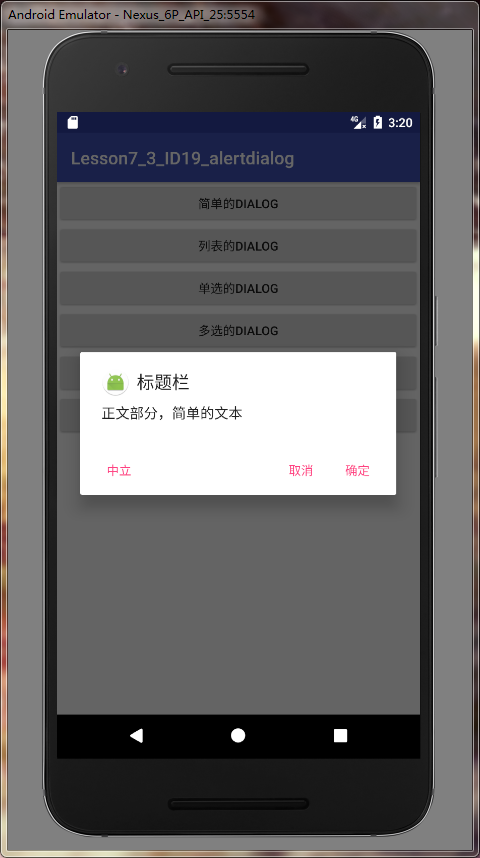
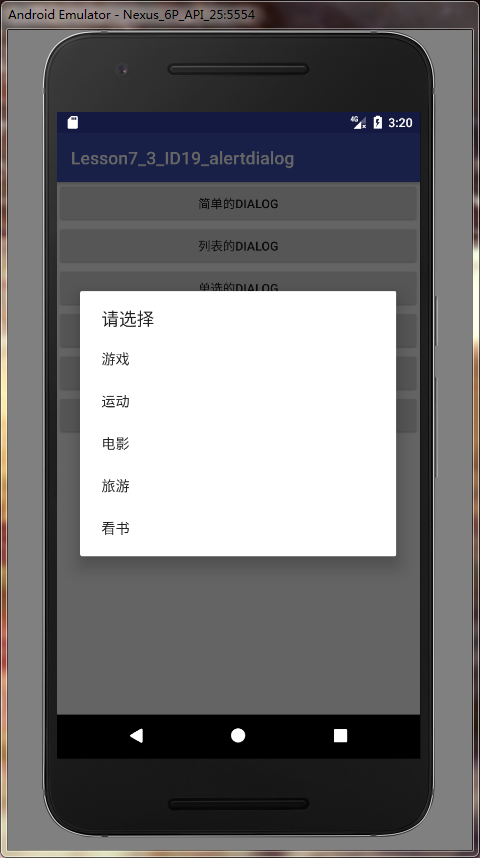
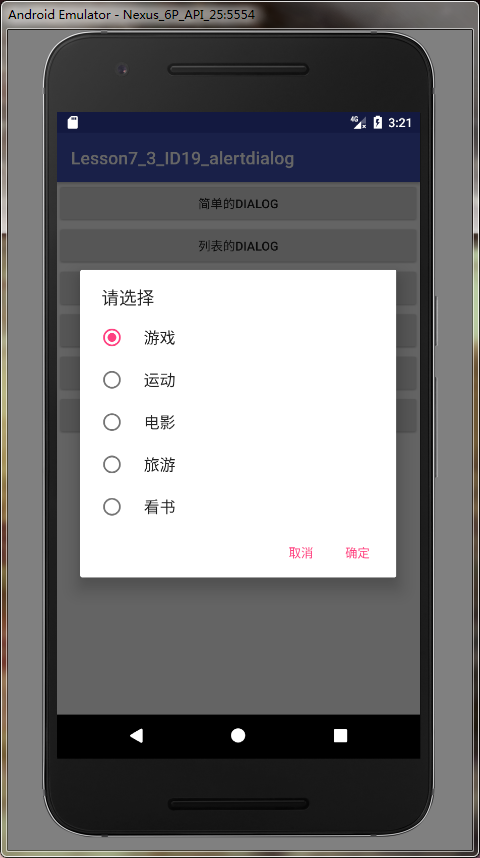
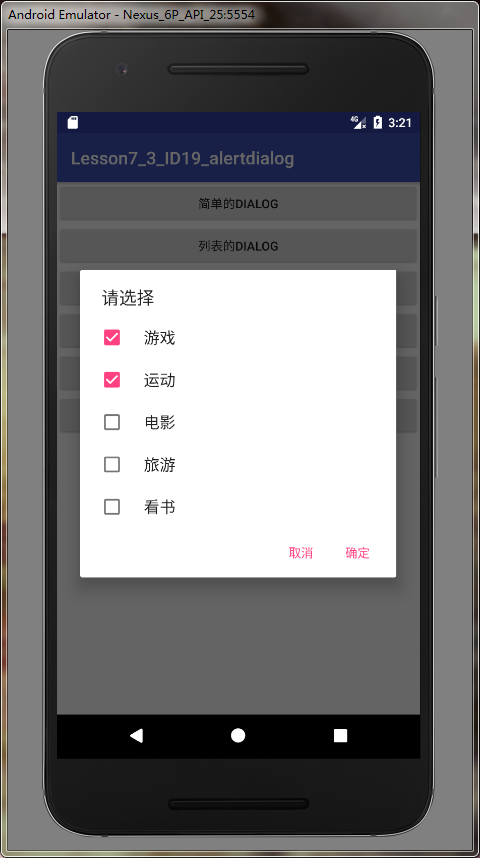
package com.example.lesson7_3_id19_alertdialog;import android.app.AlertDialog;import android.content.DialogInterface;import android.os.Bundle;import android.support.v7.app.AppCompatActivity;import android.view.View;import android.widget.ArrayAdapter;import android.widget.EditText;import android.widget.Toast;public class MainActivity extends AppCompatActivity { @Override protected void onCreate(Bundle savedInstanceState) {super.onCreate(savedInstanceState);setContentView(R.layout.activity_main); } public void dialog_1(View v){AlertDialog.Builder builder = new AlertDialog.Builder(this);builder.setIcon(R.mipmap.ic_launcher_round);builder.setTitle('標題欄');builder.setMessage('正文部分,簡單的文本');builder.setPositiveButton('確定',new DialogInterface.OnClickListener() { @Override public void onClick(DialogInterface dialog, int which) {Toast.makeText(MainActivity.this, '點擊了確定', Toast.LENGTH_SHORT).show(); }});builder.setNegativeButton('取消',null);builder.setNeutralButton('中立',null);AlertDialog alertDialog = builder.create();alertDialog.show(); } private String [] item = {'游戲','運動','電影','旅游','看書'}; public void dialog_2(View v){AlertDialog.Builder builder = new AlertDialog.Builder(this);builder.setTitle('請選擇');builder.setItems(item, new DialogInterface.OnClickListener() { @Override public void onClick(DialogInterface dialog, int which) {Toast.makeText(MainActivity.this, '選擇了'+item[which], Toast.LENGTH_SHORT).show(); }});// 取消可以不添加//builder.setNegativeButton('取消',null);AlertDialog alertDialog = builder.create();alertDialog.show(); } int index; public void dialog_3(View v){AlertDialog.Builder builder = new AlertDialog.Builder(this);builder.setTitle('請選擇');builder.setSingleChoiceItems(item, index, new DialogInterface.OnClickListener() { @Override public void onClick(DialogInterface dialog, int which) {index = which; }});builder.setPositiveButton('確定', new DialogInterface.OnClickListener() { @Override public void onClick(DialogInterface dialog, int which) {Toast.makeText(MainActivity.this, '選擇了'+item[index], Toast.LENGTH_SHORT).show(); }});builder.setNegativeButton('取消',null);AlertDialog alertDialog = builder.create();alertDialog.show(); } // 設置boolean數(shù)組所有的選項設置默認沒選 boolean[] bools = {false,false,false,false,false}; public void dialog_4(View v){AlertDialog.Builder builder = new AlertDialog.Builder(this);builder.setTitle('請選擇');builder.setMultiChoiceItems(item, bools, new DialogInterface.OnMultiChoiceClickListener() { @Override public void onClick(DialogInterface dialog, int which, boolean isChecked) {bools[which] = isChecked; }});builder.setPositiveButton('確定', new DialogInterface.OnClickListener() { @Override public void onClick(DialogInterface dialog, int which) {StringBuffer sb = new StringBuffer();for (int i = 0; i < item.length; i++) { if (bools[i]) { sb.append(item[i] + ' '); }}Toast.makeText(MainActivity.this, '選擇了' + sb.toString(), Toast.LENGTH_SHORT).show(); }});builder.setNegativeButton('取消',null);AlertDialog alertDialog = builder.create();alertDialog.show(); } public void dialog_5(View v){AlertDialog.Builder builder = new AlertDialog.Builder(this);builder.setTitle('連接wifi');final EditText et = new EditText(this);et.setHint('請輸入密碼');et.setSingleLine(true);builder.setView(et);builder.setNegativeButton('取消',null);builder.setPositiveButton('確定', new DialogInterface.OnClickListener() { @Override public void onClick(DialogInterface dialog, int which) {String password = et.getText().toString();if (password.equals('123456')) { Toast.makeText(MainActivity.this, '連接成功', Toast.LENGTH_SHORT).show();}else{ Toast.makeText(MainActivity.this, '密碼錯誤', Toast.LENGTH_SHORT).show();} }});AlertDialog alertDialog = builder.create();alertDialog.show(); } public void dialog_6(View v){ArrayAdapter<String> adapter = new ArrayAdapter<String>(this,android.R.layout.simple_list_item_1,item);AlertDialog.Builder builder = new AlertDialog.Builder(this);builder.setTitle('使用適配器');builder.setAdapter(adapter, new DialogInterface.OnClickListener() { @Override public void onClick(DialogInterface dialog, int which) {Toast.makeText(MainActivity.this, '選擇了'+item[which], Toast.LENGTH_SHORT).show(); }});AlertDialog alertDialog = builder.create();alertDialog.show(); }}
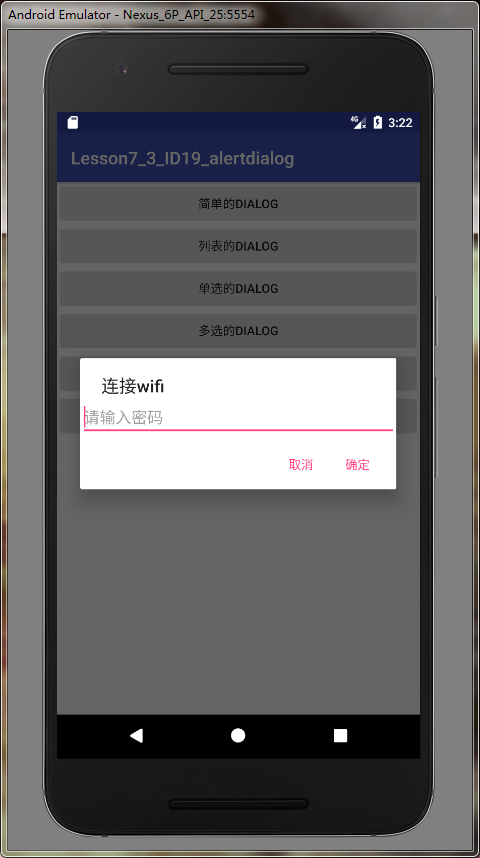
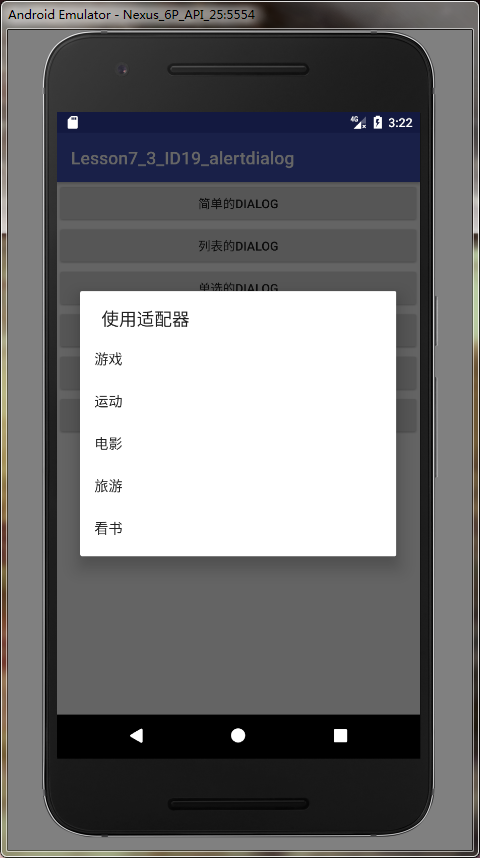
到此這篇關于Android AlertDialog的幾種用法詳解的文章就介紹到這了,更多相關Android AlertDialog方法內(nèi)容請搜索好吧啦網(wǎng)以前的文章或繼續(xù)瀏覽下面的相關文章希望大家以后多多支持好吧啦網(wǎng)!
相關文章:
1. 什么是python的自省2. Springboot Druid 自定義加密數(shù)據(jù)庫密碼的幾種方案3. Spring Boot和Thymeleaf整合結合JPA實現(xiàn)分頁效果(實例代碼)4. 解決Android studio xml界面無法預覽問題5. 詳解Android studio 動態(tài)fragment的用法6. Vuex localStorage的具體使用7. IntelliJ IDEA安裝插件的方法步驟8. php模擬實現(xiàn)斗地主發(fā)牌9. Vue封裝一個TodoList的案例與瀏覽器本地緩存的應用實現(xiàn)10. 使用Android studio查看Kotlin的字節(jié)碼教程
 網(wǎng)公網(wǎng)安備