Vue使用el-tree 懶加載進(jìn)行增刪改查功能的實(shí)現(xiàn)
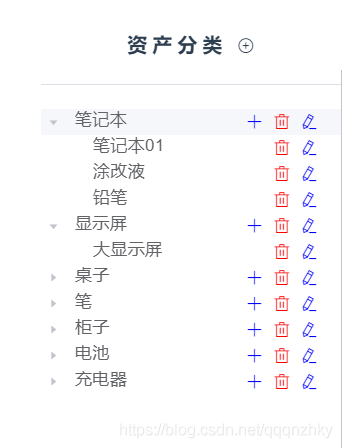
關(guān)于vue的樹(shù)形展示 使用到項(xiàng)目:以樹(shù)的形式異步展現(xiàn)效果圖先放:
找到element-ui的官方文檔,el-tree。(地址:https://element.eleme.cn/#/zh-CN/component/tree )
項(xiàng)目需求:以懶加載的形式展示,目錄根據(jù)需求需要有新增 編輯 刪除 操作以及操作后的刷新樹(shù)結(jié)構(gòu)
那我們現(xiàn)在開(kāi)始吧
一、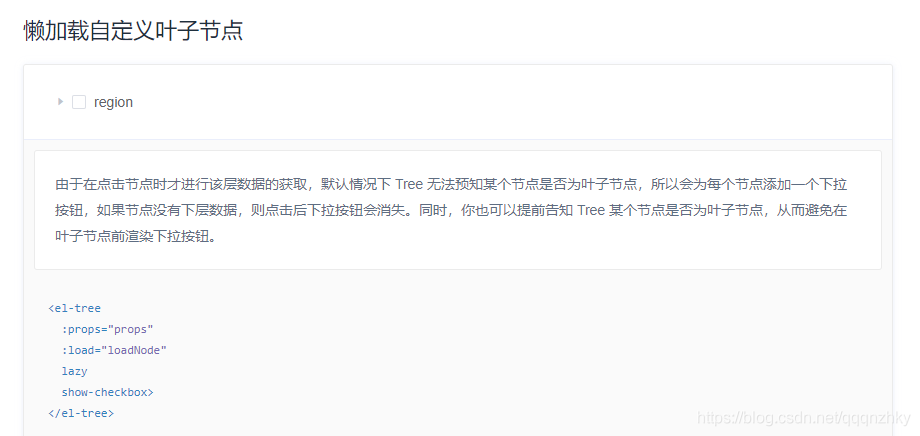
懶加載:Tree的懶加載,用一個(gè)屬性控制:lazy。使用lazy,就要使用load來(lái)加載數(shù)據(jù)進(jìn)行渲染樹(shù)原理:初始化觸發(fā)load函數(shù)先加載初始數(shù)據(jù),通過(guò)點(diǎn)擊某個(gè)節(jié)點(diǎn),觸發(fā)load函數(shù),來(lái)加載這個(gè)節(jié)點(diǎn)下的子節(jié)點(diǎn)。優(yōu)點(diǎn):適合數(shù)據(jù)量比較大的時(shí)候,對(duì)部分節(jié)點(diǎn)刷新也比較友好
二、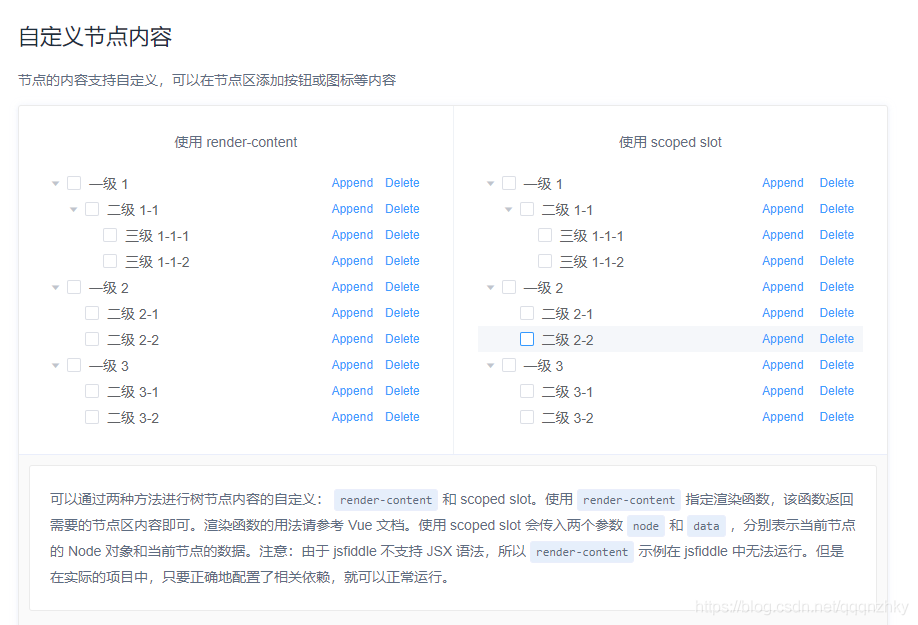
自定義節(jié)點(diǎn):節(jié)點(diǎn)后添加操作按鈕
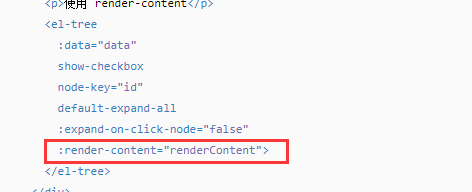
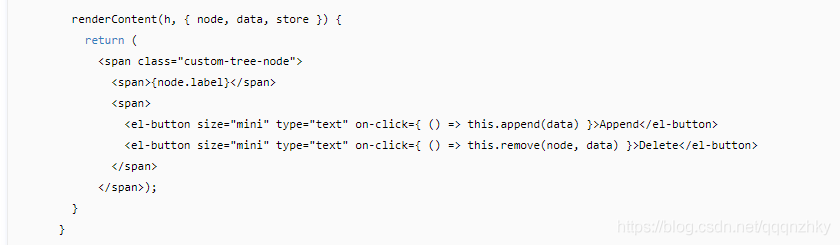
簡(jiǎn)單例子官網(wǎng)上就有示例
**
主要講講更新節(jié)點(diǎn)
**當(dāng)對(duì)節(jié)點(diǎn)進(jìn)行編輯、刪除時(shí),需要更新樹(shù),只需更新節(jié)點(diǎn),不必更新全部的樹(shù)即可。原理:更新節(jié)點(diǎn),其實(shí)更新的是該節(jié)點(diǎn)的子節(jié)點(diǎn),不包括本節(jié)點(diǎn)。刪除該節(jié)點(diǎn)的子節(jié)點(diǎn),重新請(qǐng)求數(shù)據(jù)獲取本節(jié)點(diǎn)的子節(jié)點(diǎn)數(shù)據(jù)進(jìn)行重新渲染。
// refreshNode:要刷新的節(jié)點(diǎn);newNodeData:新的子節(jié)點(diǎn)數(shù)據(jù)refreshNode.splice(0, refreshNode.length);refreshNode.doCreateChildren(newNodeData);
理解一下:1>.方法node-click調(diào)用函數(shù)menuNodeClick,記錄點(diǎn)擊的節(jié)點(diǎn)信息,對(duì)節(jié)點(diǎn)操作前,必然先點(diǎn)擊選中某個(gè)節(jié)點(diǎn)。此函數(shù)監(jiān)聽(tīng)點(diǎn)擊節(jié)點(diǎn)事件,只要點(diǎn)擊了節(jié)點(diǎn),就觸發(fā):
menuNodeClick(data, node, treeNode) { this.selectNodeData = data this.selectNode = node}
2>.節(jié)點(diǎn)操作后刷新節(jié)點(diǎn)即可,通過(guò)不同場(chǎng)景可以選擇刷新本節(jié)點(diǎn)(node)還是刷新本節(jié)點(diǎn)的父節(jié)點(diǎn)(node.parent):
/*** 刷新節(jié)點(diǎn)數(shù)據(jù)* @node [node/Object]: 刷新的節(jié)點(diǎn)node,刷新node以下的所有節(jié)點(diǎn)* @type [String]: node的類(lèi)型,’node’表示node是樹(shù)的節(jié)點(diǎn)信息Node;’data’表示node是樹(shù)節(jié)點(diǎn)信息中的data數(shù)據(jù)*/refreshTreeNode(node, type) { let refreshNode; // 拿到要更新節(jié)點(diǎn)的子節(jié)點(diǎn) if(type === ’node’) {refreshNode = node.childNodes }else if(type === ’data’) {let getNode = this.$refs.tree.getNode(node)refreshNode = getNode.childNodes } // 刪除原有的子節(jié)點(diǎn) refreshNode.splice(0, refreshNode.length); //重新請(qǐng)求數(shù)據(jù),更新節(jié)點(diǎn) this.requestTreeNode(node)}
3.選擇框checkBox:
如果懶加載中,有選擇框,需要將有選擇框的數(shù)據(jù)加載出來(lái),然后通過(guò)屬性default-checked-keys來(lái)勾選,通過(guò)default-expanded-keys設(shè)置展開(kāi)的節(jié)點(diǎn)。
4.單選:如果在懶加載中,有單選項(xiàng),則設(shè)置選中即可:
// 設(shè)置當(dāng)前節(jié)點(diǎn)選中this.$refs.tree.setCurrentKey( this.selectNodeData[this.nodeKey])
不管是單選還是多選,在第一次加載時(shí),后臺(tái)要給的,不只是選中信息,還需要選中節(jié)點(diǎn)所在分支的所有節(jié)點(diǎn)信息,賦值給default-expanded-keys以便可使節(jié)點(diǎn)所在分支從上到選擇項(xiàng)都展開(kāi)。但往往,后臺(tái)可能給的,只是選中值的信息,這就要前端自己封裝數(shù)據(jù),獲取需要展開(kāi)的分支信息。根據(jù)數(shù)據(jù)格式不同,用不同的方法1)樹(shù)形單層數(shù)據(jù)格式:
[ {...}, {...}, {...}]
這種格式的數(shù)據(jù),【點(diǎn)擊一層,加載一層】、【點(diǎn)擊一層,加載該點(diǎn)擊層的多層子節(jié)點(diǎn)】?jī)煞N情況都可以滿(mǎn)足。第一種不需要進(jìn)行數(shù)據(jù)處理;第二種情況,需要在每條數(shù)據(jù)中注入一個(gè)字段,用來(lái)關(guān)聯(lián)父子節(jié)點(diǎn),然后將數(shù)據(jù)封裝處理成el-tree所需要的格式,用一個(gè)遞歸函數(shù)整合數(shù)據(jù)(假設(shè)關(guān)聯(lián)字段為parentId,nodeKey為id,樹(shù)的子節(jié)點(diǎn)字段為children,需要加載id為’N’的多層子節(jié)點(diǎn))(注:遞歸函數(shù)會(huì)影響性能,謹(jǐn)慎使用)
2).多層數(shù)據(jù)(假設(shè)子節(jié)點(diǎn)的屬性名是children)
[ {...,children: [ {...,children: [ {...,children: [...], }, {...,children: [...], }] }, {...,children: [ {...,children: [...], }] }] } ]
這種格式的數(shù)據(jù),單層、多層都可以滿(mǎn)足,不需要做處理。選中值整合并展開(kāi)選中值所在的樹(shù):多層數(shù)據(jù)可由后臺(tái)給出選中節(jié)點(diǎn)所在的整個(gè)分支的值,賦給default-expanded-keys進(jìn)行展開(kāi)。也可以自己做篩選,寫(xiě)一個(gè)遞歸函數(shù),將多層數(shù)據(jù)循環(huán),找到選中值的節(jié)點(diǎn)的分支來(lái)設(shè)置展開(kāi)(假設(shè)nodeKey為id,樹(shù)的子節(jié)點(diǎn)字段為children,需要展開(kāi)id為’N’的節(jié)點(diǎn)所在的整個(gè)分支)
懶加載示例:HTML控件:
<el-tree :data='treeData' :props='defaultProps' :load='loadNodeTree' @node-click='handleNodeClick' lazy :expand-on-click-node='false' :default-expanded-keys='[’1’]' node-key='id' :highlight-current='true' > <span slot-scope='{ node, data }'> <span class='treeLeft'>{{ node.label }}</span> <span class='treeRight'><i v-if='node.level === 1' @click='() => appendNode(node, data)' ></i><!--增加分組--><!-- 根節(jié)點(diǎn)不需要?jiǎng)h除和重命名 --><i v-if='data.id !== 0' @click='() => deleteNode(node, data)' ></i><!--刪除分組--><i v-if='data.id !== 0' @click='() => editNode(node, data)' ></i><!--重命名分組--> </span> </span> </el-tree>
vue:data里面定義變量
// 樹(shù)形菜單 treeData: [], // 樹(shù)節(jié)點(diǎn) defaultProps: { // 修改el-tree默認(rèn)data數(shù)組參數(shù)children: ’children’,label: ’name’,id: ’id’,parentId: ’parentId’,isLeaf: ’leaf’ // 指定節(jié)點(diǎn)是否為葉子節(jié)點(diǎn),僅在指定了 lazy 屬性的情況下生效 },
methods:加載樹(shù)形菜單部分
// 加載 樹(shù)數(shù)據(jù) loadNodeTree(node, resolve) { const that = this if (node.level === 0) {that.loadtreeData(node, resolve) } else if (node.level === 1) {that.getChildByList(node, resolve) } }, // 獲取loadtreeData 就是父節(jié)點(diǎn)數(shù)據(jù),getChildByList就是異步獲取子節(jié)點(diǎn)數(shù)據(jù) loadtreeData(nodeData, resolve) { const dataType = {pageIndex: 1,pageSize: 100000 } getAlltype(dataType).then(res => { const rootChildren = [] if (res.code === 200) { const data = res.data.list data.map(item => { rootChildren.push({name: item.typeName,parentId: ’’,id: item.id,leaf: false,children: [] }) }) //如果resolve有內(nèi)容就是懶加載走查詢(xún) 否則走的是修改 if (resolve) { resolve(rootChildren) } else { nodeData.childNodes = [] nodeData.doCreateChildren(rootChildren) } } else { resolve([]) }}) }, // 獲取子節(jié)點(diǎn)請(qǐng)求 getChildByList(nodeData, resolve) { var _parentID = nodeData.data.id const typeSpec = {typeId: _parentID,pageIndex: 1,pageSize: 100000 } getAlltypeSpec(typeSpec).then(res => {const rootChildren = []if (res.code === 200) { const data = res.data.list data.map(item => { rootChildren.push({ name: item.description, parentId: item.typeId, id: item.id, leaf: true, children: [] }) }) if (resolve) { resolve(rootChildren) } else { nodeData.childNodes = [] nodeData.doCreateChildren(rootChildren) }} else { return false} }).catch(err => {console.log(err) }) }, // 節(jié)點(diǎn)點(diǎn)擊事件 handleNodeClick(data, node) { this.addnode = node this.adddata = data if (node.level === 1) {this.queryForm.typeId = node.data.idthis.queryForm.typeSpecId = ’’ } else if (node.level === 2) {this.queryForm.typeId = node.data.parentIdthis.queryForm.typeSpecId = node.data.id } this.query() },
節(jié)點(diǎn)操作:增加節(jié)點(diǎn) 修改節(jié)點(diǎn) 刪除節(jié)點(diǎn) (操作自己節(jié)點(diǎn)要傳父節(jié)點(diǎn)信息才能找到自己當(dāng)前節(jié)點(diǎn),操作子節(jié)點(diǎn)就傳當(dāng)前節(jié)點(diǎn) 結(jié)論:父節(jié)點(diǎn)操作子節(jié)點(diǎn))
// 樹(shù)節(jié)點(diǎn)增加 類(lèi)型規(guī)格 appendNode(node, data) { this.addTypesSpec = {typeName: node.data.name,typeId: node.data.id } this.createTypesSpecDialog = true }, // 樹(shù)類(lèi)型修改 editNode(node, data) { const typeId = node.data.parentId // 一級(jí) 類(lèi)型 if (node.level === 1) {this.editTypesDialog = truethis.editTypes = { id: node.data.id, typeName: node.data.name} } else {this.editTypesSpecDialog = truethis.getSelectTypes()// this.editTypesSpec = Object.assign({}, node.data)this.editTypesSpec = { typeId: typeId, id: node.data.id, description: node.data.name} } }, // 樹(shù)類(lèi)型刪除 deleteNode(node, data) { // 一級(jí) 類(lèi)型 if (node.level === 1) {this.$msgbox.confirm(’此操作將刪除資產(chǎn)類(lèi)型數(shù)據(jù), 是否繼續(xù)?’, ’刪除提示’, { confirmButtonText: ’確定’, cancelButtonText: ’取消’, type: ’warning’}).then(() => { typeDel(node.data.id).then( resp => { this.$message(’刪除成功’) this.query() this.loadNodeTree(node.parent) }, err => { console.log(’err’, err) } )}).catch(() => { this.$message.error(’已取消’)}) } else {this.$msgbox.confirm(’此操作將刪除資產(chǎn)類(lèi)型規(guī)格數(shù)據(jù), 是否繼續(xù)?’, ’刪除提示’, { confirmButtonText: ’確定’, cancelButtonText: ’取消’, type: ’warning’}).then(() => { typeSpecDel(node.data.id).then( resp => { this.loadNodeTree(node.parent) this.$message(’刪除成功’) this.query() }, err => { console.log(’err’, err) } )}).catch(() => { this.$message.error(’已取消’)}) } },
節(jié)點(diǎn)觸發(fā)之后顯示彈框 走正常的彈框增加修改刪除操作,只不過(guò)在提交后臺(tái)請(qǐng)求返回操作成功之后需要再一次加載樹(shù)形結(jié)構(gòu) 所以在這里再一次調(diào)用加載樹(shù)形方法,傳的node 當(dāng)觸發(fā)點(diǎn)擊樹(shù)形的時(shí)候可以保存一下,我的是handleNodeClick這個(gè)方法 不管點(diǎn)擊修改 增加還是刪除都保存下點(diǎn)擊的node
this.$message(’編輯成功’) this.loadNodeTree(this.addnode.parent)
1.設(shè)置展開(kāi)和收縮
if (!node.expanded) { node.expand();}else { node.collapse();}
2.獲取父節(jié)點(diǎn)
node.parent
看得懂的就看吧 代碼可以?xún)?yōu)化 但是最近沒(méi)啥時(shí)間 看不懂的能清楚這個(gè)邏輯也行啊 下次見(jiàn)
到此這篇關(guān)于Vue使用el-tree 懶加載進(jìn)行增刪改查的文章就介紹到這了,更多相關(guān)Vue el-tree 懶加載內(nèi)容請(qǐng)搜索好吧啦網(wǎng)以前的文章或繼續(xù)瀏覽下面的相關(guān)文章希望大家以后多多支持好吧啦網(wǎng)!
相關(guān)文章:
1. ASP新手必備的基礎(chǔ)知識(shí)2. asp文件用什么軟件編輯3. CentOS郵箱服務(wù)器搭建系列——SMTP服務(wù)器的構(gòu)建( Postfix )4. js實(shí)現(xiàn)計(jì)算器功能5. golang中json小談之字符串轉(zhuǎn)浮點(diǎn)數(shù)的操作6. 通過(guò)IEAD+Maven快速搭建SSM項(xiàng)目的過(guò)程(Spring + Spring MVC + Mybatis)7. 利用CSS制作3D動(dòng)畫(huà)8. IDEA 2020.1.2 安裝教程附破解教程詳解9. Vue axios獲取token臨時(shí)令牌封裝案例10. JS中6個(gè)對(duì)象數(shù)組去重的方法

 網(wǎng)公網(wǎng)安備