js實現網頁計算器
如何在利用HTML,css和js的知識制作一個簡單的網頁計算器呢?
一個計算機中具備了:
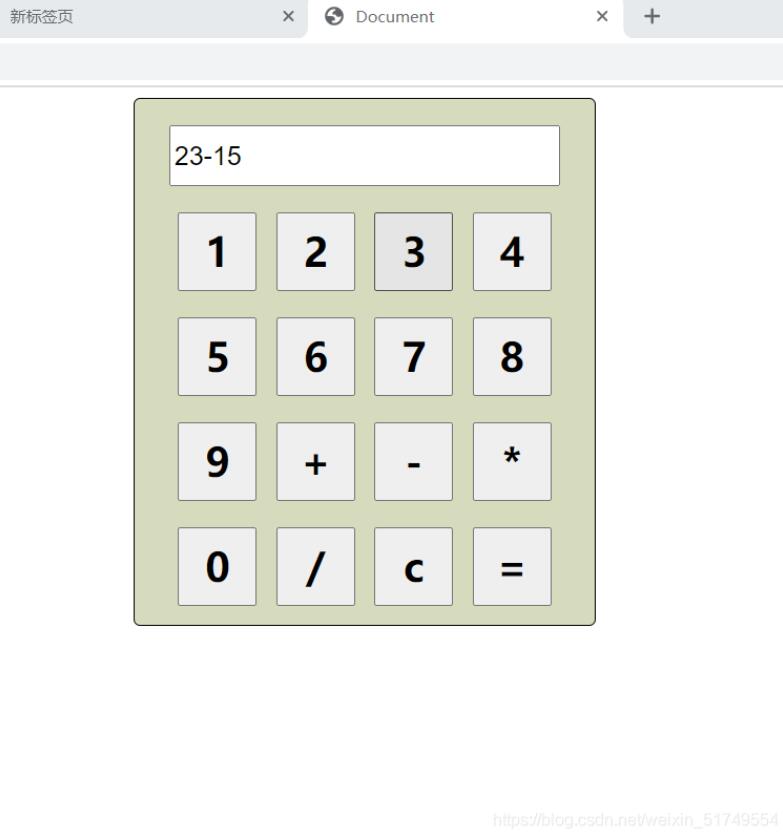
計算機整體框 輸入框 輸入按鈕計算機整體框:
/*設置div樣式*/ #showdiv{ border: solid 1px; border-radius: 5px; width: 350px; height: 400px; text-align: center; margin: auto;/*設置居中*/ margin-top: 50x; background-color: rgb(214, 219, 190); }
輸入框:
/*設置輸入框樣式*/ input[type=text]{ margin-top: 20px; width: 290px; height: 40px; font-size: 20px;}
輸入按鈕:
/*設置按鈕樣式*/ input[type=button]{ width: 60px; height: 60px; margin-top: 20px; margin-left: 5px; margin-right: 5px; font-size: 30px; font-weight: bolder; font-family: '楷書';}
使用js代碼對執行對應業務邏輯操作:
<!--聲明js代碼--><script> function test(btn){//獲取button按鈕對象var number = btn.value;//執行對應的業務邏輯switch (number) { case '=':document.getElementById('input').value= eval(document.getElementById('input').value);break; case 'c':document.getElementById('input').value='';break; default://將按鈕的值賦值給input輸入框document.getElementById('input').value+=number;break;} }</script>
使用HTML對計算機進行排版布局:
<body> <div id='showdiv'><input type='text' readonly='readonly'><br><input type='button' value='1' onclick='test(this)'><input type='button' value='2' onclick='test(this)'><input type='button' value='3' onclick='test(this)'><input type='button' value='4' onclick='test(this)'><br><input type='button' value='5' onclick='test(this)'><input type='button' value='6' onclick='test(this)'><input type='button' value='7' onclick='test(this)'><input type='button' value='8' onclick='test(this)'><br><input type='button' value='9' onclick='test(this)'><input type='button' value='+' onclick='test(this)'><input type='button' value='-' onclick='test(this)'><input type='button' value='*' onclick='test(this)'><br><input type='button' value='0' onclick='test(this)'><input type='button' value='/' onclick='test(this)'><input type='button' value='c' onclick='test(this)'><input type='button' value='=' onclick='test(this)'> </div></body>
總體代碼:
<!DOCTYPE html><html lang='en'><head> <meta charset='UTF-8'> <meta http-equiv='X-UA-Compatible' content='IE=edge'> <meta name='viewport' content='width=device-width, initial-scale=1.0'> <style>/*設置div樣式*/#showdiv{ border: solid 1px; border-radius: 5px; width: 350px; height: 400px; text-align: center; margin: auto;/*設置居中*/ margin-top: 50x; background-color: rgb(214, 219, 190); }/*設置輸入框樣式*/input[type=text]{ margin-top: 20px; width: 290px; height: 40px; font-size: 20px;}/*設置按鈕樣式*/input[type=button]{ width: 60px; height: 60px; margin-top: 20px; margin-left: 5px; margin-right: 5px; font-size: 30px; font-weight: bolder; font-family: '楷書';}</style><!--聲明js代碼--><script> function test(btn){//獲取button按鈕對象var number = btn.value;//執行對應的業務邏輯switch (number) { case '=':document.getElementById('input').value= eval(document.getElementById('input').value);break; case 'c':document.getElementById('input').value='';break; default://將按鈕的值賦值給input輸入框document.getElementById('input').value+=number;break;} }</script> <title>Document</title></head><body> <div id='showdiv'><input type='text' readonly='readonly'><br><input type='button' value='1' onclick='test(this)'><input type='button' value='2' onclick='test(this)'><input type='button' value='3' onclick='test(this)'><input type='button' value='4' onclick='test(this)'><br><input type='button' value='5' onclick='test(this)'><input type='button' value='6' onclick='test(this)'><input type='button' value='7' onclick='test(this)'><input type='button' value='8' onclick='test(this)'><br><input type='button' value='9' onclick='test(this)'><input type='button' value='+' onclick='test(this)'><input type='button' value='-' onclick='test(this)'><input type='button' value='*' onclick='test(this)'><br><input type='button' value='0' onclick='test(this)'><input type='button' value='/' onclick='test(this)'><input type='button' value='c' onclick='test(this)'><input type='button' value='=' onclick='test(this)'> </div></body></html>
實現效果:
你一定已經學會了前端網頁計算機的制作了吧!
以上就是本文的全部內容,希望對大家的學習有所幫助,也希望大家多多支持好吧啦網。
相關文章:
 網公網安備
網公網安備