js觀察者模式的彈幕案例
本文實例為大家分享了js觀察者模式的彈幕案例代碼,供大家參考,具體內(nèi)容如下
觀察者模式的彈幕案例
上代碼
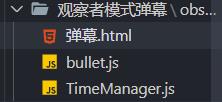
彈幕.html:
<!DOCTYPE html><html lang='en'><head> <meta charset='UTF-8'> <meta name='viewport' content='width=device-width, initial-scale=1.0'> <title>Document</title> <style> input{ width:1208px; height: 38px; font-size: 30px; position: absolute; } .div0{ width:1208px; height: 768px; position: relative; overflow: hidden; } video{ width:1208px; height: 720px; } </style></head><body> <div class='div0'> <video src='http://www.leifengta.com.cn/bcjs/y2mate.com - nylonjapan11_wjhIR0JdoXA_1080p.mp4' controls></video> <br> <input type='text'> </div> <script type='module'> import Bullet from './observer/Bullet.js';//導(dǎo)入模塊 var input=document.querySelector('input'); document.addEventListener('keyup',keyHandler);//input的鍵盤監(jiān)聽事件按回車實例化BUllet function keyHandler(e){ if(e.keyCode!==13) return; if(input.value.trim().length===0) return; var bullet=new Bullet(input.value); bullet.appendTo('.div0'); input.value=''; } </script></body></html>
bullet.js:
import TimeManager from './TimeManager.js';//導(dǎo)入觀察者export default class Bullet { rect; x; speed = 2; width; constructor(txt) { this.elem = this.createElem(txt); } //創(chuàng)建彈幕 createElem(txt) { if (this.elem) return this.elem; var div = document.createElement('div'); Object.assign(div.style, { whiteSpace: 'nowrap', position: 'absolute', }) div.textContent = txt return div; } //將彈幕隨機(jī)位置插入視屏中并且將彈幕插入到觀察者中的list數(shù)組中 appendTo(parent) { if (typeof parent === 'string') parent = document.querySelector(parent); parent.appendChild(this.elem); this.rect = parent.getBoundingClientRect(); Object.assign(this.elem.style, { top: Math.random() * this.rect.height / 4 + 'px', left: this.rect.width + 'px' }); this.x = this.rect.width; this.width = this.elem.offsetWidth; TimeManager.instance.add(this); } //使彈幕移動,并給限制如果彈幕移出視頻,則在list中刪除此元素 update() { if (!this.width) return; this.x -= this.speed; this.elem.style.left = this.x + 'px'; if (this.x < -this.width) { TimeManager.instance.remove(this); this.elem.remove(); this.elem = null; } }}
TimeManager.js:
export default class TimeManager { static _instance list = new set()//設(shè)置一個set類型的變量 ids constructor() { } static get instance() { //設(shè)置一個靜態(tài)方法,此為單例模式, if (!TimeManager._instance) { Object.defineProperty(TimeManager, ’_instance’, {value: new TimeManager() })//給TimeManager設(shè)置屬性如果沒有則賦值為實例并保存,有則直接給保存的實例 } return TimeManager._instance; } //將帶入的變量加入到list中如果list中有元素時則沒16ms調(diào)用updata方法 add(elem) { this.list.add(elem) if (this.list.size > 0 && !this.ids) { this.ids = setInterval(() => this.updata(), 16) } } //將帶入的變量從list中刪除,如果list中沒有變量了就將定時器關(guān)閉,銷毀定時器 remove(elem) { this.list.delete(elem) if (this.list.size === 0 && this.ids) { clearInterval(this.ids) this.ids = undefined } } //遍歷所有l(wèi)ist里的元素,如果元素帶有updata方法,則調(diào)用updata方法 updata() { this.list.forEach(item => { if (item.updata) item.updata }) }}
以上就是本文的全部內(nèi)容,希望對大家的學(xué)習(xí)有所幫助,也希望大家多多支持好吧啦網(wǎng)。
相關(guān)文章:
1. 什么是python的自省2. php模擬實現(xiàn)斗地主發(fā)牌3. 詳解Android studio 動態(tài)fragment的用法4. spring acegi security 1.0.0 發(fā)布5. MyBatis中的JdbcType映射使用詳解6. vue 使用localstorage實現(xiàn)面包屑的操作7. Vue封裝一個TodoList的案例與瀏覽器本地緩存的應(yīng)用實現(xiàn)8. Vuex localStorage的具體使用9. Python random庫使用方法及異常處理方案10. jQuery 實現(xiàn)DOM元素拖拽交換位置的實例代碼

 網(wǎng)公網(wǎng)安備