IntelliJ Idea2017如何修改緩存文件的路徑
IDEA的緩存文件夾.IntelliJIdea2017.1,存放著IDEA的破解密碼,各個項目的緩存,默認是在C盤的用戶目錄下,目前有1.5G大小。現在想要把它從C盤移出。
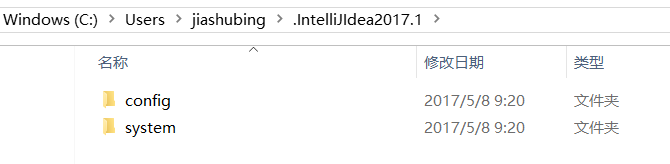
在IDEA的安裝路徑下中,進入bin目錄后找到屬性文件:idea.properties 用記事本打開,找到如下代碼段:
#---------------------------------------------------------------------# Uncomment this option if you want to customize path to IDE config folder. Make sure you’re using forward slashes.#---------------------------------------------------------------------# idea.config.path=${user.home}/.IntelliJIdea/config#---------------------------------------------------------------------# Uncomment this option if you want to customize path to IDE system folder. Make sure you’re using forward slashes.#---------------------------------------------------------------------# idea.system.path=${user.home}/.IntelliJIdea/system#---------------------------------------------------------------------# Uncomment this option if you want to customize path to user installed plugins folder. Make sure you’re using forward slashes.#---------------------------------------------------------------------# idea.plugins.path=${idea.config.path}/plugins
需要注意,在IDEA2017中,默認這些配置是注釋掉的,我在這可吃了大虧,沒想到配置沒有生效的原因是如此簡單。
更改配置文件如下:
#---------------------------------------------------------------------# Uncomment this option if you want to customize path to IDE config folder. Make sure you’re using forward slashes.#---------------------------------------------------------------------idea.config.path=E:/jiashubing/.IntelliJIdea/config#---------------------------------------------------------------------# Uncomment this option if you want to customize path to IDE system folder. Make sure you’re using forward slashes.#---------------------------------------------------------------------idea.system.path=E:/jiashubing/.IntelliJIdea/system#---------------------------------------------------------------------# Uncomment this option if you want to customize path to user installed plugins folder. Make sure you’re using forward slashes.#---------------------------------------------------------------------idea.plugins.path=${idea.config.path}/plugins
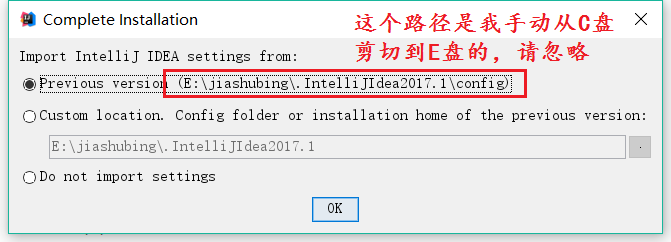
更改了以后重啟IDEA,會彈出如下界面Complete Installation,選擇Previous version
此時,在目錄下生成了一個.IntelliJIdea文件
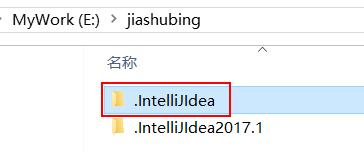
此時把.IntelliJIdea2017.1刪除了也可以,原來的項目也都能找得到
PS:初始緩存文件夾.IntelliJIdea2017.1的來歷,之前安裝的是IDEA2015,那時的緩存文件是.IntelliJIdea,后來將IDEA2015升級成了IDE2017,在同一個目錄下生成了這個.IntelliJIdea2017.1文件夾。可能是IDEA內部的某種設置,如果文件中已經存在了.IntelliJIdea文件,就要在后面增加版本號后綴。
以上就是本文的全部內容,希望對大家的學習有所幫助,也希望大家多多支持好吧啦網。
相關文章:

 網公網安備
網公網安備