詳解docker nginx 容器啟動(dòng)掛載到本地
首先nginx容器內(nèi)部的結(jié)構(gòu):
進(jìn)入容器:
docker exec -it b511b6049f57 bash
查看容器的結(jié)構(gòu)目錄:其實(shí)每一個(gè)容器就相當(dāng)于一個(gè)獨(dú)立的系統(tǒng)。
root@b511b6049f57:/# lsbin dev home lib64mnt proc run srv tmp varboot etc lib mediaopt root sbin sys usr
nginx的結(jié)構(gòu)目錄在容器中:
日志位置:/var/log/nginx/ 配置文件位置:/etc/nginx/ 項(xiàng)目位置:/usr/share/nginx/html如果你想在本地去添加location 需要把這些容器中的配置掛載到本地:
配置文件相對(duì)來(lái)說(shuō)有點(diǎn)麻煩,一般nginx只需要加載nginx.conf就可以了,在dokcer中,是首先加載nginx.conf,然后在nginx.conf有這么一行include /etc/nginx/conf.d/*.conf;,就是加載conf.d目錄下的配置文件。所以對(duì)于配置只需要掛載到conf.d,覆蓋掉即可。
在本地創(chuàng)建對(duì)應(yīng)的文件夾和主配置文件nginx.conf:
mkdir -p /home/test/nginx/{log,conf,html}touch nginx.conf
nginx.conf包含子配置文件(最后一行):
user nginx;worker_processes 1;error_log /var/log/nginx/error.log warn;pid /var/run/nginx.pid;events { worker_connections 1024;}http { include /etc/nginx/mime.types; default_type application/octet-stream; log_format main ’'$remote_addr' '$http_host' '[$time_local]' '$request' '$status' '$body_bytes_sent' ’ ’'$bytes_sent' '$gzip_ratio' '$http_referer' '$http_user_agent' '$http_x_forwarded_for' ’ ’'$upstream_addr' '$upstream_response_time' '$request_time' '$request_body' '$http_authorization' ’; access_log /var/log/nginx/access.log main; sendfile on; #tcp_nopush on; keepalive_timeout 65; #gzip on; include /etc/nginx/conf.d/*.conf;}
在 conf下創(chuàng)建一個(gè)默認(rèn)的default.conf:
server { listen 80; server_name localhost; #charset koi8-r; access_log /var/log/nginx/log/host.access.log main; location / { #root /data/nginx/html; root /usr/share/nginx/html; index index.html index.htm; #autoindex on; #try_files $uri /index/index/page.html; #try_files $uri /index/map/page.html; } #error_page 404 /404.html; # redirect server error pages to the static page /50x.html # error_page 500 502 503 504 /50x.html; location = /50x.html { root /usr/share/nginx/html; } location ~ /images { default_type application/json; return 200 ’{'code': 'A000000', 'message': 'ok', 'timestamp': '20180307184426', 'data': {'isvip': '1', 'monthProList': []}}’; } # proxy the PHP scripts to Apache listening on 127.0.0.1:80 # #location ~ .php$ { # proxy_pass http://127.0.0.1; #} # pass the PHP scripts to FastCGI server listening on 127.0.0.1:9000 # #location ~ .php$ { # root html; # fastcgi_pass 127.0.0.1:9000; # fastcgi_index index.php; # fastcgi_param SCRIPT_FILENAME /scripts$fastcgi_script_name; # include fastcgi_params; #} # deny access to .htaccess files, if Apache’s document root # concurs with nginx’s one # #location ~ /.ht { # deny all; #}}
準(zhǔn)備完成上面的本地文件以后開始啟動(dòng)容器掛載到本地相關(guān)配置文件:
docker run --name docker_nginx -d -p 80:80 -v /home/test/nginx/log:/var/log/nginx -v /home/test/nginx/conf:/etc/nginx/conf.d -v /home/test/nginx/nginx.conf:/etc/nginx/nginx.conf -v /home/test/nginx/html:/usr/share/nginx/html nginx### 第一個(gè)-v:掛載日志目錄 第二個(gè)-v:掛載配置目錄 第三個(gè)-v:掛載主配置文件 第四個(gè)-v:掛載項(xiàng)目目錄
掛載完成以后訪問(wèn)主頁(yè)面:
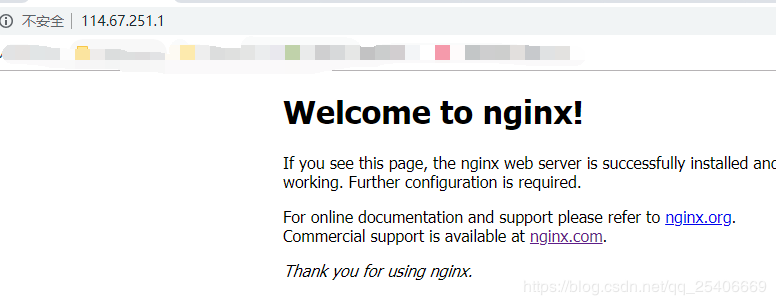
然后在訪問(wèn)我們之前在default寫的一個(gè)location /images:
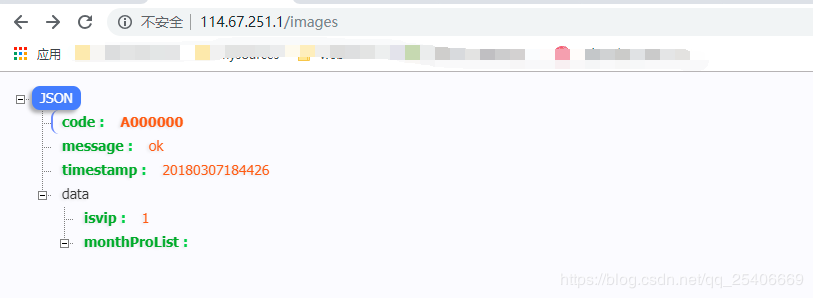
重啟nginx:
docker exec -it b511b6049f57 nginx -s reload
到此這篇關(guān)于詳解docker nginx 容器啟動(dòng)掛載到本地的文章就介紹到這了,更多相關(guān)docker nginx啟動(dòng)掛載內(nèi)容請(qǐng)搜索好吧啦網(wǎng)以前的文章或繼續(xù)瀏覽下面的相關(guān)文章希望大家以后多多支持好吧啦網(wǎng)!
相關(guān)文章:
1. ASP新手必備的基礎(chǔ)知識(shí)2. CentOS郵箱服務(wù)器搭建系列——SMTP服務(wù)器的構(gòu)建( Postfix )3. PHP基礎(chǔ)之生成器4——比較生成器和迭代器對(duì)象4. asp文件用什么軟件編輯5. Vue axios獲取token臨時(shí)令牌封裝案例6. 利用CSS制作3D動(dòng)畫7. golang中json小談之字符串轉(zhuǎn)浮點(diǎn)數(shù)的操作8. js實(shí)現(xiàn)計(jì)算器功能9. 通過(guò)IEAD+Maven快速搭建SSM項(xiàng)目的過(guò)程(Spring + Spring MVC + Mybatis)10. JS中6個(gè)對(duì)象數(shù)組去重的方法
 網(wǎng)公網(wǎng)安備