最簡單的MyBatis Plus的多表聯接、分頁查詢實現方法
一、前言
最近在加強 ITAEM 團隊的一個 app 項目——學生教師學習交流平臺人員組成:安卓 + 前端 + 后臺后臺 DAO 層借鑒了華工其他軟件開發團隊,使用了新穎強大的 MyBatisPlus 框架,里邊有一個類似百度貼吧的發帖子的功能:

而如果設計表,應為
帖子表 t_post- id- title 標題- content 內容- xx- user_id 用戶外鍵 用戶表 t_user+ id+ name 帖子發起者名字+ xx示例圖中紅色框中的內容為 t_user 表的字段 name,而要實現上面顯示帖子,就要用到關聯查詢了,而且帖子很多,必須用分頁查詢,
那么,怎么通過 MyBatisPlus 來實現關聯、分頁查詢呢 ?很簡單,往下看。
二、需求、數據庫表設計
這是個人 app 項目中 v1.0 版本的部分表。
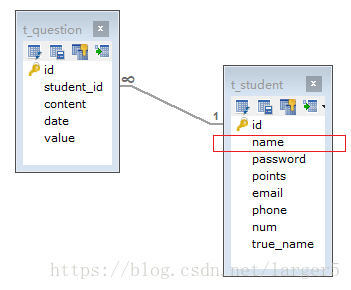
需求:顯示帖子
要帖子基本內容如時間、帖子內容等,即 t_question 表的內容全部要,
同時還要發帖子的人名字,即 t_student 的字段 name
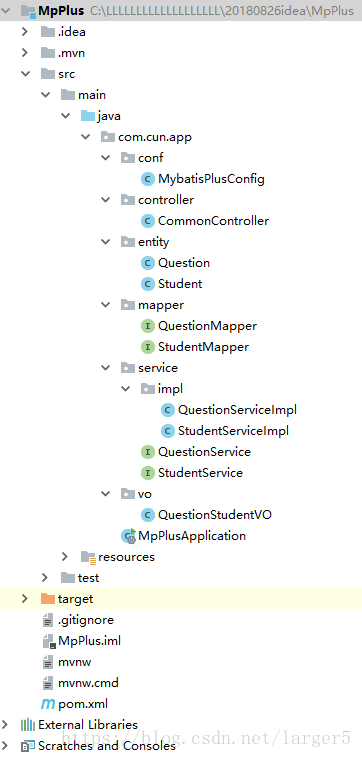
三、代碼結構
為了寫這篇文章,抽取了該 app 項目中的部分代碼,彼此相互關系如下圖
四、代碼實現
1、代碼已經放到 github 上了,若對本文的代碼有疑問可以去 github 上查看詳情:https://github.com/larger5/MyBatisPlus_page_tables.git
2、entity、mapper、service、controller 使用了 MyBatisPlus 的代碼生成器,自動生成大部分基礎的代碼,操作方法見之前的文章:在 SpringBoot 中引入 MyBatisPlus 之 常規操作
1.實體
① Question
// import 省略@TableName('t_question')public class Question implements Serializable { private static final long serialVersionUID = 1L; @ApiModelProperty(value = '問答主鍵id') @TableId(value = 'id', type = IdType.AUTO) private Integer id; @ApiModelProperty(value = '學生外鍵id') @TableField('student_id') private Integer studentId; @ApiModelProperty(value = '問題內容') private String content; @ApiModelProperty(value = '問題發布時間,發布的時候后臺自動生成') private Date date; @ApiModelProperty(value = '問題懸賞的積分') private Integer value;// getter、setter 省略}
② Student
// import 省略@TableName('t_student')public class Student implements Serializable { private static final long serialVersionUID = 1L; @ApiModelProperty(value = '學生主鍵id') @TableId(value = 'id', type = IdType.AUTO) private Integer id; @ApiModelProperty(value = '學生名稱') private String name; @ApiModelProperty(value = '學生密碼') private String password; @ApiModelProperty(value = '學生積分數') private Integer points; @ApiModelProperty(value = '學生郵件地址') private String email; @ApiModelProperty(value = '學生手機號碼') private String phone; @ApiModelProperty(value = '學生學號') private String num; @ApiModelProperty(value = '學生真實姓名') @TableField('true_name') private String trueName;// getter、setter 省略}
2.mapper
① StudentMapper
// import 省略public interface StudentMapper extends BaseMapper<Student> {}
② QuestionMapper
// import 省略public interface QuestionMapper extends BaseMapper<Question> { /** * * @param page 翻頁對象,可以作為 xml 參數直接使用,傳遞參數 Page 即自動分頁 * @return */ @Select('SELECT t_question.*,t_student.`name` FROM t_question,t_student WHERE t_question.student_id=t_student.id') List<QuestionStudentVO> getQuestionStudent(Pagination page);}
3、service
① StudentService
// import 省略public interface StudentService extends IService<Student> {}
② QuestionService
// import 省略public interface QuestionService extends IService<Question> { Page<QuestionStudentVO> getQuestionStudent(Page<QuestionStudentVO> page);}
4、serviceImpl
① StudentServiceImpl
// import 省略@Servicepublic class StudentServiceImpl extends ServiceImpl<StudentMapper, Student> implements StudentService {}
② QuestionServiceImpl
// 省略 import@Servicepublic class QuestionServiceImpl extends ServiceImpl<QuestionMapper, Question> implements QuestionService { @Override public Page<QuestionStudentVO> getQuestionStudent(Page<QuestionStudentVO> page) { return page.setRecords(this.baseMapper.getQuestionStudent(page)); }}
5、controller
// 省略 import@RestController@RequestMapping('/common')@EnableSwagger2public class CommonController { @Autowired QuestionService questionService; @Autowired StudentService studentService; @GetMapping('/getAllQuestionByPage/{page}/{size}') public Map<String, Object> getAllQuestionByPage(@PathVariable Integer page, @PathVariable Integer size) { Map<String, Object> map = new HashMap<>(); Page<Question> questionPage = questionService.selectPage(new Page<>(page, size)); if (questionPage.getRecords().size() == 0) { map.put('code', 400); } else { map.put('code', 200); map.put('data', questionPage); } return map; } @GetMapping('/getAllQuestionWithStudentByPage/{page}/{size}') public Map<String, Object> getAllQuestionWithStudentByPage(@PathVariable Integer page, @PathVariable Integer size) { Map<String, Object> map = new HashMap<>(); Page<QuestionStudentVO> questionStudent = questionService.getQuestionStudent(new Page<>(page, size)); if (questionStudent.getRecords().size() == 0) { map.put('code', 400); } else { map.put('code', 200); map.put('data', questionStudent); } return map; }}
6、MyBatisPlus 配置
// 省略 import@EnableTransactionManagement@Configuration@MapperScan('com.cun.app.mapper')public class MybatisPlusConfig { /** * 分頁插件 */ @Bean public PaginationInterceptor paginationInterceptor() { return new PaginationInterceptor(); } /** * 打印 sql */ @Bean public PerformanceInterceptor performanceInterceptor() { PerformanceInterceptor performanceInterceptor = new PerformanceInterceptor(); //格式化sql語句 Properties properties = new Properties(); properties.setProperty('format', 'true'); performanceInterceptor.setProperties(properties); return performanceInterceptor; }}
7、關聯查詢 VO 對象
// import 省略public class QuestionStudentVO implements Serializable { @ApiModelProperty(value = '問答主鍵id') @TableId(value = 'id', type = IdType.AUTO) private Integer id; @ApiModelProperty(value = '學生外鍵id') @TableField('student_id') private Integer studentId; private String name; @ApiModelProperty(value = '問題內容') private String content; @ApiModelProperty(value = '問題發布時間,發布的時候后臺自動生成') private Date date; @ApiModelProperty(value = '問題懸賞的積分') private Integer value;// getter、setter 省略
五、測試接口
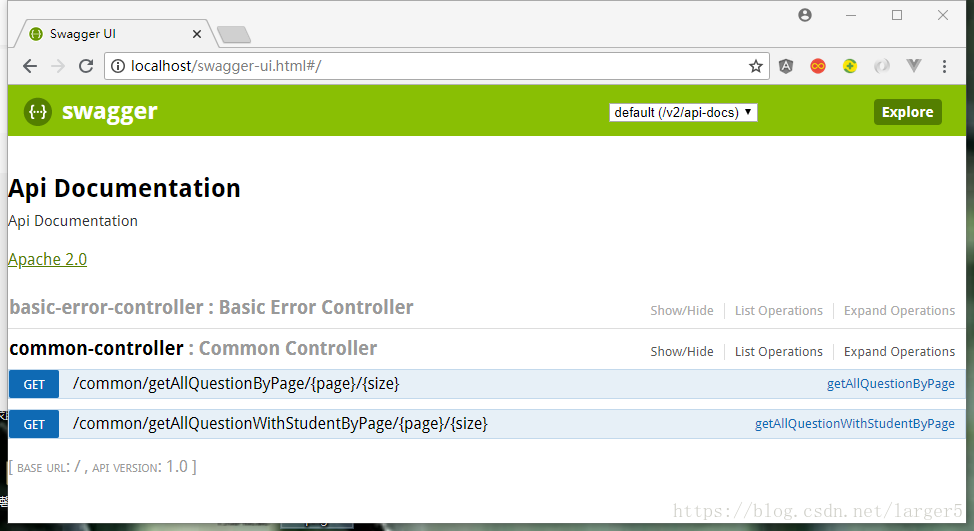
1、沒有關聯的分頁查詢接口
http://localhost/common/getAllQuestionByPage/1/2
① json 輸出
{ 'code': 200, 'data': { 'total': 10, 'size': 2, 'current': 1, 'records': [ { 'id': 1, 'studentId': 3, 'content': '唐代,渝州城里,有一個性格開朗、樂觀的小伙子,名叫景天。', 'date': 1534497561000, 'value': 5 }, { 'id': 2, 'studentId': 1, 'content': '雪見從小父母雙亡,由爺爺唐坤撫養成人。', 'date': 1533201716000, 'value': 20 } ], 'pages': 5 }}
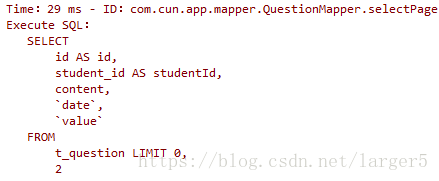
② sql 執行
2、多表關聯、分頁查詢接口
http://localhost/common/getAllQuestionWithStudentByPage/1/2
① json 輸出
{ 'code': 200, 'data': { 'total': 10, 'size': 2, 'current': 1, 'records': [ { 'id': 1, 'studentId': 3, 'name': 'vv', 'content': '唐代,渝州城里,有一個性格開朗、樂觀的小伙子,名叫景天。', 'date': 1534497561000, 'value': 5 }, { 'id': 2, 'studentId': 1, 'name': 'cun', 'content': '雪見從小父母雙亡,由爺爺唐坤撫養成人。', 'date': 1533201716000, 'value': 20 } ], 'pages': 5 }}
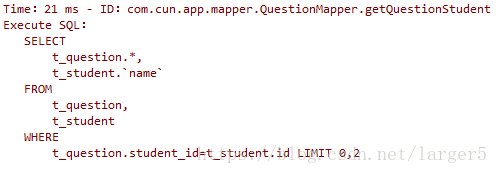
② sql 執行
六、小結
寫本文的原因:
①網上有做法不合時宜的文章(自定義page類、配置版)②官方文檔使用的是配置版的,筆者采用注解版的
MyBatis 配置版 MyBatis 注解版 ① 動態 sql 靈活、② xml 格式的 sql,可拓展性好 ① 少一個設置,少一個錯誤爆發點、② 代碼清晰優雅
當然,智者見智仁者見仁
參考資料:MyBatisPlus 官方文檔:分頁插件:方式一 、傳參區分模式【推薦】
到此這篇關于最簡單的MyBatis Plus的多表聯接、分頁查詢實現方法的文章就介紹到這了,更多相關MyBatis Plus多表聯接、分頁查詢內容請搜索好吧啦網以前的文章或繼續瀏覽下面的相關文章希望大家以后多多支持好吧啦網!
相關文章:
1. 數據庫Oracle9i的企業管理器簡介2. SQLite教程(十四):C語言編程實例代碼(2)3. mysql的like模式4. MySQL存儲過程的查詢命令介紹5. Microsoft Office Access添加頁眉或頁腳的方法6. SQLite教程(二):C/C++接口簡介7. Linux CentOS7安裝Oracle11g的超完美新手教程8. sql查詢一個數組中是否包含某個內容find_in_set問題9. MYSQL(電話號碼,身份證)數據脫敏的實現10. SQL SERVER偏移函數(LAG、LEAD、FIRST_VALUE、LAST _VALUE、NTH_VALUE)
 網公網安備
網公網安備