Mybatis 逆向工程的三種方法詳解
Mybatis 逆向工程
逆向工程通常包括由數(shù)據(jù)庫的表生成 Java 代碼 和 通過 Java 代碼生成數(shù)據(jù)庫表。而Mybatis 逆向工程是指由數(shù)據(jù)庫表生成 Java 代碼。 Mybaits 需要程序員自己編寫 SQL 語句,但是 Mybatis 官方提供逆向工程可以針對(duì)單表自動(dòng)生成 Mybaits 執(zhí)行所需要的代碼,包括 POJO、Mapper.java、Mapper.xml …。
一、通過 Eclipse 插件完成 Mybatis 逆向工程
1. 在線安裝 Eclipse 插件
操作步驟:打開Eclipse => Help => Eclipse Marketplace => 搜索 Mybatis Generator => 選擇 Mybatis Generator 的版本 => Install => 重啟。
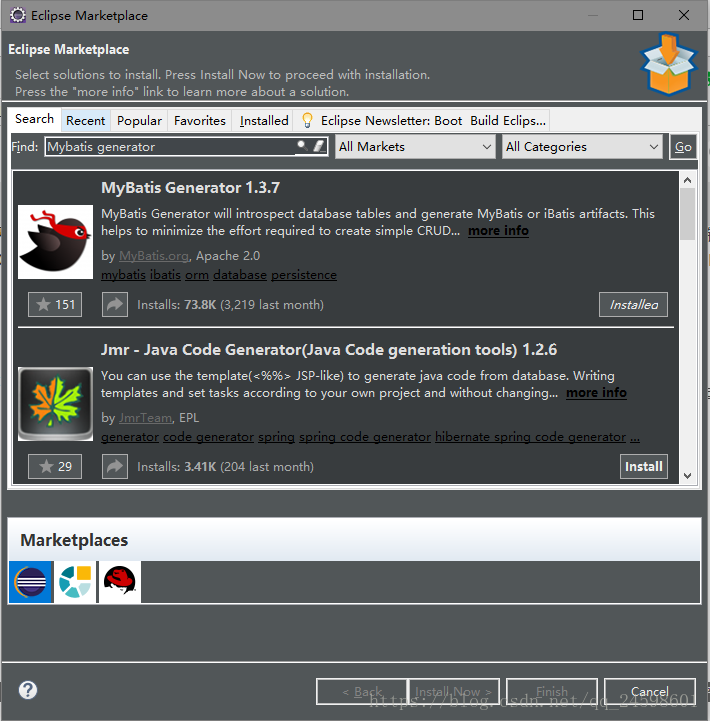
2. 新建一個(gè) Java Project 項(xiàng)目
新建一個(gè)叫 mybatisGenerator 的 Java 項(xiàng)目,導(dǎo)入 MySQL 的驅(qū)動(dòng)包,如果是 Oracle 數(shù)據(jù)庫就導(dǎo)入 Oracle 的驅(qū)動(dòng)包,我這里是 MySQL 數(shù)據(jù)庫,所以導(dǎo)入的是 MySQL 的。
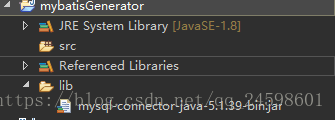
3. 編寫配置文件
逆向工程需要用到 xml 配置文件,編寫配置文件(generatorConfig.xml)如下:
<?xml version='1.0' encoding='UTF-8'?><!DOCTYPE generatorConfiguration PUBLIC '-//mybatis.org//DTD MyBatis Generator Configuration 1.0//EN' 'http://mybatis.org/dtd/mybatis-generator-config_1_0.dtd'><generatorConfiguration><context targetRuntime='MyBatis3'><commentGenerator><!-- 是否去除自動(dòng)生成的注釋 true:是 : false:否 --><property name='suppressAllComments' value='false' /></commentGenerator><!--數(shù)據(jù)庫連接的信息:驅(qū)動(dòng)類、連接地址、用戶名、密碼 --><jdbcConnection driverClass='com.mysql.jdbc.Driver'connectionURL='jdbc:mysql://localhost:3306/mybatis' userId='root'password='123456'></jdbcConnection><!-- <jdbcConnection driverClass='oracle.jdbc.OracleDriver'connectionURL='jdbc:oracle:thin:@localhost:1521:mybatis' userId=''password=''></jdbcConnection> --><!-- 默認(rèn)false,把JDBC DECIMAL 和 NUMERIC 類型解析為 Integer,為 true時(shí)把JDBC DECIMAL 和 NUMERIC 類型解析為java.math.BigDecimal --><javaTypeResolver><property name='forceBigDecimals' value='false' /></javaTypeResolver><!-- targetProject:生成PO類的位置 --><javaModelGenerator targetPackage='com.ssm.po'targetProject='mybatisGenerator'><!-- enableSubPackages:是否讓schema作為包的后綴 --><property name='enableSubPackages' value='false' /><!-- 從數(shù)據(jù)庫返回的值被清理前后的空格 --><property name='trimStrings' value='true' /></javaModelGenerator> <!-- targetProject:mapper映射文件生成的位置 --><sqlMapGenerator targetPackage='com.ssm.mapper' targetProject='mybatisGenerator'><!-- enableSubPackages:是否讓schema作為包的后綴 --><property name='enableSubPackages' value='false' /></sqlMapGenerator><!-- targetPackage:mapper接口生成的位置 --><javaClientGenerator type='XMLMAPPER'targetPackage='com.ssm.mapper' targetProject='mybatisGenerator'><!-- enableSubPackages:是否讓schema作為包的后綴 --><property name='enableSubPackages' value='false' /></javaClientGenerator><!-- 指定數(shù)據(jù)庫表 --><!-- tableName:要生成的表名 domainObjectName:生成后的實(shí)例名 enableCountByExample:Count語句中加入where條件查詢,默認(rèn)true開啟 enableUpdateByExample:Update語句中加入where條件查詢,默認(rèn)true開啟 enableDeleteByExample:Delete語句中加入where條件查詢,默認(rèn)true開啟 enableSelectByExample:Select多條語句中加入where條件查詢,默認(rèn)true開啟 selectByExampleQueryId:Select單個(gè)對(duì)象語句中加入where條件查詢,默認(rèn)true開啟 --><table tableName='items'><!-- 常用:property:將所有字段逆向生成為類屬性,默認(rèn)全部ignoreColumn:生成時(shí)忽略列字段 --></table><table tableName='orders'></table><table tableName='orderdetail'></table><table tableName='user'></table></context></generatorConfiguration>
注意:targetProject='mybatisGenerator'
4. 使用插件運(yùn)行
操作步驟:右擊 generatorConfig.xml 文件 => Run as => Run Mybatis Generator => 刷新工程。
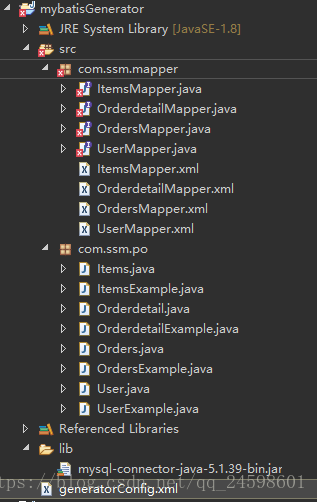
有報(bào)錯(cuò)是因?yàn)闆]有導(dǎo)入 Mybatis 相關(guān)的包。最后將生成的文件拷入相關(guān)的工程當(dāng)中。
二、通過 Java 代碼完成 Mybatis 逆向工程
1. 新建一個(gè) Java Project 項(xiàng)目
新建一個(gè) Java 項(xiàng)目,導(dǎo)入Mybatis逆向工程包mybatis-generator-core-1.3.2.jar和數(shù)據(jù)庫驅(qū)動(dòng)包mysql-connector-java-5.1.39-bin.jar。
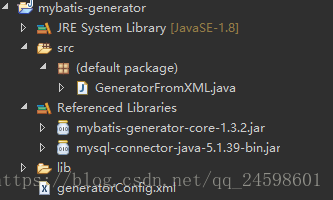
2. 編寫配置文件
編寫配置文件,和前一種方法的配置文件差不多,區(qū)別在于這里的 targetProject 不一樣,這種方式的是targetProject='./src',生成的文件也會(huì)在這個(gè)下面。
<?xml version='1.0' encoding='UTF-8'?><!DOCTYPE generatorConfiguration PUBLIC '-//mybatis.org//DTD MyBatis Generator Configuration 1.0//EN' 'http://mybatis.org/dtd/mybatis-generator-config_1_0.dtd'><generatorConfiguration><context targetRuntime='MyBatis3'><commentGenerator><!-- 是否去除自動(dòng)生成的注釋 true:是 : false:否 --><property name='suppressAllComments' value='false' /></commentGenerator><!--數(shù)據(jù)庫連接的信息:驅(qū)動(dòng)類、連接地址、用戶名、密碼 --><jdbcConnection driverClass='com.mysql.jdbc.Driver'connectionURL='jdbc:mysql://localhost:3306/mybatis' userId='root'password='123456'></jdbcConnection><!-- <jdbcConnection driverClass='oracle.jdbc.OracleDriver'connectionURL='jdbc:oracle:thin:@localhost:1521:mybatis' userId=''password=''></jdbcConnection> --><!-- 默認(rèn)false,把JDBC DECIMAL 和 NUMERIC 類型解析為 Integer,為 true時(shí)把JDBC DECIMAL 和 NUMERIC 類型解析為java.math.BigDecimal --><javaTypeResolver><property name='forceBigDecimals' value='false' /></javaTypeResolver><!-- targetProject:生成PO類的位置 --><javaModelGenerator targetPackage='com.ssm.po'targetProject='./src'><!-- enableSubPackages:是否讓schema作為包的后綴 --><property name='enableSubPackages' value='false' /><!-- 從數(shù)據(jù)庫返回的值被清理前后的空格 --><property name='trimStrings' value='true' /></javaModelGenerator> <!-- targetProject:mapper映射文件生成的位置 --><sqlMapGenerator targetPackage='com.ssm.mapper' targetProject='./src'><!-- enableSubPackages:是否讓schema作為包的后綴 --><property name='enableSubPackages' value='false' /></sqlMapGenerator><!-- targetPackage:mapper接口生成的位置 --><javaClientGenerator type='XMLMAPPER'targetPackage='com.ssm.mapper' targetProject='./src'><!-- enableSubPackages:是否讓schema作為包的后綴 --><property name='enableSubPackages' value='false' /></javaClientGenerator><!-- 指定數(shù)據(jù)庫表 --><!-- tableName:要生成的表名 domainObjectName:生成后的實(shí)例名 enableCountByExample:Count語句中加入where條件查詢,默認(rèn)true開啟 enableUpdateByExample:Update語句中加入where條件查詢,默認(rèn)true開啟 enableDeleteByExample:Delete語句中加入where條件查詢,默認(rèn)true開啟 enableSelectByExample:Select多條語句中加入where條件查詢,默認(rèn)true開啟 selectByExampleQueryId:Select單個(gè)對(duì)象語句中加入where條件查詢,默認(rèn)true開啟 --><table tableName='items'><!-- 常用:property:將所有字段逆向生成為類屬性,默認(rèn)全部ignoreColumn:生成時(shí)忽略列字段 --></table><table tableName='orders'></table><table tableName='orderdetail'></table><table tableName='user'></table></context></generatorConfiguration>
3. 編寫生成代碼程序
最后編寫一個(gè)簡單的 Java 運(yùn)行程序,運(yùn)行后刷新工程就可以了。
<?xml version='1.0' encoding='UTF-8'?><!DOCTYPE generatorConfiguration PUBLIC '-//mybatis.org//DTD MyBatis Generator Configuration 1.0//EN' 'http://mybatis.org/dtd/mybatis-generator-config_1_0.dtd'><generatorConfiguration><context targetRuntime='MyBatis3'><commentGenerator><!-- 是否去除自動(dòng)生成的注釋 true:是 : false:否 --><property name='suppressAllComments' value='false' /></commentGenerator><!--數(shù)據(jù)庫連接的信息:驅(qū)動(dòng)類、連接地址、用戶名、密碼 --><jdbcConnection driverClass='com.mysql.jdbc.Driver'connectionURL='jdbc:mysql://localhost:3306/mybatis' userId='root'password='123456'></jdbcConnection><!-- <jdbcConnection driverClass='oracle.jdbc.OracleDriver'connectionURL='jdbc:oracle:thin:@localhost:1521:mybatis' userId=''password=''></jdbcConnection> --><!-- 默認(rèn)false,把JDBC DECIMAL 和 NUMERIC 類型解析為 Integer,為 true時(shí)把JDBC DECIMAL 和 NUMERIC 類型解析為java.math.BigDecimal --><javaTypeResolver><property name='forceBigDecimals' value='false' /></javaTypeResolver><!-- targetProject:生成PO類的位置 --><javaModelGenerator targetPackage='com.ssm.po'targetProject='./src'><!-- enableSubPackages:是否讓schema作為包的后綴 --><property name='enableSubPackages' value='false' /><!-- 從數(shù)據(jù)庫返回的值被清理前后的空格 --><property name='trimStrings' value='true' /></javaModelGenerator> <!-- targetProject:mapper映射文件生成的位置 --><sqlMapGenerator targetPackage='com.ssm.mapper' targetProject='./src'><!-- enableSubPackages:是否讓schema作為包的后綴 --><property name='enableSubPackages' value='false' /></sqlMapGenerator><!-- targetPackage:mapper接口生成的位置 --><javaClientGenerator type='XMLMAPPER'targetPackage='com.ssm.mapper' targetProject='./src'><!-- enableSubPackages:是否讓schema作為包的后綴 --><property name='enableSubPackages' value='false' /></javaClientGenerator><!-- 指定數(shù)據(jù)庫表 --><!-- tableName:要生成的表名 domainObjectName:生成后的實(shí)例名 enableCountByExample:Count語句中加入where條件查詢,默認(rèn)true開啟 enableUpdateByExample:Update語句中加入where條件查詢,默認(rèn)true開啟 enableDeleteByExample:Delete語句中加入where條件查詢,默認(rèn)true開啟 enableSelectByExample:Select多條語句中加入where條件查詢,默認(rèn)true開啟 selectByExampleQueryId:Select單個(gè)對(duì)象語句中加入where條件查詢,默認(rèn)true開啟 --><table tableName='items'><!-- 常用:property:將所有字段逆向生成為類屬性,默認(rèn)全部ignoreColumn:生成時(shí)忽略列字段 --></table><table tableName='orders'></table><table tableName='orderdetail'></table><table tableName='user'></table></context></generatorConfiguration>
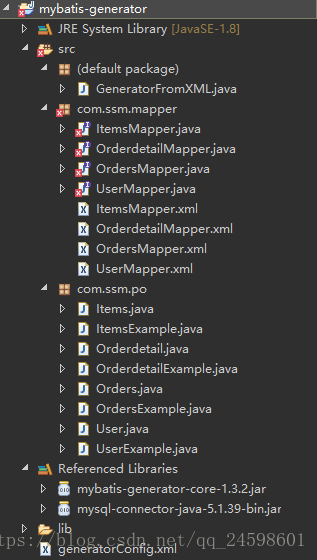
建議在這個(gè)項(xiàng)目中加入日志,這樣能直觀得看出其運(yùn)行過程。加入日志配置文件log4j.properties。
# Global logging configurationlog4j.rootLogger=DEBUG, stdout# MyBatis logging configuration...log4j.logger.org.mybatis.example.BlogMapper=TRACE# Console output...log4j.appender.stdout=org.apache.log4j.ConsoleAppenderlog4j.appender.stdout.layout=org.apache.log4j.PatternLayoutlog4j.appender.stdout.layout.ConversionPattern=%5p [%t] - %m%n
運(yùn)行 GeneratorFromXML.java 時(shí)產(chǎn)生的日志記錄:
DEBUG [main] - Retrieving column information for table 'items'DEBUG [main] - Found column 'id', data type 4, in table 'mybatis..items'DEBUG [main] - Found column 'name', data type 12, in table 'mybatis..items'DEBUG [main] - Found column 'price', data type 7, in table 'mybatis..items'DEBUG [main] - Found column 'detail', data type -1, in table 'mybatis..items'DEBUG [main] - Found column 'pic', data type 12, in table 'mybatis..items'DEBUG [main] - Found column 'createtime', data type 93, in table 'mybatis..items'DEBUG [main] - Retrieving column information for table 'orders'DEBUG [main] - Found column 'id', data type 4, in table 'mybatis..orders'DEBUG [main] - Found column 'user_id', data type 4, in table 'mybatis..orders'DEBUG [main] - Found column 'number', data type 12, in table 'mybatis..orders'DEBUG [main] - Found column 'createtime', data type 93, in table 'mybatis..orders'DEBUG [main] - Found column 'note', data type 12, in table 'mybatis..orders'DEBUG [main] - Retrieving column information for table 'orderdetail'DEBUG [main] - Found column 'id', data type 4, in table 'mybatis..orderdetail'DEBUG [main] - Found column 'orders_id', data type 4, in table 'mybatis..orderdetail'DEBUG [main] - Found column 'items_id', data type 4, in table 'mybatis..orderdetail'DEBUG [main] - Found column 'items_num', data type 4, in table 'mybatis..orderdetail'DEBUG [main] - Retrieving column information for table 'user'DEBUG [main] - Found column 'ID', data type 4, in table 'mybatis..user'DEBUG [main] - Found column 'USERNAME', data type 12, in table 'mybatis..user'DEBUG [main] - Found column 'SEX', data type 12, in table 'mybatis..user'DEBUG [main] - Found column 'birthday', data type 91, in table 'mybatis..user'DEBUG [main] - Found column 'address', data type 12, in table 'mybatis..user'
三、通過 Maven 完成 Mybatis 逆向工程
1. 新建一個(gè) Maven Project 項(xiàng)目
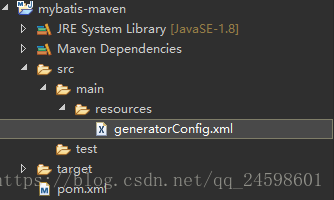
新建一個(gè) Maven 項(xiàng)目,然后新建文件夾 /mybatis-maven/src/main/resources,在文件夾下新建文件 generatorConfig.xml。
2. 配置 pom.xml 文件
配置 pom.xml 文件,在 pom.xml 文件的 project 標(biāo)簽里加入代碼:
<build><plugins><plugin><groupId>org.mybatis.generator</groupId><artifactId>mybatis-generator-maven-plugin</artifactId><version>1.3.2</version><dependencies><dependency> <groupId>mysql</groupId> <artifactId>mysql-connector-java</artifactId> <version>5.1.38</version> </dependency></dependencies><configuration><overwrite>true</overwrite></configuration></plugin></plugins></build>
配置插件 generator 版本是 1.3.2 并配置 Mysql 驅(qū)動(dòng)是 5.1.38。
3. 配置文件 generatorConfig.xml
generatorConfig.xml 是在目錄 src 下的 main 下的 resources 下。注意這里的targetProject='./src' 生成的文件也會(huì)在這個(gè)下面。
<?xml version='1.0' encoding='UTF-8'?><!DOCTYPE generatorConfiguration PUBLIC '-//mybatis.org//DTD MyBatis Generator Configuration 1.0//EN' 'http://mybatis.org/dtd/mybatis-generator-config_1_0.dtd'><generatorConfiguration><context targetRuntime='MyBatis3'><commentGenerator><!-- 是否去除自動(dòng)生成的注釋 true:是 : false:否 --><property name='suppressAllComments' value='false' /></commentGenerator><!--數(shù)據(jù)庫連接的信息:驅(qū)動(dòng)類、連接地址、用戶名、密碼 --><jdbcConnection driverClass='com.mysql.jdbc.Driver'connectionURL='jdbc:mysql://localhost:3306/mybatis' userId='root'password='123456'></jdbcConnection><!-- <jdbcConnection driverClass='oracle.jdbc.OracleDriver'connectionURL='jdbc:oracle:thin:@localhost:1521:mybatis' userId=''password=''></jdbcConnection> --><!-- 默認(rèn)false,把JDBC DECIMAL 和 NUMERIC 類型解析為 Integer,為 true時(shí)把JDBC DECIMAL 和 NUMERIC 類型解析為java.math.BigDecimal --><javaTypeResolver><property name='forceBigDecimals' value='false' /></javaTypeResolver><!-- targetProject:生成PO類的位置 --><javaModelGenerator targetPackage='com.ssm.po'targetProject='./src'><!-- enableSubPackages:是否讓schema作為包的后綴 --><property name='enableSubPackages' value='false' /><!-- 從數(shù)據(jù)庫返回的值被清理前后的空格 --><property name='trimStrings' value='true' /></javaModelGenerator> <!-- targetProject:mapper映射文件生成的位置 --><sqlMapGenerator targetPackage='com.ssm.mapper' targetProject='./src'><!-- enableSubPackages:是否讓schema作為包的后綴 --><property name='enableSubPackages' value='false' /></sqlMapGenerator><!-- targetPackage:mapper接口生成的位置 --><javaClientGenerator type='XMLMAPPER'targetPackage='com.ssm.mapper' targetProject='./src'><!-- enableSubPackages:是否讓schema作為包的后綴 --><property name='enableSubPackages' value='false' /></javaClientGenerator><!-- 指定數(shù)據(jù)庫表 --><!-- tableName:要生成的表名 domainObjectName:生成后的實(shí)例名 enableCountByExample:Count語句中加入where條件查詢,默認(rèn)true開啟 enableUpdateByExample:Update語句中加入where條件查詢,默認(rèn)true開啟 enableDeleteByExample:Delete語句中加入where條件查詢,默認(rèn)true開啟 enableSelectByExample:Select多條語句中加入where條件查詢,默認(rèn)true開啟 selectByExampleQueryId:Select單個(gè)對(duì)象語句中加入where條件查詢,默認(rèn)true開啟 --><table tableName='items'><!-- 常用:property:將所有字段逆向生成為類屬性,默認(rèn)全部ignoreColumn:生成時(shí)忽略列字段 --></table><table tableName='orders'></table><table tableName='orderdetail'></table><table tableName='user'></table></context></generatorConfiguration>
4. 運(yùn)行 Maven
運(yùn)行命令mybatis-generator:generate。 操作步驟:選中項(xiàng)目右擊 => Run As => Maven build… =>在 Goals 中輸入mybatis-generator:generate => Run =>刷新工程。
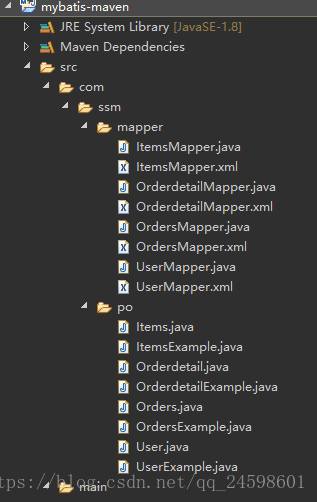
到此這篇關(guān)于Mybatis 逆向工程的三種方法詳解的文章就介紹到這了,更多相關(guān)Mybatis 逆向工程內(nèi)容請(qǐng)搜索好吧啦網(wǎng)以前的文章或繼續(xù)瀏覽下面的相關(guān)文章希望大家以后多多支持好吧啦網(wǎng)!
相關(guān)文章:
1. mysql的like模式2. MySQL分區(qū)的優(yōu)點(diǎn)3. Oracle根據(jù)逗號(hào)拆分字段內(nèi)容轉(zhuǎn)成多行的函數(shù)說明4. 加密你的Access數(shù)據(jù)庫asp打開方法5. MYSQL(電話號(hào)碼,身份證)數(shù)據(jù)脫敏的實(shí)現(xiàn)6. 什么是Access數(shù)據(jù)庫7. MySQL 字符串函數(shù):字符串截取8. 如何實(shí)現(xiàn)MySQL數(shù)據(jù)庫的備份與恢復(fù)9. mysql數(shù)據(jù)庫中最常用的時(shí)間轉(zhuǎn)換函數(shù)的用法10. mysql like語句問題
 網(wǎng)公網(wǎng)安備