文章詳情頁(yè)
Nginx如何安裝配置Lua支持
瀏覽:379日期:2023-06-15 15:23:23
目錄
- Nginx安裝配置Lua支持
- Nginx中配置lua腳本,訪(fǎng)問(wèn)url總是提示404
- 總結(jié)
Nginx安裝配置Lua支持
默認(rèn)情況下Nginx不支持Lua模塊,需要安裝LuaJIT解釋器,并且重新編譯Nginx,或者可使用國(guó)人開(kāi)發(fā)的openrestry
需要的模塊:LuaJIT,Ngx_devel和lua-nginx-module
Luajit官網(wǎng):https://luajit.org
1. 環(huán)境準(zhǔn)備
[root@nginx_lua ~]# yum install -y gcc gcc-c++ make pcre-devel zlib-devel openssl-devel
2. 下載最新的luajit和ngx_devel_kit以及lua-nginx-module解壓
[root@nginx_lua ~]# mkdir -p /soft/src [root@nginx_lua ~]# cd /soft/src/wget https://luajit.org/download/LuaJIT-2.0.4.tar.gzwget https://github.com/simpl/ngx_devel_kit/archive/v0.2.19.tar.gzwget https://github.com/openresty/lua-nginx-module/archive/v0.10.13.tar.gz
3. 解壓ngx_devel_kit以及lua-nginx-module
[root@nginx_lua src]# tar xf v0.2.19.tar.gz[root@nginx_lua src]# tar xf v0.10.13.tar.gz
4. 編譯安裝LuaJIT,即Lua及時(shí)編譯器
[root@nginx_lua src]# tar xf LuaJIT-2.0.4.tar.gz[root@nginx_lua src]# cd LuaJIT-2.0.4/[root@nginx_lua LuaJIT-2.0.4]# make && make install
5. 編譯安裝Nginx
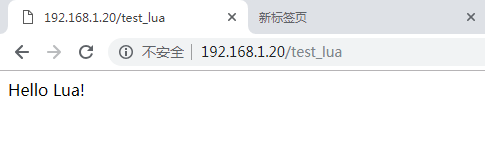
[root@nginx_lua src]# wget http://nginx.org/download/nginx-1.14.2.tar.gz[root@nginx_lua src]# tar xf nginx-1.14.2.tar.gz[root@nginx_lua src]# cd nginx-1.14.2[root@nginx_lua nginx-1.14.2]# ./configure --prefix=/soft/nginx --with-http_ssl_module --with-http_stub_status_module --with-http_dav_module --with-file-aio --with-http_dav_module --add-module=../ngx_devel_kit-0.2.19/ --add-module=../lua-nginx-module-0.10.13/[root@nginx_lua nginx-1.14.2]# make && make install[root@nginx_lua nginx-1.14.2]# ln -s /soft/nginx/sbin/nginx /usr/bin/nginx[root@nginx_lua conf]# vim nginx.conf #簡(jiǎn)單配置寫(xiě)nginx測(cè)試Nginx是否已經(jīng)支持Lua(lua指令方式)...server { location /test_lua {default_type text/html;content_by_lua_block {ngx.say("Hello Lua!") }}...}#lua指令方式#在server 中添加一個(gè)localtionlocation /hello { default_type "text/plain"; content_by_lua "ngx.say("hello, lua")";}#lua文件方式#在server 中添加一個(gè)localtionlocation /lua { default_type "text/html"; content_by_lua_file conf/lua/test.lua; #相對(duì)于nginx安裝目錄}#test.lua文件內(nèi)容ngx.say("hello world");//建立軟連接,如果不建立軟鏈接,則會(huì)出現(xiàn)share object錯(cuò)誤[root@nginx_lua conf]# nginx -t/soft/nginx/sbin/nginx: error while loading shared libraries: libluajit-5.1.so.2: cannot open shared object file: No such file or directory[root@nginx_lua conf]# [root@nginx_lua lib64]# ln -s /usr/local/lib/libluajit-5.1.so.2 /lib64/libluajit-5.1.so.2[root@nginx_lua lib64]# ll libluajit-5.1.so.2lrwxrwxrwx 1 root root 33 Dec 21 20:52 libluajit-5.1.so.2 -> /usr/local/lib/libluajit-5.1.so.2[root@nginx_lua lib64]##//加載lua庫(kù),加入到ld.so.conf文件(暫時(shí)不執(zhí)行這一步)#[root@nginx_lua nginx-1.14.2]# echo "/usr/local/LuaJIT/lib" >> /etc/ld.so.conf[root@nginx_lua conf]# nginx -tnginx: the configuration file /soft/nginx/conf/nginx.conf syntax is oknginx: configuration file /soft/nginx/conf/nginx.conf test is successful[root@nginx_lua conf]# nginx -s reload6. 測(cè)試安裝Lua成功
Nginx中配置lua腳本,訪(fǎng)問(wèn)url總是提示404
然后進(jìn)入nginx的error.log中發(fā)現(xiàn)了以下錯(cuò)誤日志
2022/06/09 18:31:46 [error] 24475#24475: *5 failed to load external Lua file "/root/lua/68/update_content.lua": cannot open /root/lua/68/update_content.lua: Permission denied, client: 112.4.254.104, server: localhost, request: "GET /api/update_content HTTP/1.1", host: "your host"
然后在nginx.conf中配置
user root root;
再重啟nginx即可
總結(jié)
以上為個(gè)人經(jīng)驗(yàn),希望能給大家一個(gè)參考,也希望大家多多支持。
標(biāo)簽:
Nginx
排行榜
 網(wǎng)公網(wǎng)安備