nginx配置完rewrite瀏覽器提示將您重定向的次數過多的解決方法
因為公司要求訪問 shidongyun.com的時候瀏覽器會自動跳轉到www.shidong.com下面,專業術語叫“301跳轉”百度了一番,nginx配置規則,用rewrite還有return進行重寫301跳轉。我這里用的是rewrite。
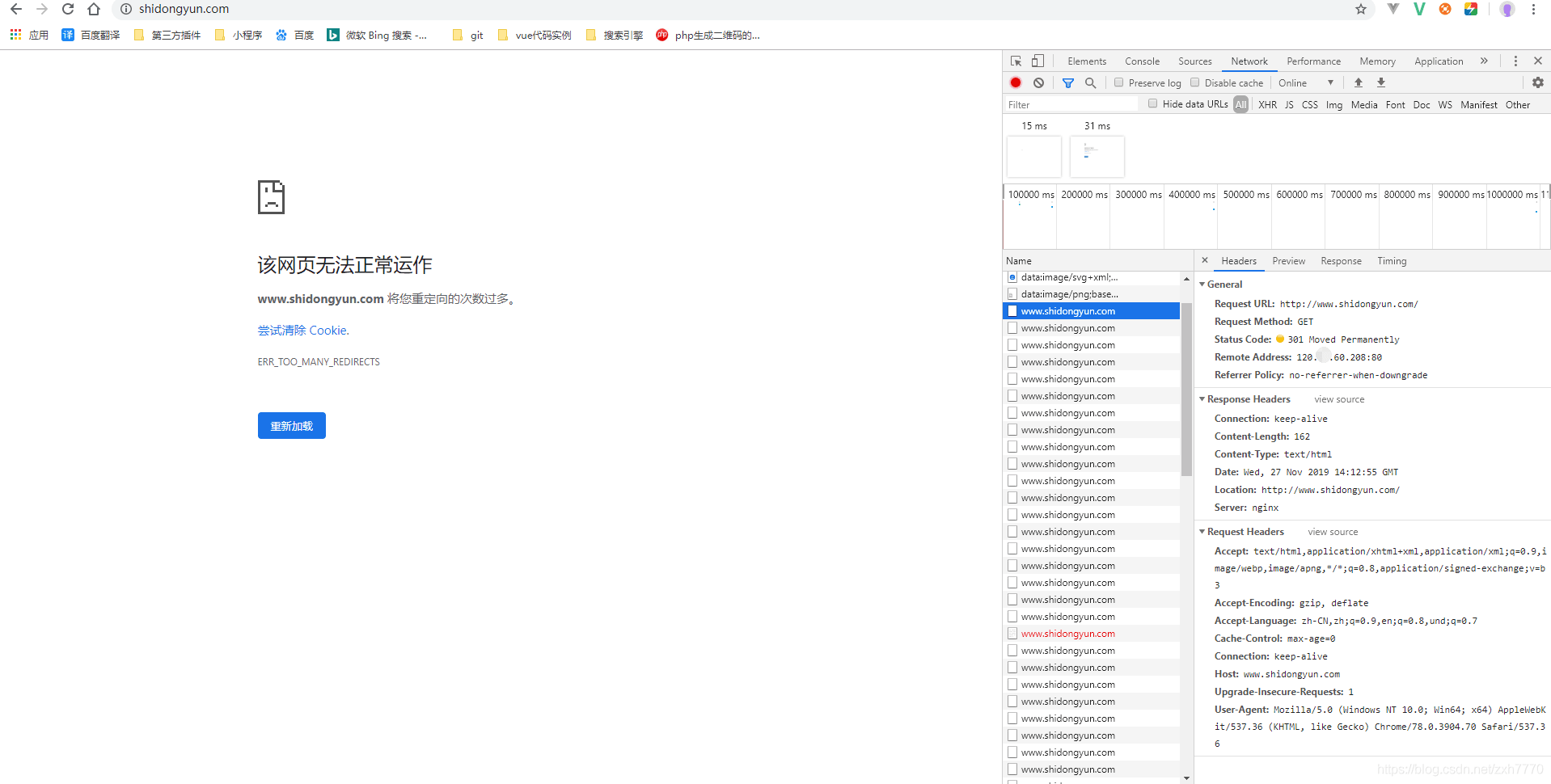
在配置網站站點的時候service里面的service_name 規則不正確。錯誤配置規則如下:
只看service這部分錯誤的即可。service_name 不能把rewrite即將要重寫的域名寫進去,這樣就造成了死循環了。比如:我要訪問"shidongyun.com",利用rewrite在瀏覽器輸入“shidongyun.com”的時候,重寫到www.shidongyun.com下面。那么在service_name就不能寫www.shidongyun.com這個域名。可以單獨寫一個service,也可以不用寫。直接這樣寫:rewrite ^/(.*) http://www.shidongyun.com/$1 permanent;。
server { listen 80; server_name www.shidongyun.com shidongyun.com; #charset koi8-r; #access_log logs/host.access.log main; root '/data/wwwroot/shidong'; location / {rewrite ^/(.*) http://www.shidongyun.com/$1 permanent;index index.html index.htm index.php l.php;try_files $uri $uri/ /index.php?$query_string; autoindex off; }解決方案1,把service下面的service_name 做正確的修改,刪除www.shidongyun.com這個要重寫的域名。
server { listen 80; server_name shidongyun.com; #charset koi8-r; #access_log logs/host.access.log main; root '/data/wwwroot/shidong'; location / {rewrite ^/(.*) http://www.shidongyun.com/$1 permanent;index index.html index.htm index.php l.php;try_files $uri $uri/ /index.php?$query_string; autoindex off; }在次在瀏覽器訪問:shidongyun.com,我們看到截圖中已經成功的重寫過去了。但是訪問域名的時候默認找的是網站安裝時候的目錄。并不是項目目錄。解決方案如下:

2,需要配置rewrite重定向到指定的目錄或者單獨配置一個service虛擬機,然后把需要rewrite重定向的service主機跟域名配置好。配置信息如下:
我們先配置一個service虛擬機,要訪問的域名,比如“shidongyun.com”,然后在配置一個service虛擬機,把要rewrite重寫的域名放進去,比如:“www.shidong.com”,我們達到的效果就是訪問“shidongyun.com”瀏覽器地址會自動跳轉到“www.shidongyun,com”下面。
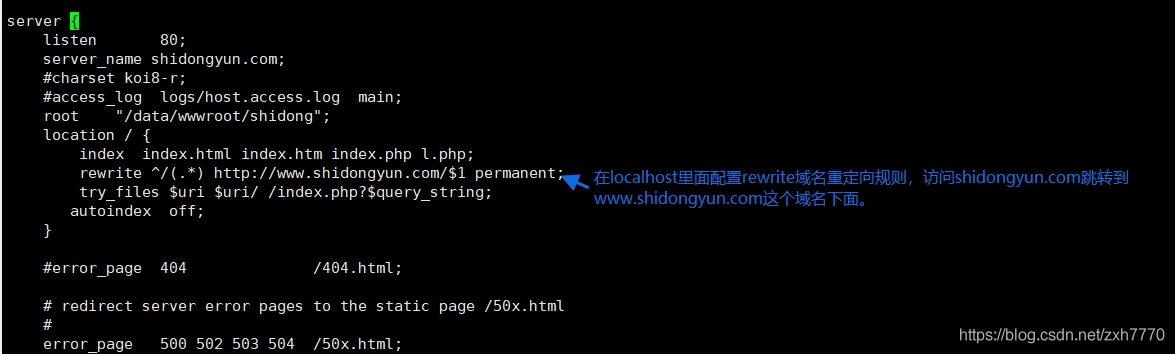
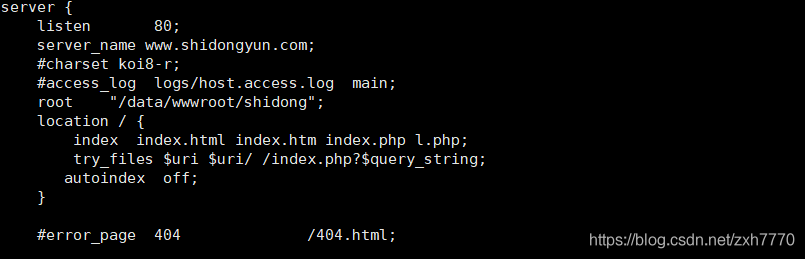
示例代碼如下:
server { listen 80; server_name shidongyun.com; #charset koi8-r; #access_log logs/host.access.log main; root '/data/wwwroot/shidong'; location / {index index.html index.htm index.php l.php;rewrite ^/(.*) http://www.shidongyun.com/$1 permanent;try_files $uri $uri/ /index.php?$query_string; autoindex off; } 省略多余的部分.....只需要看rewrite跟service_name即可}server { listen 80; server_name www.shidongyun.com; #charset koi8-r; #access_log logs/host.access.log main; root '/data/wwwroot/shidong'; location / {index index.html index.htm index.php l.php;try_files $uri $uri/ /index.php?$query_string; autoindex off; }省略多余的部分.....只需要看service_name即可。root設置項目路徑。 }重啟nginx服務器1, /etc/init.d/nginx restart
[root@iZm5e8nyz28v9zr7lhb7moZ ~]# /etc/init.d/nginx restartnginx: the configuration file /usr/local/nginx/conf/nginx.conf syntax is oknginx: configuration file /usr/local/nginx/conf/nginx.conf test is successfulStopping nginx: [ OK ]Starting nginx: [ OK ][root@iZm5e8nyz28v9zr7lhb7moZ ~]#2,瀏覽器輸入“shidongyun.com”自動跳轉到“www.shidongyun.com”下面

到此這篇關于nginx配置完rewrite瀏覽器提示將您重定向的次數過多的解決方法的文章就介紹到這了,更多相關nginx rewrite重定向內容請搜索好吧啦網以前的文章或繼續瀏覽下面的相關文章希望大家以后多多支持好吧啦網!
 網公網安備
網公網安備