文章詳情頁
Nginx中include的具體用法
瀏覽:36日期:2023-08-20 20:22:35
include可以用在任何地方,前提是include的文件自身語法正確。include文件路徑可以是絕對路徑,也可以是相對路徑,相對路徑以nginx.conf為基準,同時可以使用通配符。
配置實例
# 絕對路徑include /etc/conf/nginx.conf# 相對路徑include port/80.conf# 通配符include *.conf測試配置文件
> ./nginx -t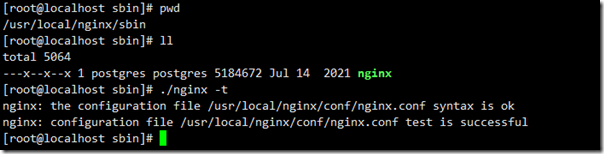
主模式配置
user wwwt; # 服務器使用用戶worker_processes 1; # 配置 worker 進程啟動的數量,建議配置為 CPU 核心數#error_log logs/error.log; # 全局錯誤日志pid /etc/nginx/logs/nginx.pid; # 設置記錄主進程 ID 的文件events { # 單個后臺 worker process 進程的最大并發鏈接數 # 并發總數 max_clients = worker_professes * worker_connections worker_connections 4096; ## Defaule: 1024 # multi_accept on; ## 指明 worker 進程立刻接受新的連接}# 主模式http { include mime.types; default_type application/octet-stream; #log_format main '$remote_addr - $remote_user [$time_local] '$request' ' # '$status $body_bytes_sent '$http_referer' ' # ''$http_user_agent' '$http_x_forwarded_for''; #access_log logs/access.log main; sendfileon; #tcp_nopush on; #keepalive_timeout 0; keepalive_timeout 65; # 重點,分文件放置路徑 include /etc/nginx/cs/*.conf; #gzip on server {# the port your site will be served onlisten 80;# the domain name it will serve forcharset utf-8;# max upload sizeclient_max_body_size 75M; # adjust to taste# Finally, send all non-media requests to the Django server.location / {} }}分文件
server { # the port your site will be served on listen 443; # the domain name it will serve for server_name cs.oyz.cn; # substitute your machine's IP address or FQDN charset utf-8; ssl on; ssl_certificate cert/*****.pem; ssl_certificate_key cert/*****.key; # max upload size client_max_body_size 75M; # adjust to taste # Django media location /media {alias ********; # your Django project's media files - amend as required } location /static {alias ********; # your Django project's static files - amend as required } location / {uwsgi_param UWSGI_SCHEME https;uwsgi_pass 127.0.0.1:9002;uwsgi_send_timeout 3600s;# 指定向uWSGI傳送請求的超時時間,完成握手后向 uWSGI傳送請求的超時時間。uwsgi_connect_timeout 3600s; # 指定連接到后端uWSGI的超時時間。uwsgi_read_timeout 3600s;# 指定接收uWSGI應答的超時時間,完成握手后接收uWSGI應答的超時時間。include /etc/nginx/uwsgi_params; # the uwsgi_params file you installed }}到此這篇關于Nginx中include的具體用法的文章就介紹到這了,更多相關Nginx include內容請搜索好吧啦網以前的文章或繼續瀏覽下面的相關文章希望大家以后多多支持好吧啦網!
標簽:
Nginx
相關文章:
1. 關于Tomcat 結合Atomikos 實現JTA的方法2. 處理程序 PageHandlerFactory-Integrated 在其模塊列表中有一個錯誤模塊 ManagedPipelineHandler3. Tomcat使用https配置實戰教程4. Windows server 2016服務器基本設置5. Windows Server 2019 DNS服務器配置方法(入門篇)6. 關于Keytool配置 Tomcat的HTTPS雙向認證的問題7. Apache POI操作批量導入MySQL數據庫8. nginx配置IP白名單的詳細步驟9. 教你使用Apache搭建Http下載服務器10. ApplicationHost.config(IIS存儲配置區文件)介紹
排行榜
 網公網安備
網公網安備