文章詳情頁(yè)
Windows20H2系統(tǒng)更新后系統(tǒng)提示更新錯(cuò)誤怎么辦?
瀏覽:176日期:2022-08-20 15:54:33
用戶在更新20H2版本后,設(shè)置里的更新和安全選項(xiàng)卡,windows系統(tǒng)更新提示出現(xiàn)錯(cuò)誤,并建議重新打開(kāi)設(shè)置。遇到這種情況該如何解決呢?我們一起來(lái)看看吧!
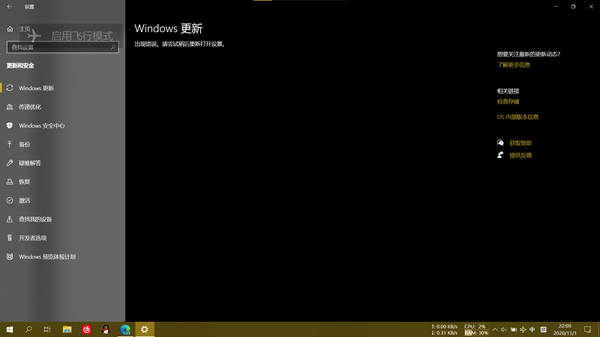
具體解決步驟:
1、以管理員權(quán)限打開(kāi)cmd,輸入以下命令;
01SC config wuauserv start= auto02SC config bits start= auto03SC config cryptsvc start= auto04SC config trustedinstaller start= auto05SC config wuauserv type=share復(fù)制代碼SC config wuauserv start= autoSC config bits start= autoSC config cryptsvc start= autoSC config trustedinstaller start= autoSC config wuauserv type=share2、然后輸入;
01net stop wuauserv02net stop cryptSvc03net stop bits04net stop msiserver05ren C:WindowsSoftwareDistribution SoftwareDistribution.old06ren C:WindowsSystem32catroot2 catroot2.old07net start wuauserv08net start cryptSvc09net start bits10net start msiserver復(fù)制代碼net stop wuauservnet stop cryptSvcnet stop bitsnet stop msiserverren C:WindowsSoftwareDistribution SoftwareDistribution.oldren C:WindowsSystem32catroot2 catroot2.oldnet start wuauservnet start cryptSvcnet start bitsnet start msiserver重啟后,windows20H2中系統(tǒng)更新后,Windows更新出現(xiàn)錯(cuò)誤的問(wèn)題就解決了,你也來(lái)試試吧!
標(biāo)簽:
Windows系統(tǒng)
相關(guān)文章:
1. Vm虛擬機(jī)無(wú)法安裝Win11系統(tǒng)怎么辦?Vm虛擬機(jī)安裝Win11圖文教程2. win7任務(wù)欄顏色更改教程3. win10系統(tǒng)出現(xiàn)鼠標(biāo)失靈詳細(xì)解決方法4. Unix系統(tǒng)中文件管理和文件權(quán)限設(shè)置教程5. 海爾S500筆記本U盤怎樣安裝win10系統(tǒng) 安裝win10系統(tǒng)步驟說(shuō)明6. win7屏幕休眠時(shí)間更改教程7. win11pro是什么版本8. windows 2003中給用戶文件指派登錄腳本9. Win7、Win8系統(tǒng)文件夾內(nèi)圖片不能預(yù)覽是什么原因?10. Win10系統(tǒng)提示未能成功安裝設(shè)備驅(qū)動(dòng)程序怎么辦?
排行榜
 網(wǎng)公網(wǎng)安備