升級Win11 22509.1000下載錯誤0x80888002怎么辦?
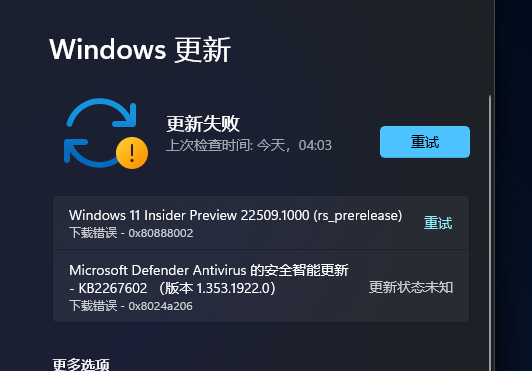
就在今天凌晨,微軟公司發(fā)布了最新的Windows11 Dev預覽版22509.1000版本,但是不少用戶在今日更新的時候卻反復提示下載錯誤0x80888002,遇到這種問題我們要怎么解決呢?下面小編就帶著大家一起看看吧!
好吧啦網(wǎng)www.leifengta.com.cn原創(chuàng),轉(zhuǎn)載需注明出處。
方法一:替換文件法。
首先用戶需要下載舊版的自動屏蔽PTM 2.0工具,并在檢查更新的時候選擇開啟。
下載地址:http://www.leifengta.com.cn/soft/225819.html
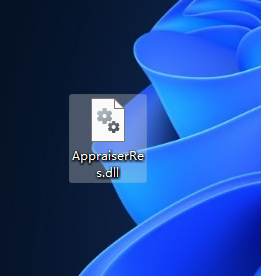
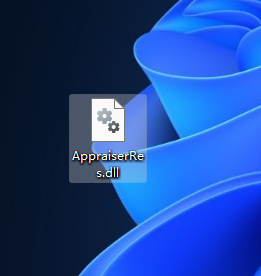
下載完成后,在電腦桌面新建一個名稱為【AppraiserRes. dll】文件。
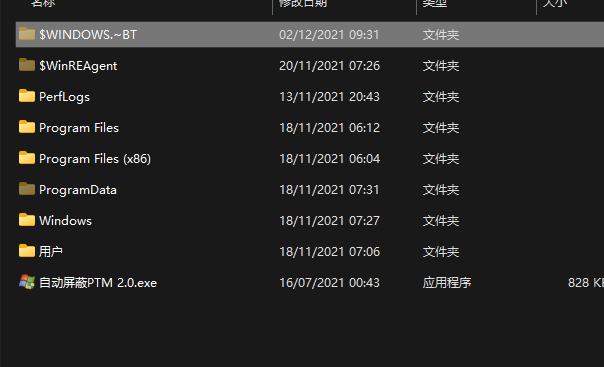
在開始檢查更新的時候,打開電腦C盤可以看到多出來兩個文件夾,打開$WINDOWS.~BTSources
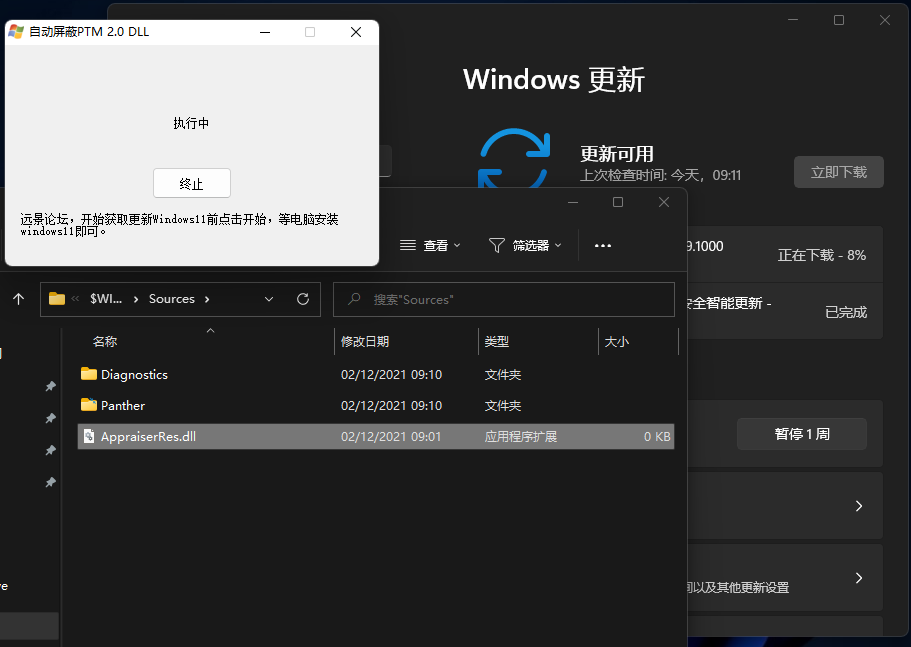
當自動更新到8%的時候,將桌面的【AppraiserRes. dll】文件復制到C:$WINDOWS.~BTSources文件夾,即可。
方法二:刪除文件法
首先用戶需要下載舊版的自動屏蔽PTM 2.0工具,并在檢查更新的時候選擇開啟。
下載地址:http://www.leifengta.com.cn/soft/225819.html
在開始檢查更新的時候,打開電腦C盤可以看到多出來兩個文件夾,打開$WINDOWS.~BTSources
當自動更新到8%的時候,將C:$WINDOWS.~BTSources文件夾中【AppraiserRes. dll】文件刪除即可。
方法三:
電腦桌面新建一個文本文檔,后綴名改為.cmd文件。
更改后,復制以下代碼進入文件中并保存。
01@(set "0=%~f0"^)#) & powershell -nop -c iex([io.file]::ReadAllText(:0)) & exit/b02#:: double-click to run or just copy-paste into powershell - it's a standalone hybrid script03#:: v1 of the toggle script works perfectly fine for most people with a non-botched windows installation04#:: uses a fast, fileless wmi subscription to watch for the Virtual Disk Service Loader process running during setup,05#:: then launches a cmd erase of appraiserres.dll - that's all there is to it, no rocket science, just a great implementation06#:: you probably don't need to have it installed at all times - just when doing feature updates or manual setup within windows07#:: hence the on off toggle just by running the script again08= {09= 'Skip TPM Check on Dynamic Update'; =10$0 = sp 'HKLM:SYSTEMSetupMoSetup' 'AllowUpgradesWithUnsupportedTPMOrCPU' 1 -type dword -force -ea 011$0 = ri 'HKLM:SOFTWAREMicrosoftWindows NTCurrentVersionImage File Execution Optionsvdsldr.exe' -force -ea 012$0 = sc.exe config Winmgmt start= demand; sp HKLM:SOFTWAREMicrosoftWbem 'Enable Costly Providers' 0 -type dword -force -ea 013= gwmi -Class __FilterToConsumerBinding -Namespace 'rootsubscription' -Filter "Filter = ""__eventfilter.name=''""" -ea 014= gwmi -Class CommandLineEventConsumer -Namespace 'rootsubscription' -Filter "Name=''" -ea 015= gwmi -Class __EventFilter -NameSpace 'rootsubscription' -Filter "Name=''" -ea 016if () { | rwmi; = } ; if () { | rwmi; = } ; if () { | rwmi; = }17if () { write-host -fore 0xf -back 0xd "`n [REMOVED] run again to install "; timeout /t 5; return }18= "$([environment]::SystemDirectory)cmd.exe"; = " /q (c) AveYo, 2021 /d /rerase appraiserres.dll /f /s /q"19= "$():`.~BT"; = "SELECT SessionID from Win32_ProcessStartTrace WHERE ProcessName='vdsldr.exe'"20= swmi -Class __EventFilter -NameSpace 'rootsubscription' -args @{21Name = ; EventNameSpace = 'rootcimv2'; QueryLanguage = 'WQL'; Query = } -PutType 2 -ea 022= swmi -Class CommandLineEventConsumer -Namespace 'rootsubscription' -args @{23Name = ; WorkingDirectory = ; ExecutablePath = ; CommandLineTemplate = ; Priority = 128} -PutType 2 -ea 024= swmi -Class __FilterToConsumerBinding -Namespace 'rootsubscription' -args @{Filter=;Consumer=} -PutType 2 -ea 025write-host -fore 0xf -back 0x2 "`n [INSTALLED] run again to remove "; timeout /t 526} ; start -verb runas powershell -args "-nop -c & {`n`n$(-replace'"','"')}"27#::復制代碼@(set "0=%~f0"^)#) & powershell -nop -c iex([io.file]::ReadAllText(:0)) & exit/b#:: double-click to run or just copy-paste into powershell - it's a standalone hybrid script#:: v1 of the toggle script works perfectly fine for most people with a non-botched windows installation#:: uses a fast, fileless wmi subscription to watch for the Virtual Disk Service Loader process running during setup,#:: then launches a cmd erase of appraiserres.dll - that's all there is to it, no rocket science, just a great implementation#:: you probably don't need to have it installed at all times - just when doing feature updates or manual setup within windows#:: hence the on off toggle just by running the script again= {= 'Skip TPM Check on Dynamic Update'; =$0 = sp 'HKLM:SYSTEMSetupMoSetup' 'AllowUpgradesWithUnsupportedTPMOrCPU' 1 -type dword -force -ea 0$0 = ri 'HKLM:SOFTWAREMicrosoftWindows NTCurrentVersionImage File Execution Optionsvdsldr.exe' -force -ea 0$0 = sc.exe config Winmgmt start= demand; sp HKLM:SOFTWAREMicrosoftWbem 'Enable Costly Providers' 0 -type dword -force -ea 0= gwmi -Class __FilterToConsumerBinding -Namespace 'rootsubscription' -Filter "Filter = ""__eventfilter.name=''""" -ea 0= gwmi -Class CommandLineEventConsumer -Namespace 'rootsubscription' -Filter "Name=''" -ea 0= gwmi -Class __EventFilter -NameSpace 'rootsubscription' -Filter "Name=''" -ea 0if () { | rwmi; = } ; if () { | rwmi; = } ; if () { | rwmi; = }if () { write-host -fore 0xf -back 0xd "`n [REMOVED] run again to install "; timeout /t 5; return }= "$([environment]::SystemDirectory)cmd.exe"; = " /q (c) AveYo, 2021 /d /rerase appraiserres.dll /f /s /q"= "$():`.~BT"; = "SELECT SessionID from Win32_ProcessStartTrace WHERE ProcessName='vdsldr.exe'"= swmi -Class __EventFilter -NameSpace 'rootsubscription' -args @{Name = ; EventNameSpace = 'rootcimv2'; QueryLanguage = 'WQL'; Query = } -PutType 2 -ea 0= swmi -Class CommandLineEventConsumer -Namespace 'rootsubscription' -args @{Name = ; WorkingDirectory = ; ExecutablePath = ; CommandLineTemplate = ; Priority = 128} -PutType 2 -ea 0= swmi -Class __FilterToConsumerBinding -Namespace 'rootsubscription' -args @{Filter=;Consumer=} -PutType 2 -ea 0write-host -fore 0xf -back 0x2 "`n [INSTALLED] run again to remove "; timeout /t 5} ; start -verb runas powershell -args "-nop -c & {`n`n$(-replace'"','"')}"#::之后,以管理員的身份運行.cmd文件。
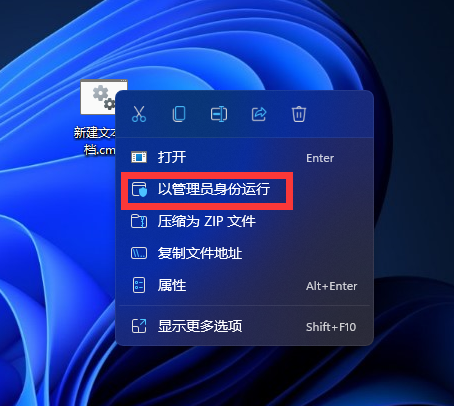
運行結(jié)束后,點擊檢查更新。
然后再電腦桌面新建一個空白的【AppraiserRes.dll】文件。
等待更新到8%時,電腦C盤將會多出兩個文件夾。
迅速打開C:$WINDOWS.~BTSources并將【AppraiserRes.dll】文件復制到該目錄即可。
相關(guān)文章:
1. 海爾S500筆記本U盤怎樣安裝win10系統(tǒng) 安裝win10系統(tǒng)步驟說明2. win7任務欄顏色更改教程3. windows 2003中給用戶文件指派登錄腳本4. Unix系統(tǒng)中文件管理和文件權(quán)限設置教程5. Windows7系統(tǒng)怎么防止U盤中病毒?6. Win7旗艦版電腦開機顯示器沒反應怎么辦?7. Win10系統(tǒng)提示未能成功安裝設備驅(qū)動程序怎么辦?8. win10 Edge瀏覽器首頁站點標簽怎么刪除9. 深度技術(shù)win7系統(tǒng)賬號密碼不能修改10. win10自帶顯示cpu溫度如何顯示在任務欄
 網(wǎng)公網(wǎng)安備