文章詳情頁
win101903更新安裝失敗解決方法
瀏覽:126日期:2023-01-04 09:04:15
有的小伙伴們可能會遇到win101903更新安裝失敗,錯誤代碼0xc1900130的情況。小編覺得我們可以在命令提示符中使用相關代碼來進行問題的修復,下面就看看解決方法解決問題吧。
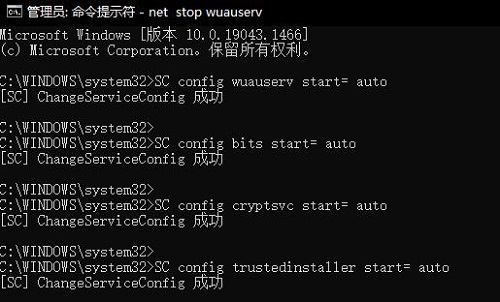
win101903更新安裝失敗怎么解決:1、啟動開始菜單,輸入“cmd”,右鍵以管理員身份運行,然后依次執行以下命令:
SC config wuauserv start= auto
SC config bits start= auto
SC config cryptsvc start= auto
SC config trustedinstaller start= auto
SC config wuauserv type=share
net stop wuauserv
net stop cryptSvc
net stop bits
net stop msiserver
ren C:WindowsSoftwareDistribution SoftwareDistribution.old
net start wuauserv
net start cryptSvc
net start bits
net start msiserver
2、重啟設備,再次嘗試更新 Windows,看一下是否還會提示錯誤。
你可能還想看:錯誤代碼0x80070424 | 錯誤0xc1900223
以上就是win101903更新安裝失敗解決方法的全部內容,望能這篇win101903更新安裝失敗解決方法可以幫助您解決問題,能夠解決大家的實際問題是好吧啦網一直努力的方向和目標。
相關文章:
排行榜
 網公網安備
網公網安備