win8系統(tǒng)截圖怎么設(shè)置自動(dòng)排列
方法一:修改注冊(cè)表法
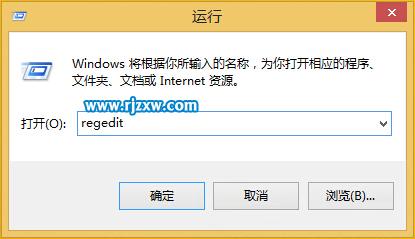
1、右擊開始按鈕,打開運(yùn)行窗口,或者使用Win+R組合鍵;
2、輸入rgedit,打開注冊(cè)表編輯器;
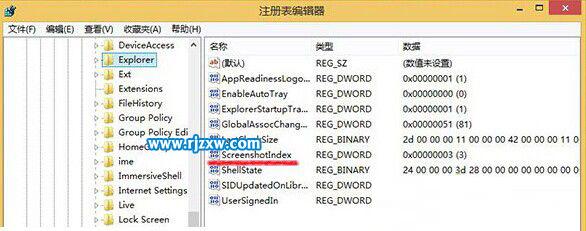
3、依次定位至HKEY_CURRENT_USERSoftwareMicrosoftWindowsCurrentVersionExplorer;
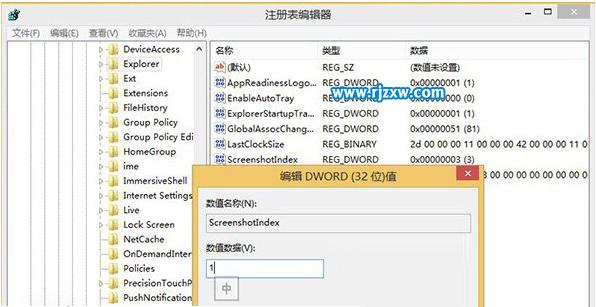
4、選擇Explorer,將右側(cè)的ScreenshotIndex值改為1,重啟生效。
方法二:導(dǎo)入注冊(cè)表法:
注:該注冊(cè)表支持重復(fù)使用!
1、用記事本,新建”Win8屏幕截圖.reg“注冊(cè)表文件,輸入以下內(nèi)容,保存生效。
Windows Registry Editor Version 5.00
[HKEY_CURRENT_USERSoftwareMicrosoftWindowsCurrentVersionExplorer]
“ExplorerStartupTraceRecorded”=dword:00000001
“ShellState”=hex:24,00,00,00,3d,28,00,00,00,00,00,00,00,00,00,00,00,00,00,00,
01,00,00,00,13,00,00,00,00,00,00,00,6a,00,00,00
“UserSignedIn”=dword:00000001
“SIDUpdatedOnLibraries”=dword:00000001
“LastClockSize”=hex:2d,00,00,00,11,00,00,00,42,00,00,00,11,00,00,00,32,00,00,
00,11,00,00,00
“GlobalAssocChangedCounter”=dword:00000051
“AppReadinessLogonComplete”=dword:00000001
“EnableAutoTray”=dword:00000000
“ScreenshotIndex”=dword:00000001
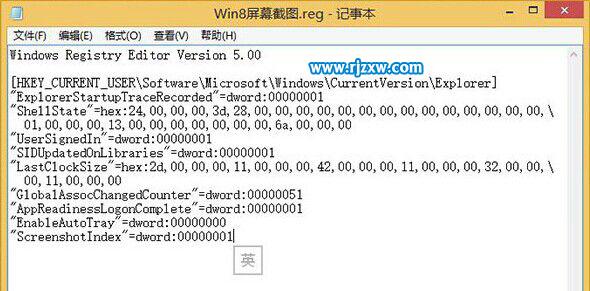
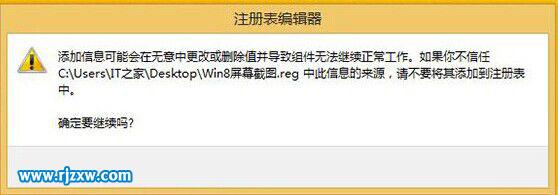
2、導(dǎo)入Win8屏幕截圖.reg注冊(cè)表。
相關(guān)文章:
1. Unix系統(tǒng)中文件管理和文件權(quán)限設(shè)置教程2. 如何使用UNetbootin把Win10 ISO鏡像制作成系統(tǒng)安裝U盤?3. win10系統(tǒng)出現(xiàn)鼠標(biāo)失靈詳細(xì)解決方法4. Win10系統(tǒng)更新到一半突然暫停或取消怎么辦?5. 海爾S500筆記本U盤怎樣安裝win10系統(tǒng) 安裝win10系統(tǒng)步驟說明6. Win7系統(tǒng)使用的不是Administrator管理員賬號(hào)怎么回事?7. Vm虛擬機(jī)無法安裝Win11系統(tǒng)怎么辦?Vm虛擬機(jī)安裝Win11圖文教程8. win7屏幕休眠時(shí)間更改教程9. win7任務(wù)欄顏色更改教程10. win11pro是什么版本
 網(wǎng)公網(wǎng)安備