如何在Mac os終端下打開APP應用程序
如何在Mac os終端下打開APP應用程序?用戶在Mac os平臺上配置文件的時候有時候需要在Mac終端里面配置一些文件,這時候就需要用命令在終端里面打開app應用程序,但是有很多的用戶不會使用終端命令,那么如何在Mac os終端下打開APP應用程序呢?小編為大家提供了一個在終端下打開APP應用程序的教程。
如何在Mac os終端下打開APP應用程序?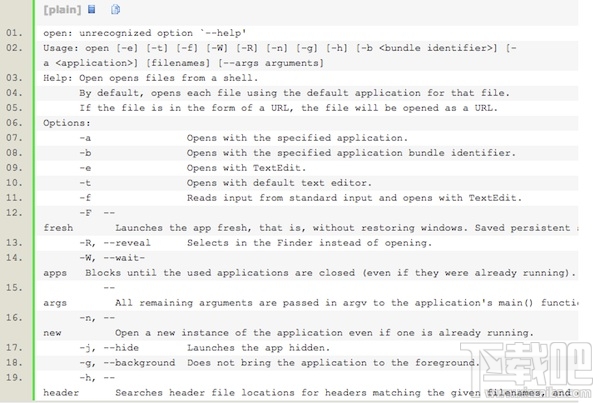
打開終端 直接輸入 open /Applications/xxx(應用的名稱).app 比如打開iTunes輸入:open /Applications/iTunes.app (注意open之后需要空格再輸入斜杠 / )
Mac 下在終端中打開應用程序的命令
from:http://macosx.com/forums/howto-faqs/29520-how-launch-application-terminal.html
The command is simply open (which can also be used for opening directories). The most basic example of launching an application:
open /path/to/some.app
More complex possibilities also exist:
open "/Volumes/Macintosh HD/foo.txt"
opens the document in the default application for its type (as determined by LaunchServices).
open /Applications/
opens that directory in the Finder.
open -a /Applications/TextEdit.app "/Volumes/Macintosh HD/foo.txt"
opens the document in the application specified (in this case, TextEdit).
open -e "/Volumes/Macintosh HD/foo.txt"
opens the document in TextEdit (the -e option specifies TextEdit).
open http://www.apple.com/
opens the URL in the default browser (lynx, naturally *wink*)
open "file://localhost/Volumes/Macintosh HD/foo.txt"
opens the document in the default application for its type (as determined by LaunchServices).
open "file://localhost/Volumes/Macintosh HD/Applications/"
opens that directory in the Finder.
相關文章:
 網公網安備
網公網安備