Java spring boot 實(shí)現(xiàn)支付寶支付功能的示例代碼
一、準(zhǔn)備工作:
1、登陸支付寶開發(fā)者中心,申請(qǐng)一個(gè)開發(fā)者賬號(hào)。
地址:https://openhome.alipay.com/
2、進(jìn)入研發(fā)服務(wù):
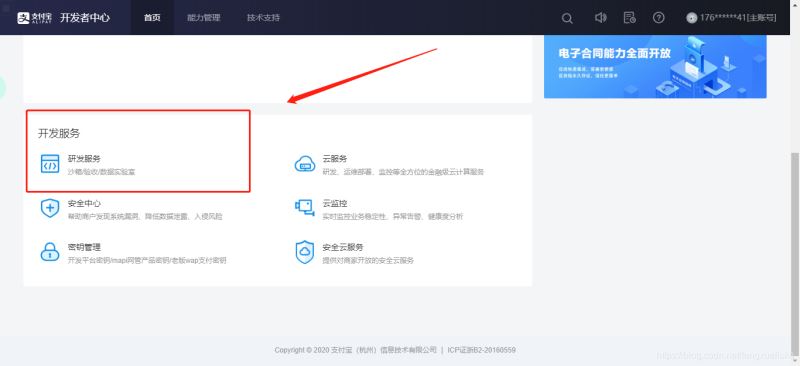
3、點(diǎn)擊鏈接進(jìn)入工具下載頁面:
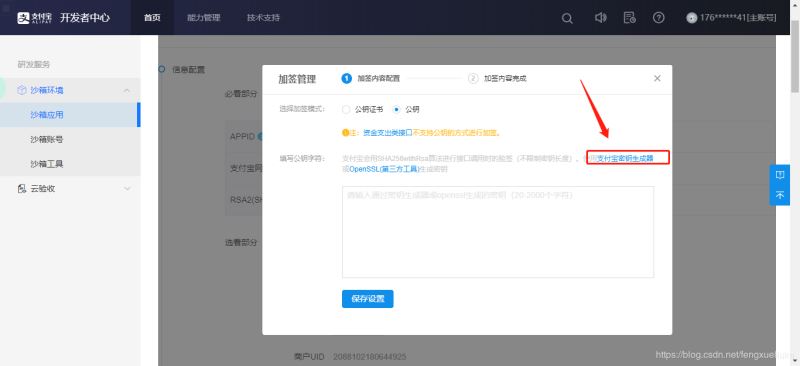
4、點(diǎn)擊下載對(duì)應(yīng)版本的RSA公鑰生成器:
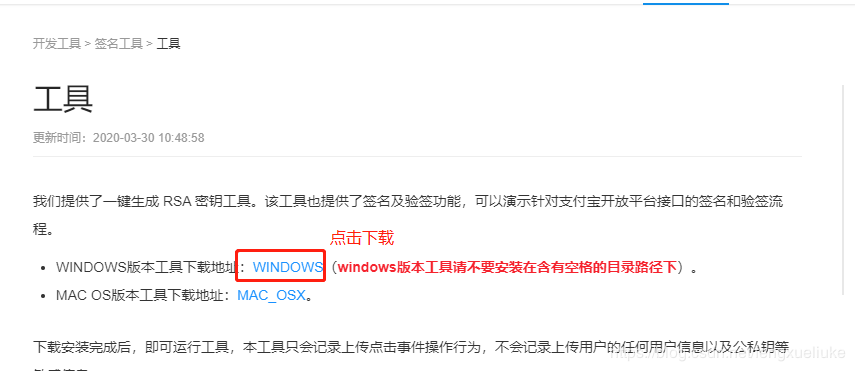
5、生成公鑰密鑰(記錄你的應(yīng)用私鑰):
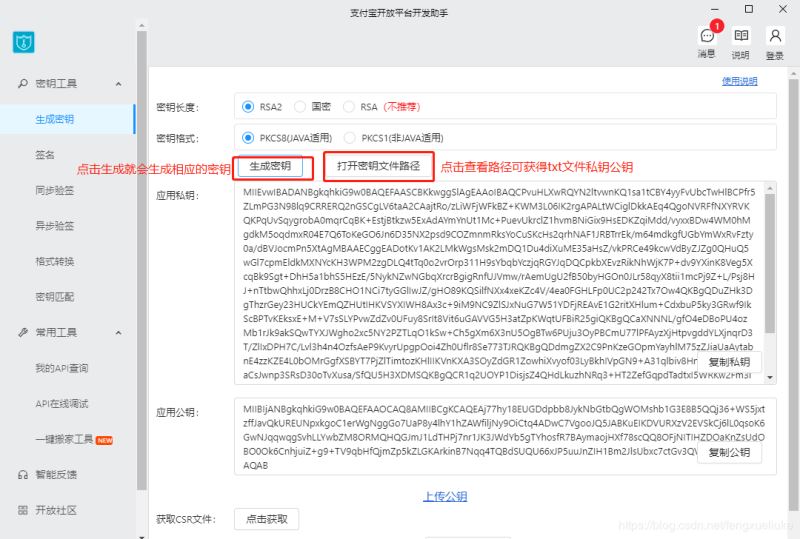
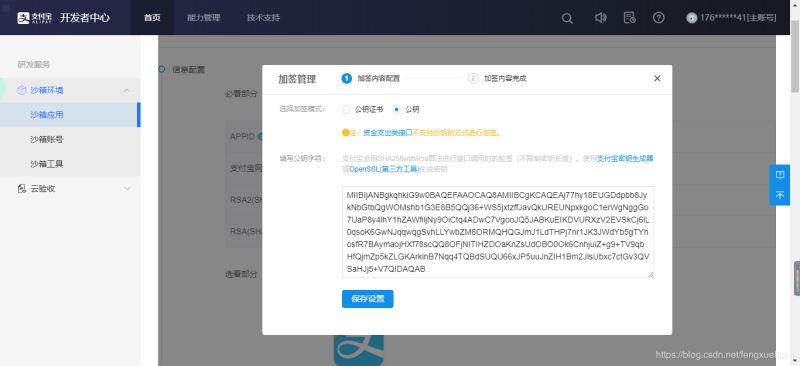
6、在支付寶配置公鑰(點(diǎn)擊保存):
二、搭建demo
1、引入jia包:
<dependency> <groupId>com.alipay.sdk</groupId> <artifactId>alipay-sdk-java</artifactId> <version>4.9.9</version> </dependency>
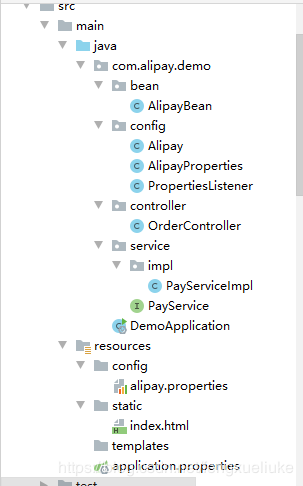
2、搭建工程,目錄結(jié)構(gòu)如下:
3、編寫alipay.properties配置文件
# 您的APPIDappId = 2016102200738709# 商戶私鑰privateKey = 您的商戶私鑰# 支付寶公鑰publicKey = 您的支付寶公鑰# 服務(wù)器異步通知頁面路徑 ,需要公網(wǎng)能訪問到。notifyUrl = http://公網(wǎng)能訪問的路徑# 頁面跳轉(zhuǎn)同步通知頁面路徑 需要公網(wǎng)能訪問到。returnUrl = http://公網(wǎng)能訪問的路徑# 簽名方式signType = RSA2# 字符編碼格式charset = utf-8# 支付寶網(wǎng)關(guān)gatewayUrl = https://openapi.alipaydev.com/gateway.do# 支付寶網(wǎng)關(guān)logPath = 'C:'
4、編寫AlipayBean:
public class AlipayBean { /** * 商戶訂單號(hào),必填 * */ private String out_trade_no; /** * 訂單名稱,必填 */ private String subject; /** * 付款金額,必填 * 根據(jù)支付寶接口協(xié)議,必須使用下劃線 */ private String total_amount; /** * 商品描述,可空 */ private String body; /** * 超時(shí)時(shí)間參數(shù) */ private String timeout_express= '10m'; /** * 產(chǎn)品編號(hào) */ private String product_code= 'FAST_INSTANT_TRADE_PAY'; /** * 省略get set 方法 */}
5、編寫Alipay:
/** * 支付寶支付接口 */@Componentpublic class Alipay { /** * 支付接口 * @param alipayBean * @return * @throws AlipayApiException */ public String pay(AlipayBean alipayBean) throws AlipayApiException { // 1、獲得初始化的AlipayClient String serverUrl = AlipayProperties.getGatewayUrl(); String appId = AlipayProperties.getAppId(); String privateKey = AlipayProperties.getPrivateKey(); String format = 'json'; String charset = AlipayProperties.getCharset(); String alipayPublicKey = AlipayProperties.getPublicKey(); String signType = AlipayProperties.getSignType(); String returnUrl = AlipayProperties.getReturnUrl(); String notifyUrl = AlipayProperties.getNotifyUrl(); AlipayClient alipayClient = new DefaultAlipayClient(serverUrl, appId, privateKey, format, charset, alipayPublicKey, signType); // 2、設(shè)置請(qǐng)求參數(shù) AlipayTradePagePayRequest alipayRequest = new AlipayTradePagePayRequest(); // 頁面跳轉(zhuǎn)同步通知頁面路徑 alipayRequest.setReturnUrl(returnUrl); // 服務(wù)器異步通知頁面路徑 alipayRequest.setNotifyUrl(notifyUrl); // 封裝參數(shù) alipayRequest.setBizContent(JSON.toJSONString(alipayBean)); // 3、請(qǐng)求支付寶進(jìn)行付款,并獲取支付結(jié)果 String result = alipayClient.pageExecute(alipayRequest).getBody(); // 返回付款信息 return result; }}
6、編寫AlipayProperties:
/** * 應(yīng)用啟動(dòng)加載文件 */@Componentpublic class AlipayProperties { public static final String APP_ID = 'appId'; public static final String PRIVARY_KEY = 'privateKey'; public static final String PUBLIC_KEY = 'publicKey'; public static final String NOTIFY_URL = 'notifyUrl'; public static final String RETURN_URL = 'returnUrl'; public static final String SIGN_TYPE = 'signType'; public static final String CHARSET = 'charset'; public static final String GATEWAY_URL = 'gatewayUrl'; public static final String LOG_PATH = 'logPath'; /** * 保存加載配置參數(shù) */ private static Map<String, String> propertiesMap = new HashMap<String, String>(); /** * 加載屬性 */ public static void loadProperties() { // 獲得PathMatchingResourcePatternResolver對(duì)象 PathMatchingResourcePatternResolver resolver = new PathMatchingResourcePatternResolver(); try { // 加載resource文件(也可以加載resources) Resource resources = resolver.getResource('classpath:你的alipay.properties文件路徑'); PropertiesFactoryBean config = new PropertiesFactoryBean(); config.setLocation(resources); config.afterPropertiesSet(); Properties prop = config.getObject(); // 循環(huán)遍歷所有得鍵值對(duì)并且存入集合 for (String key : prop.stringPropertyNames()) { propertiesMap.put(key, (String) prop.get(key)); } } catch (Exception e) { new Exception('配置文件加載失敗'); } } /** * 獲取配置參數(shù)值 * @param key * @return */ public static String getKey(String key) { return propertiesMap.get(key); } public static String getAppId() { return propertiesMap.get(APP_ID); } public static String getPrivateKey() { return propertiesMap.get(PRIVARY_KEY); } public static String getPublicKey() { return propertiesMap.get(PUBLIC_KEY); } public static String getNotifyUrl() { return propertiesMap.get(NOTIFY_URL); } public static String getReturnUrl() { return propertiesMap.get(RETURN_URL); } public static String getSignType() { return propertiesMap.get(SIGN_TYPE); } public static String getCharset() { return propertiesMap.get(CHARSET); } public static String getGatewayUrl() { return propertiesMap.get(GATEWAY_URL); } public static String getLogPath() { return propertiesMap.get(LOG_PATH); }}
7、編寫PropertiesListener:
/** * 配置文件監(jiān)聽器,用來加載自定義配置文件 */@Componentpublic class PropertiesListener implements ApplicationListener<ApplicationStartedEvent> { @Override public void onApplicationEvent(ApplicationStartedEvent event) { AlipayProperties.loadProperties(); }}
8、編寫PayService:
/** * 支付服務(wù) */public interface PayService { /** * 支付寶支付接口 * @param alipayBean * @return * @throws AlipayApiException */ String aliPay(AlipayBean alipayBean) throws AlipayApiException;}
9、編寫PayServiceImpl:
@Servicepublic class PayServiceImpl implements PayService { @Autowired private Alipay alipay; @Override public String aliPay(AlipayBean alipayBean) throws AlipayApiException { return alipay.pay(alipayBean); }}
10、編寫OrderController:
/** * 訂單接口 * * @author Louis * @date Dec 12, 2018 */@RestController()@RequestMapping('order')public class OrderController { @Autowired private PayService payService; @RequestMapping(value = 'alipay') public String alipay(String outTradeNo, String subject, String totalAmount, String body) throws AlipayApiException { AlipayBean alipayBean = new AlipayBean(); alipayBean.setOut_trade_no(outTradeNo); alipayBean.setSubject(subject); alipayBean.setTotal_amount(totalAmount); alipayBean.setBody(body); return payService.aliPay(alipayBean); }//支付成功支付寶調(diào)用方法: @RequestMapping(value = 'ok') public void ok(){ System.out.println('付款成功!'); }}
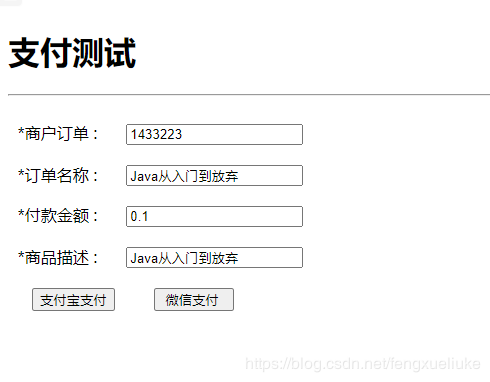
11、訪問頁面,輸入信息進(jìn)入支付頁面:
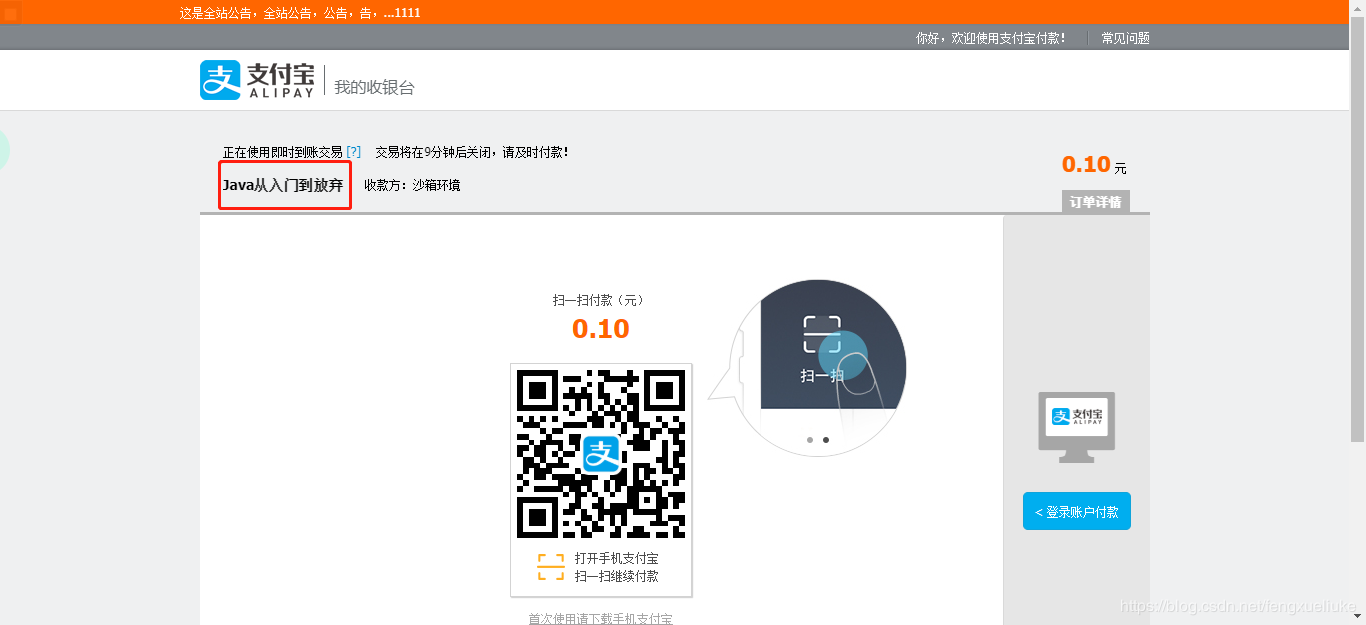
12、點(diǎn)擊支付寶支付,頁面跳轉(zhuǎn),成功!
總結(jié)
到此這篇關(guān)于Java spring boot 實(shí)現(xiàn)支付寶支付功能的示例代碼的文章就介紹到這了,更多相關(guān)spring boot 支付寶支付內(nèi)容請(qǐng)搜索好吧啦網(wǎng)以前的文章或繼續(xù)瀏覽下面的相關(guān)文章希望大家以后多多支持好吧啦網(wǎng)!
相關(guān)文章:

 網(wǎng)公網(wǎng)安備