Java調(diào)用計(jì)算機(jī)攝像頭拍照實(shí)現(xiàn)過程解析
Java調(diào)用計(jì)算機(jī)攝像頭照相(Rest API的頁面操作)
使用開源組件webcam-capture:https://github.com/sarxos/webcam-capture
項(xiàng)目源碼GitHub:https://github.com/muphy1112/RuphyRecorder
本例子使用基于Java rest API的頁面操作,方便遠(yuǎn)程拍照
新建Spring Boot項(xiàng)目
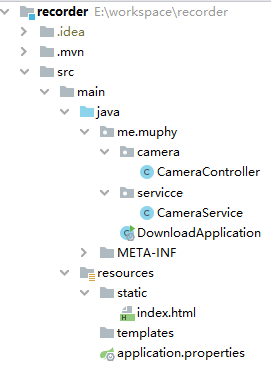
pop.xml
<?xml version='1.0' encoding='UTF-8'?><project xmlns='http://maven.apache.org/POM/4.0.0' xmlns:xsi='http://www.w3.org/2001/XMLSchema-instance' xsi:schemaLocation='http://maven.apache.org/POM/4.0.0 https://maven.apache.org/xsd/maven-4.0.0.xsd'> <modelVersion>4.0.0</modelVersion> <parent> <groupId>org.springframework.boot</groupId> <artifactId>spring-boot-starter-parent</artifactId> <version>2.2.5.RELEASE</version> <relativePath/> <!-- lookup parent from repository --> </parent> <groupId>me.muphy</groupId> <artifactId>recorder</artifactId> <version>0.0.1-SNAPSHOT</version> <name>recorder</name> <description>Demo project for Spring Boot</description> <properties> <java.version>1.8</java.version> </properties> <dependencies> <dependency> <groupId>org.springframework.boot</groupId> <artifactId>spring-boot-starter-web</artifactId> </dependency> <dependency> <groupId>com.github.sarxos</groupId> <artifactId>webcam-capture</artifactId> <version>0.3.12</version> </dependency> <dependency> <groupId>org.springframework.boot</groupId> <artifactId>spring-boot-starter-test</artifactId> <scope>test</scope> <exclusions><exclusion> <groupId>org.junit.vintage</groupId> <artifactId>junit-vintage-engine</artifactId></exclusion> </exclusions> </dependency> </dependencies> <build> <plugins> <plugin><groupId>org.springframework.boot</groupId><artifactId>spring-boot-maven-plugin</artifactId> </plugin> </plugins> </build></project>
server.port=8080
#保存根路徑
record.path=E:/workspace/share/
index.html
<!DOCTYPE html><html lang='en'><head> <meta charset='UTF-8'> <title>莫非照相機(jī)</title></head><body><div> <div><span><a href='http://www.leifengta.com.cn/tp' rel='external nofollow' >拍照</a></span></div></div></body></html>
CameraController.java
package me.muphy.camera;import me.muphy.servicce.CameraService;import org.springframework.beans.factory.annotation.Autowired;import org.springframework.web.bind.annotation.GetMapping;import org.springframework.web.bind.annotation.RestController;@RestControllerpublic class CameraController { @Autowired private CameraService cameraService; @GetMapping('/tp') public String takePictures(String[] args) { String msg = cameraService.takePictures(); return '<div><span>' + msg + '</span></div><div>' +'<span><a href='http://www.leifengta.com.cn/ll?d=/picture' >點(diǎn)擊查看所有照片</a></span>' +'<span style='margin-left: 20px;'><a href='http://www.leifengta.com.cn/' >返回首頁</a></span></div>'; }}
CameraService.java
package me.muphy.servicce;import com.github.sarxos.webcam.Webcam;import com.github.sarxos.webcam.WebcamResolution;import com.github.sarxos.webcam.WebcamUtils;import org.springframework.beans.factory.annotation.Value;import org.springframework.stereotype.Service;import java.io.File;import java.text.SimpleDateFormat;import java.util.Date;@Servicepublic class CameraService { @Value('${download.path:E:/workspace/download/}') private String downloadPath; public String takePictures() { Webcam webcam = Webcam.getDefault(); if (webcam == null) { return '沒有找到攝像設(shè)備!'; } String filePath = downloadPath + '/picture/' + new SimpleDateFormat('yyyy-MM-dd').format(new Date()); File path = new File(filePath); if (!path.exists()) {//如果文件不存在,則創(chuàng)建該目錄 path.mkdirs(); } String time = new SimpleDateFormat('yyyMMdd_HHmmss').format(new Date()); File file = new File(filePath + '/' + time + '.jpg'); webcam.setViewSize(WebcamResolution.VGA.getSize()); WebcamUtils.capture(webcam, file); return '拍照成功!'; }}
CameraApplication.java
package me.muphy;import org.springframework.boot.SpringApplication;import org.springframework.boot.autoconfigure.SpringBootApplication;@SpringBootApplicationpublic class CameraApplication { public static void main(String[] args) { SpringApplication.run(CameraApplication.class, args); }}
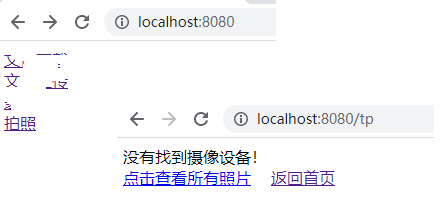
當(dāng)前電腦沒有攝像頭,因此是正常的
以上就是本文的全部內(nèi)容,希望對大家的學(xué)習(xí)有所幫助,也希望大家多多支持好吧啦網(wǎng)。
相關(guān)文章:
1. Spring的核心機(jī)制依賴注入簡介2. 詳解PHP laravel中的加密與解密函數(shù)3. 如何用JS實(shí)現(xiàn)簡單的數(shù)據(jù)監(jiān)聽4. golang json數(shù)組拼接的實(shí)例5. 利用CSS制作3D動(dòng)畫6. 使用本機(jī)IIS?Express開發(fā)Asp.Net?Core應(yīng)用圖文教程7. php基于DOMDocument操作頁面元素實(shí)例 原創(chuàng)8. java中應(yīng)用Stack進(jìn)行算術(shù)運(yùn)算的操作9. 基于Python實(shí)現(xiàn)全自動(dòng)下載抖音視頻10. intellij idea寫Python教程

 網(wǎng)公網(wǎng)安備