Android實現(xiàn)倒計時效果
本文實例為大家分享了Android實現(xiàn)倒計時效果的具體代碼,供大家參考,具體內(nèi)容如下
一個倒計時的效果
先看效果圖:
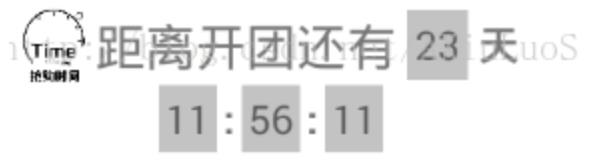
直接上代碼:
這里是關于倒計時 …天時分秒…的邏輯判斷
/** * 倒計時計算 */ private void computeTime() { mSecond--; if (mSecond < 0) { mMin--; mSecond = 59; if (mMin < 0) { mMin = 59; mHour--; if (mHour < 0) { // 倒計時結束 mHour = 23; mDay--; if(mDay < 0){ // 倒計時結束 mDay = 0; mHour= 0; mMin = 0; mSecond = 0; } } } }}
定時器主要代碼如下…當然也可以開線程或者開后臺服務來處理…只是沒那種必要…定時器就可以搞定容易控制…畢竟倒計時時間起點…你總得后臺獲取吧,不是做時鐘鬧鐘…如果是做時鐘鬧鐘…拿你也不用考慮后臺服務或者自己開線程…而是使用AlarmManager來實現(xiàn)
/** * 開啟倒計時 * //time為Date類型:在指定時間執(zhí)行一次。 * timer.schedule(task, time); * //firstTime為Date類型,period為long,表示從firstTime時刻開始,每隔period毫秒執(zhí)行一次。 * timer.schedule(task, firstTime,period); * //delay 為long類型:從現(xiàn)在起過delay毫秒執(zhí)行一次。 * timer.schedule(task, delay); * //delay為long,period為long:從現(xiàn)在起過delay毫秒以后,每隔period毫秒執(zhí)行一次。 * timer.schedule(task, delay,period); */ private void startRun() { TimerTask mTimerTask = new TimerTask() { @Override public void run() { Message message = Message.obtain(); message.what = 1; timeHandler.sendMessage(message); } }; mTimer.schedule(mTimerTask,0,1000); }
修改界面,利用handler來提醒更新界面
private Handler timeHandler = new Handler() { @Override public void handleMessage(Message msg) { super.handleMessage(msg); if (msg.what == 1) { computeTime(); mDays_Tv.setText(mDay+'');//天數(shù)不用補位 mHours_Tv.setText(getTv(mHour)); mMinutes_Tv.setText(getTv(mMin)); mSeconds_Tv.setText(getTv(mSecond)); if (mSecond == 0 && mDay == 0 && mHour == 0 && mMin == 0 ) { mTimer.cancel(); } } } }; private String getTv(long l){ if(l>=10){ return l+''; }else{ return '0'+l;//小于10,,前面補位一個'0' } }
附帶主activity的代碼…
import android.os.Handler;import android.os.Message;import android.support.v7.app.AppCompatActivity;import android.os.Bundle;import android.view.View;import android.widget.RelativeLayout;import android.widget.TextView; import java.util.Timer;import java.util.TimerTask; public class MainActivity extends AppCompatActivity { private RelativeLayout countDown; // 倒計時 private TextView mDays_Tv, mHours_Tv, mMinutes_Tv, mSeconds_Tv; private long mDay = 23;// 天 private long mHour = 11;//小時, private long mMin = 56;//分鐘, private long mSecond = 32;//秒 private Timer mTimer; private Handler timeHandler = new Handler() { @Override public void handleMessage(Message msg) { super.handleMessage(msg); if (msg.what == 1) { computeTime(); mDays_Tv.setText(mDay+'');//天數(shù)不用補位 mHours_Tv.setText(getTv(mHour)); mMinutes_Tv.setText(getTv(mMin)); mSeconds_Tv.setText(getTv(mSecond)); if (mSecond == 0 && mDay == 0 && mHour == 0 && mMin == 0 ) { mTimer.cancel(); } } } }; private String getTv(long l){ if(l>=10){ return l+''; }else{ return '0'+l;//小于10,,前面補位一個'0' } } @Override protected void onCreate(Bundle savedInstanceState) { super.onCreate(savedInstanceState); setContentView(R.layout.activity_main); mTimer = new Timer(); countDown = (RelativeLayout) findViewById(R.id.countdown_layout); mDays_Tv = (TextView) findViewById(R.id.days_tv); mHours_Tv = (TextView) findViewById(R.id.hours_tv); mMinutes_Tv = (TextView) findViewById(R.id.minutes_tv); mSeconds_Tv = (TextView) findViewById(R.id.seconds_tv); startRun(); } /** * 開啟倒計時 * //time為Date類型:在指定時間執(zhí)行一次。 * timer.schedule(task, time); * //firstTime為Date類型,period為long,表示從firstTime時刻開始,每隔period毫秒執(zhí)行一次。 * timer.schedule(task, firstTime,period); * //delay 為long類型:從現(xiàn)在起過delay毫秒執(zhí)行一次。 * timer.schedule(task, delay); * //delay為long,period為long:從現(xiàn)在起過delay毫秒以后,每隔period毫秒執(zhí)行一次。 * timer.schedule(task, delay,period); */ private void startRun() { TimerTask mTimerTask = new TimerTask() { @Override public void run() { Message message = Message.obtain(); message.what = 1; timeHandler.sendMessage(message); } }; mTimer.schedule(mTimerTask,0,1000); } /** * 倒計時計算 */ private void computeTime() { mSecond--; if (mSecond < 0) { mMin--; mSecond = 59; if (mMin < 0) { mMin = 59; mHour--; if (mHour < 0) { // 倒計時結束 mHour = 23; mDay--; if(mDay < 0){ // 倒計時結束 mDay = 0; mHour= 0; mMin = 0; mSecond = 0; } } } } }}
附帶xml的代碼
<?xml version='1.0' encoding='utf-8'?><RelativeLayout xmlns:android='http://schemas.android.com/apk/res/android' xmlns:tools='http://schemas.android.com/tools' android: android:layout_width='match_parent' android:layout_height='match_parent' android:background='@android:color/white' android:gravity='center' > <RelativeLayout android: android:layout_width='match_parent' android:layout_height='40.0dip' android:layout_marginLeft='10.0dip' android:layout_marginRight='10.0dip' android:gravity='center' > <ImageView android: android:layout_width='40dp' android:layout_height='40dp' android:src='http://www.leifengta.com.cn/bcjs/@mipmap/img' android:scaleType='fitXY' android:gravity='center_vertical' /> <TextView android: android:layout_width='wrap_content' android:layout_height='wrap_content' android:layout_centerVertical='true' android:layout_marginRight='5.0dip' android:layout_toRightOf='@+id/describe_iv' android:text='距離開團還有' android:textSize='25sp' /> <TextView android: android:layout_width='wrap_content' android:layout_height='wrap_content' android:layout_centerVertical='true' android:padding='4dp' android:layout_toRightOf='@+id/describe_tv' android:background='#c2c2c2' android:gravity='center' android:text='' android:textSize='20sp' /> <TextView android: android:layout_width='wrap_content' android:layout_height='wrap_content' android:layout_centerVertical='true' android:layout_marginLeft='5.0dip' android:layout_marginRight='3.0dip' android:layout_toRightOf='@+id/days_tv' android:text='天' android:textSize='20sp' android:textStyle='bold' /> </RelativeLayout> <RelativeLayout android:layout_width='match_parent' android:layout_height='wrap_content' android:layout_below='@+id/daojishi_rl' android:gravity='center_horizontal' > <TextView android: android:layout_width='wrap_content' android:layout_height='wrap_content' android:layout_centerVertical='true' android:layout_toLeftOf='@+id/colon1' android:background='#c2c2c2' android:gravity='center' android:text='23' android:padding='3dp' android:textSize='20sp' /> <TextView android: android:layout_width='wrap_content' android:layout_height='wrap_content' android:layout_centerVertical='true' android:layout_marginLeft='3.0dip' android:layout_marginRight='3.0dip' android:layout_toLeftOf='@+id/minutes_tv' android:text=':' android:textSize='20sp' android:textStyle='bold' /> <TextView android: android:layout_width='wrap_content' android:layout_height='wrap_content' android:layout_centerVertical='true' android:layout_toLeftOf='@+id/colon2' android:background='#c2c2c2' android:gravity='center' android:text='59' android:padding='3dp' android:textSize='20sp' /> <TextView android: android:layout_width='wrap_content' android:layout_height='wrap_content' android:layout_centerVertical='true' android:layout_marginLeft='3.0dip' android:layout_marginRight='3.0dip' android:layout_toLeftOf='@+id/seconds_tv' android:text=':' android:textSize='20sp' android:textStyle='bold' /> <TextView android: android:layout_width='wrap_content' android:layout_height='wrap_content' android:layout_alignParentRight='true' android:layout_centerVertical='true' android:background='#c2c2c2' android:gravity='center' android:text='59' android:padding='3dp' android:textSize='20sp' /> </RelativeLayout> </RelativeLayout>
完美實現(xiàn),直接用就可以了。
以上就是本文的全部內(nèi)容,希望對大家的學習有所幫助,也希望大家多多支持好吧啦網(wǎng)。
相關文章:

 網(wǎng)公網(wǎng)安備